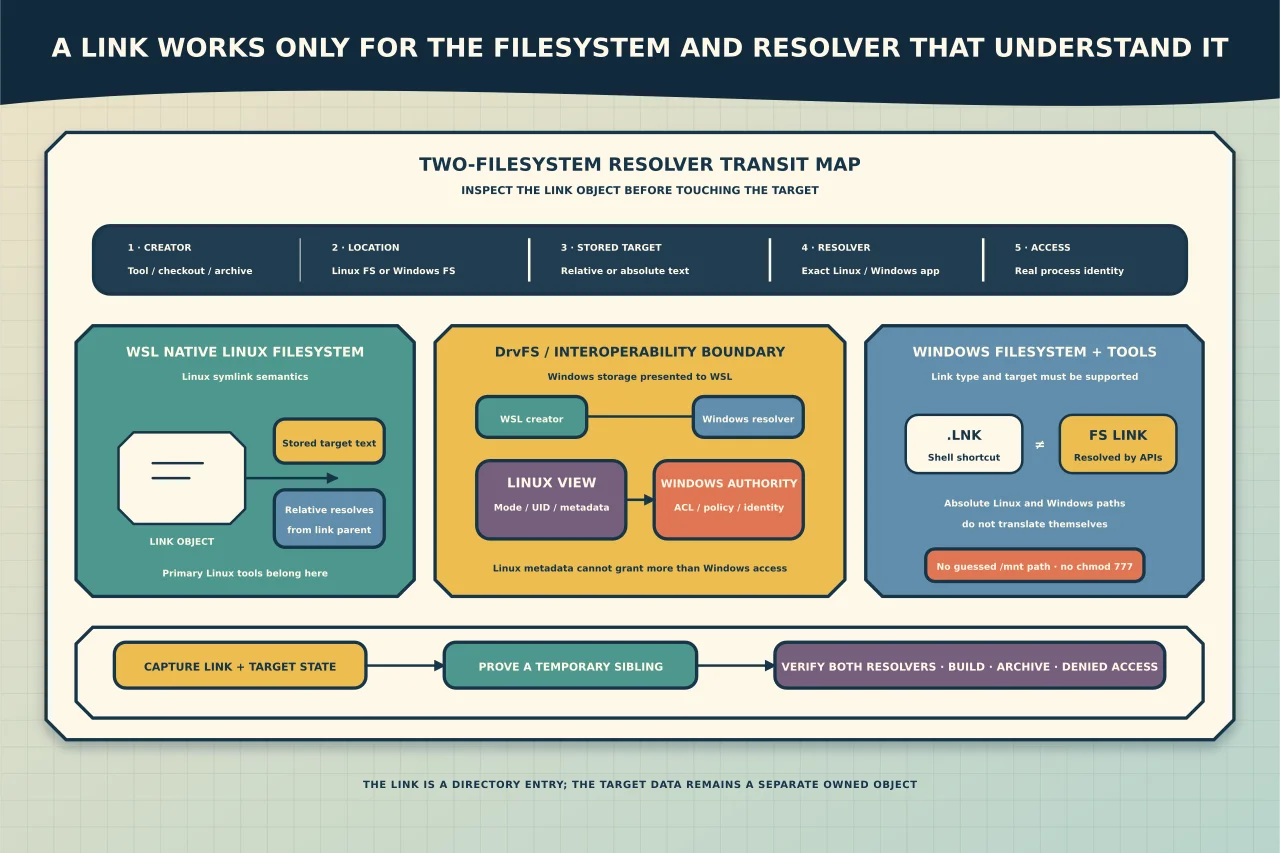
A link is small, but it crosses several boundaries: filesystem, path syntax, permissions and the program opening it. “It points to the right place” in one terminal does not mean another operating system or tool sees the same object.
Diagnose five facts:
- Creator: Linux/WSL tool, Windows API/tool, Git checkout or archive extraction.
- Link location: WSL’s Linux filesystem or a Windows-mounted filesystem such as DrvFS.
- Stored target text: relative or absolute; Linux or Windows path syntax.
- Resolver: the exact Linux/Windows application that follows it.
- Access: both link metadata and target permissions under that application’s identity.
A shortcut is not a symbolic link
A Windows .lnk file is generally interpreted by the Windows shell as a shortcut. A filesystem symbolic link is resolved by filesystem/path APIs. Applications that expect one may ignore the other.
Within a WSL distribution’s native Linux filesystem, symlinks follow Linux semantics. On Windows storage mounted through DrvFS, WSL can represent special files including symlinks using NTFS reparse points/metadata, but behaviour still depends on how the Windows-side tool interprets that object and target.
Do not rename a shortcut to make it a symlink or assume every reparse point is the same kind of link.
Choose the filesystem for the primary tools
Microsoft recommends keeping files on the filesystem used by the tools that work them most heavily:
- primarily Linux/WSL tools: keep the project in the distribution’s Linux filesystem, for example below
/home/<user>/...; - primarily Windows tools: keep it in the Windows filesystem, for example below
C:\....
Windows drives are normally visible in WSL below /mnt, but the automount root is configurable. Do not hard-code /mnt/c into reusable scripts when wslpath or a configuration-aware input can translate/identify the path.
Cross-filesystem access is useful for handoff and occasional editing. Building a dependency-heavy project across the boundary can add performance, watch/locking, case and permission surprises.
Inspect before changing anything
From the Linux/WSL side, use read-only inspection on the link itself:
ls -ld -- '<link>'
readlink -- '<link>'
stat -- '<link>'
readlink shows the target text stored in the link. A canonicalising tool such as realpath attempts to resolve components; failure can mean a broken link, inaccessible component or environment-specific path—not that the target data should be deleted.
From Windows, inspect the object with a filesystem-aware tool such as PowerShell Get-Item and confirm its attributes/link type/target as supported by that version. Also check the target directly under the identity that runs the real application.
Record:
- exact link and parent filesystem;
- stored target text;
- resolved target in each required environment;
- whether target exists and is the intended object;
- file/directory and case;
- Windows effective access and Linux mode/ownership view;
- creator/check-out/extraction method; and
- applications that must consume it.
Relative versus absolute targets
A relative symlink is interpreted from the directory containing the link—not the caller’s current working directory. It is portable when the link and target keep the same relative layout.
An absolute Linux target such as /home/... usually has no meaning to a native Windows application. An absolute Windows target such as C:\... is not a Linux path; WSL normally sees the corresponding drive through its mount location. Use wslpath at an interop boundary rather than embedding a guessed translation.
Choose based on the consumer:
- same repository/tree moved together: relative link often travels better;
- fixed Linux-system location used only inside one distribution: absolute Linux link may be appropriate;
- Windows application consumption: create/test a Windows-supported link/target form under the approved Windows policy;
- both environments: test the exact object with both required tools; a copy/configured path may be more reliable than one “universal” link.
Never point a production process at a different target merely because the path resolves.
Permissions have two authorities on Windows storage
On DrvFS without Linux metadata, WSL derives its displayed permissions from the Windows user’s effective access. With metadata enabled, Linux UID/GID/mode information can be stored, but Microsoft notes that WSL still cannot grant more access than the Windows user has.
Therefore chmod 777 is neither a Windows ACL repair nor a safe diagnosis. Check:
- Windows ACL/effective access for the actual process identity;
- WSL metadata and mount options;
- Linux permissions on a native Linux target;
- execute/traverse access on every parent directory; and
- whether security/application policy permits the link target.
Avoid enabling metadata or changing automount options globally to fix one link. That is a separate compatibility/security change affecting more than the object under diagnosis.
Git and archives can change the object
A repository can record a symlink as link metadata plus target text. The working tree created on another platform may not reproduce it as a usable symlink if Git, privileges, policy or filesystem support differs. An archive tool may preserve the link, dereference it into target content or omit what you expected depending on options/format.
After checkout/extraction, verify:
- object is actually a symlink/relevant Windows link type;
- stored target text is unchanged;
- target exists within the expected root;
- no link escapes into a sensitive/unintended location;
- build/test/package tools treat it correctly; and
- the release artefact contains the intended files rather than dangling links or duplicated secrets.
Do not “fix” a repository by committing a platform-specific absolute personal path.
Repair with a link contract
Write a one-line contract: “<link> is a directory link, stored in <filesystem>, resolving to <target> for <Linux/Windows tools>, without exposing or copying target data.”
Then:
- capture current object metadata and stored target;
- verify/backup any unsynchronised target data;
- reproduce the failure under the actual consuming identities;
- choose the correct link type and relative/translated target;
- create a temporary sibling link using the platform’s approved method;
- verify read/write/delete semantics on disposable test content where authorised;
- switch only the link after application downtime/rollback is agreed; and
- verify the application, Git/build and both required environments.
Removing a symlink normally removes the directory entry, not the target, but a malformed command, dereferencing tool or application cleanup can act on target contents. Confirm that the object is a link and use a path-scoped, reviewed operation—never a recursive deletion recipe.
Acceptance evidence
The repair is complete when:
- link type/location/target text matches the contract;
- every required resolver reaches the same intended target—or documented separate targets;
- expected read/write behaviour works under real identities;
- unauthorised identities remain denied;
- repository/build/archive behaviour is correct;
- no personal, distribution-specific or transient absolute path leaked into shared configuration; and
- rollback and target-data ownership remain clear.
The reliable answer is rarely “symlinks are broken in WSL”. It is usually one mismatched assumption among the link object, its target syntax, the filesystem boundary and the tool asked to follow it.