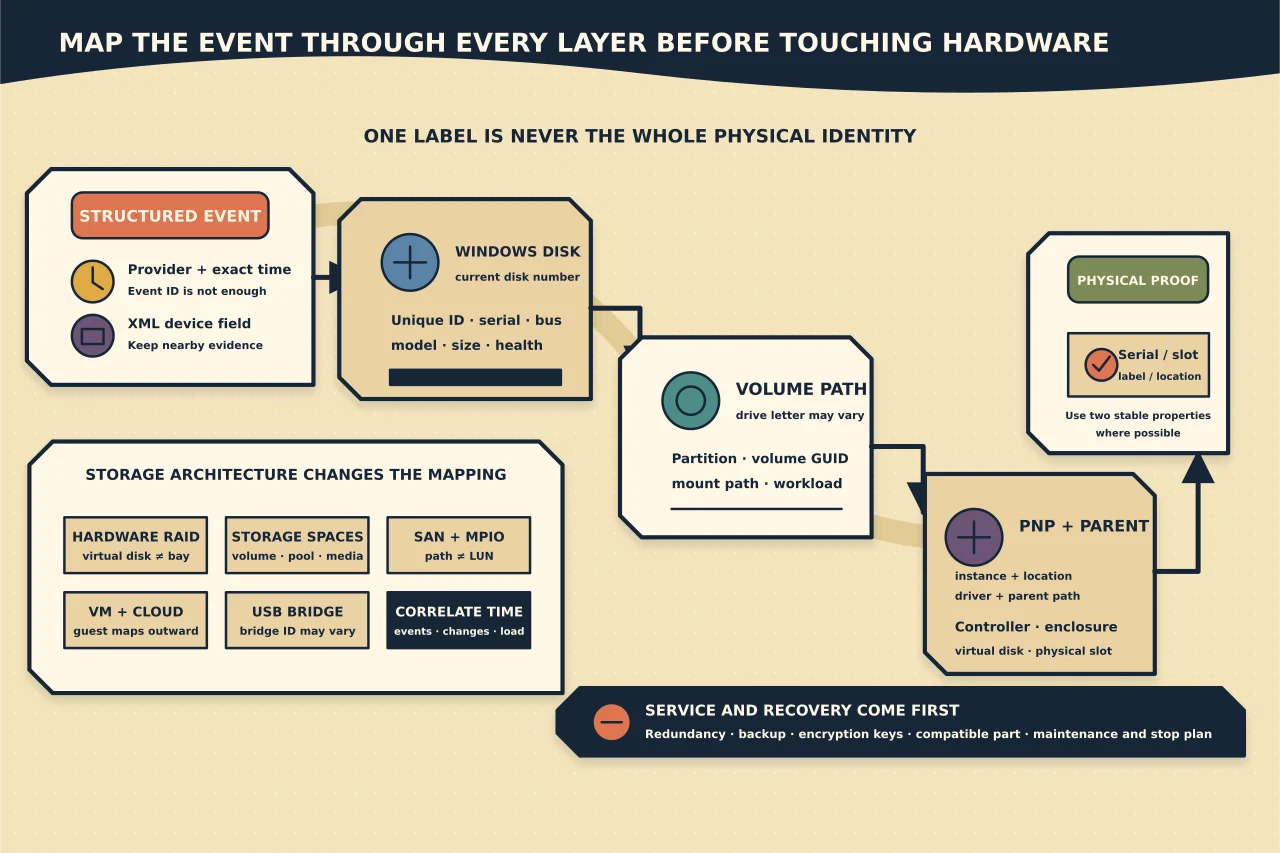
Windows may report an error against Disk 3, \Device\Harddisk2\DR5, a volume GUID, a controller port or a PnP instance. None of those labels is automatically the sticker on the drive you should pull.
Map the event through every layer before touching hardware.
Preserve the event as structured evidence
Record:
- log and provider;
- event ID, level and exact time;
- computer name and boot/session context;
- rendered message;
- event XML/data fields;
- referenced device/path/instance; and
- surrounding related events before and after.
Use Event Viewer Details → XML or a bounded Get-WinEvent query. Do not search the web for “Event ID 153” and assume every provider or storage stack means the same thing. Provider plus structured event data and time matter.
Diagnostic exports can contain hostnames, usernames, paths, serials and workload details. Store/redact them appropriately.
Snapshot the current storage model
PowerShell’s Storage module can give a read-only view:
Get-Disk | Select-Object Number, FriendlyName, SerialNumber, UniqueId, BusType, OperationalStatus, HealthStatus, Size
Get-Partition | Select-Object DiskNumber, PartitionNumber, DriveLetter, AccessPaths, Size
Get-Volume | Select-Object DriveLetter, FileSystemLabel, FileSystem, HealthStatus, Size, SizeRemaining
Capture output with a timestamp. A drive letter maps to a volume/partition at that moment; it is not a permanent physical identity. Disk numbers can change after reboot, re-cabling, controller changes or virtual-disk recreation.
Never run Initialize-Disk, Clear-Disk, format or offline commands during discovery.
Enumerate the PnP device and driver
If you have the device instance path from an event or Device Manager, current Microsoft guidance supports:
pnputil /enum-devices /instanceid "<device-instance-path>"To find devices with reported problems:
pnputil /enum-devices /problemRecord instance ID, class, manufacturer, status/problem code and driver relationship. A problem code identifies a Windows PnP state; it does not independently prove failed hardware.
For install/update history, %SystemRoot%\inf\setupapi.dev.log records device installation activity. Search around the event/change time and exact instance ID. Preserve the original file rather than renaming or clearing it on a production machine.
Build a mapping chain
Use a table:
| Layer | Evidence | Stable enough for |
|---|---|---|
| Event | Provider, time, XML device field | Identifying the reported software path |
| Windows disk | Number, UniqueId, serial, bus, size | Correlating current OS object |
| Partition/volume | disk number, partition, volume GUID, mount/drive letter | Linking filesystems/workloads now |
| PnP | instance ID, location paths, parent/controller | Linking driver/device tree |
| Controller/enclosure | controller ID, virtual/physical disk, slot/bay | Physical service action |
| Physical label | manufacturer serial/asset ID/slot LED | Final hands-on confirmation |
Require at least two independent stable properties where possible. Size and model alone are weak when several identical drives exist.
Account for the storage architecture
Hardware RAID
Windows may see one controller virtual disk while several physical drives sit behind it. The Windows disk event may identify the virtual disk or controller path, not a member slot. Use the current controller management interface/logs and chassis indicators under the hardware procedure.
Storage Spaces
Virtual disks, storage pools and physical disks are distinct objects. Map the volume to virtual disk/pool and then to physical-disk health before replacement. Do not infer a member from the Windows disk number.
SAN and MPIO
One logical unit can have multiple paths. A path/controller event may not mean the shared LUN is failing. Correlate MPIO, HBA, fabric and array events at the same time.
Virtual machines and cloud disks
The guest’s disk number is a virtual device. Map guest disk/controller/unique identifiers to the hypervisor or cloud volume, then to underlying storage only where you own that layer.
USB bridges and docks
The bridge may expose its own generic serial or no stable serial. Match enclosure port, device instance/location path, capacity and media identity carefully before action.
Correlate time and change
Place on one timeline:
- storage/system events;
- device arrival/removal and SetupAPI entries;
- controller/array/enclosure logs;
- backup, snapshot, antivirus and high-I/O jobs;
- resets, cabling/power events and firmware/driver changes;
- filesystem/application errors; and
- user-visible symptoms.
A disk timeout following a controller reset can implicate the path rather than the medium. Repeated errors across several disks behind one controller point differently from growing media errors on one physical member.
Do not treat health “OK” as a veto on real I/O failures or a single scary event as automatic replacement. Look for repetition, scope, related counters and independent vendor evidence.
Preserve service and recovery first
Before any disruptive action, confirm:
- affected workloads and owners;
- redundancy and current degraded state;
- independent backups and accepted recovery;
- encryption keys and replacement/rebuild requirements;
- whether removal can cause a second failure or lose the only copy;
- correct compatible replacement part; and
- maintenance/rollback/stop plan.
Never remove a drive because an OS disk number appears to match a bay number. Use the controller/enclosure’s supported identify procedure and physically verify the label.
After an approved correction
Rebuild the same mapping chain and confirm:
- intended physical component/path changed;
- controller/pool/virtual disk returns to expected health;
- no unexpected disk-number or volume mapping affects workloads;
- filesystems/applications read/write normally;
- related events cease across a meaningful observation window;
- backup and monitoring resume; and
- inventory, serial, slot and warranty records are updated.
The defensible conclusion is not “Disk 2 was bad”. It is: this provider event, PnP instance, OS disk, controller object and physically verified serial/slot referred to the same component, and the service/recovery evidence supports the action.