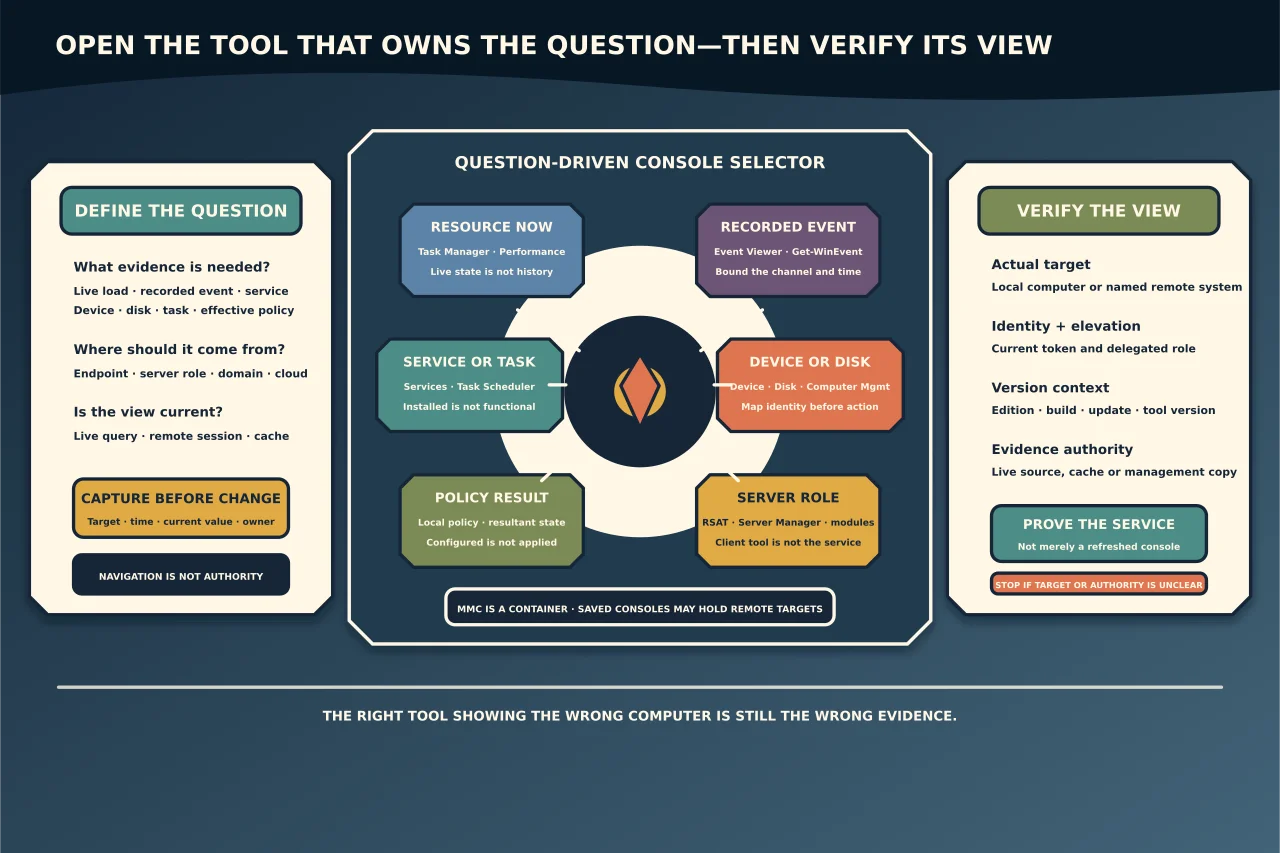
Windows includes several administration interfaces because they answer different questions. The quickest route is not memorising dozens of shortcuts; it is knowing which layer owns the evidence and confirming which computer the tool is managing.
Press Win + R to use the Run dialog for the names below. Opening a console does not require or imply approval to change it.
First capture identity and version
Use at least two of these when version matters:
- Settings → System → About for edition, version, build and device basics;
winverfor the human-readable Windows release/build;msinfo32for detailed OS, hardware, BIOS/firmware and component context; or- PowerShell
Get-ComputerInfofor structured inventory fields.
Record the complete edition, version and OS build—not “Windows 11” or “Server”. Feature availability, support and known issues can differ by build and installed updates.
For remote work, also record the computer name and whether the output comes from the endpoint, a management cache or a remote session.
Choose the console by question
| Question | Console/command | Launch |
|---|---|---|
| What is consuming resources now? | Task Manager | taskmgr |
| What did Windows or an application record? | Event Viewer | eventvwr.msc |
| Is a Windows service installed/running? | Services | services.msc |
| What devices and drivers are present? | Device Manager | devmgmt.msc |
| How are disks/volumes currently represented? | Disk Management | diskmgmt.msc |
| What shares, sessions, local users/groups or devices belong to this computer? | Computer Management | compmgmt.msc |
| What performance counters changed over time? | Performance Monitor | perfmon.msc |
| What scheduled tasks exist and what ran? | Task Scheduler | taskschd.msc |
| What local policy is configured? | Local Group Policy Editor where available | gpedit.msc |
| What effective policy applied? | Resultant Set/reporting tools | rsop.msc or supported reporting |
| What firewall rules/profiles apply? | Windows Defender Firewall with Advanced Security | wf.msc |
Some tools are absent on Home editions or when optional management features are not installed. Do not download an unknown replacement executable to make a shortcut work.
MMC is a container, not the managed service
Microsoft Management Console (mmc.exe) hosts snap-ins such as Event Viewer, Certificates and Group Policy tools. A saved .msc console can contain a chosen set of snap-ins and remote targets.
Before trusting a saved console:
- confirm its source and signature/provenance;
- inspect which snap-ins and computers it targets;
- do not embed reusable credentials;
- avoid copying a customer-specific console into another environment; and
- distinguish an empty/custom MMC from the operating system’s built-in
.mscshortcuts.
A snap-in reporting “Local Computer” can mean the computer running the console, while a remote connection shows another target. Read the tree header and properties before changing anything.
RSAT and Server Manager
Remote Server Administration Tools add management components for Windows Server roles from supported Windows clients/servers. Current Microsoft documentation groups them as Server Manager, MMC snap-ins, PowerShell modules and command-line tools.
RSAT availability depends on the managing platform and Feature on Demand state. The management workstation does not become the server; its tools connect to the server under the current identity and remoting/security configuration.
Check:
- managing and managed OS versions;
- installed RSAT capability/tool;
- current account and delegated role;
- DNS/network/remoting path;
- whether the console targets the correct server/domain; and
- whether the role’s authoritative management system is local, domain or cloud based.
Do not solve a remote-console error by disabling firewalls or trusting arbitrary hosts.
PowerShell for repeatable evidence
Graphical consoles are excellent for exploration. PowerShell is often better for bounded, exportable evidence. Examples:
Get-ComputerInfo | Select-Object WindowsProductName, WindowsVersion, OsBuildNumber
Get-Service -Name 'ExampleService'
Get-WinEvent -FilterHashtable @{LogName='System'; StartTime=(Get-Date).AddHours(-1)} -MaxEvents 100
Use fictional service names and bounded time windows. Record the command, target and timestamp. Avoid piping discovery straight into a change command.
Use Get-WinEvent rather than legacy Get-EventLog for modern Windows Event Log channels; Microsoft notes that Get-EventLog covers classic logs and uses a deprecated API.
Version-checking discipline
When a fix says it applies to a version, verify:
- product edition and architecture;
- release/version and full build;
- installed cumulative update or relevant component version;
- role/feature and management tool version;
- whether the machine is supported; and
- the date/version of the documentation.
An old shortcut can still open while the advice behind it is obsolete. Treat memorised console paths and registry locations as leads until current vendor documentation confirms them.
Useful navigation patterns
Win + Xopens the quick-link menu for Terminal, Settings, Device Manager, Disk Management and related tools (items vary).- Search by the plain-language console name when a launch alias is forgotten.
- Use Run as administrator only for the action that requires it; observation often works without elevation.
- In a console, prefer Connect to another computer only after confirming the intended target and delegated authority.
- Export reports/logs to a controlled case folder with a timestamp; diagnostic files can contain sensitive system and user information.
Before you press Apply
Capture:
- exact computer/domain/tenant target;
- current identity and elevation;
- OS and console/tool version;
- current value/state and source of truth;
- intended change and affected service;
- expected result, denial and side effects; and
- recovery or rollback.
The real skill is not opening services.msc quickly. It is knowing whether Services is the right authority, whether it is showing the right computer, and what evidence would prove the business service—not just the console—works afterward.