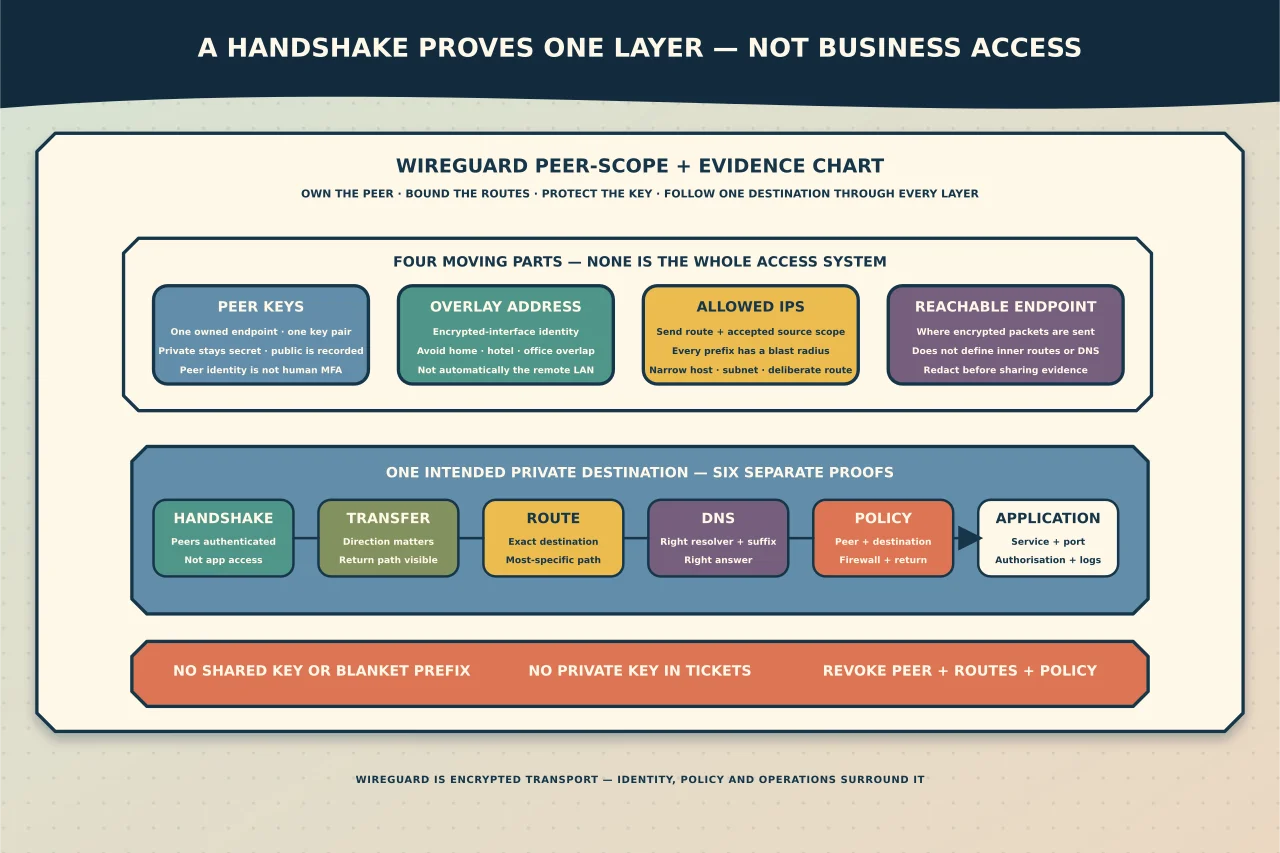
WireGuard is deliberately small. It creates an encrypted IP tunnel between peers that possess the right keys. That simplicity is one of its strengths, but it also explains many disappointing deployments: WireGuard is not a user directory, an MFA service, a device-compliance engine, a helpdesk approval process or a complete least-privilege policy system.
On Windows, a tunnel can be active and a recent handshake can be visible while the user still cannot reach the intended service. That is not contradictory. It means one layer worked and a later one did not.
Start with the access decision, not the tunnel file
Write down the intended outcome before choosing addresses or prefixes:
- Who or what owns this peer?
- Is the peer one person, one managed device or a site gateway?
- Which exact subnets or hosts should Windows send through it?
- Which destinations should accept traffic from it?
- Which DNS resolver and suffixes are needed for private names?
- Should ordinary internet traffic remain local or use the tunnel?
- How will a lost device or departed user be revoked?
- Who can see handshake, transfer and destination-service evidence?
If a single configuration is shared between people or devices, individual attribution and revocation are already weakened. A safer operational pattern is one peer key pair per managed device or other clearly owned endpoint, with a unique record tying its public key to an owner and purpose.
Understand the four moving parts
Keys identify peers
Each peer has a private key and a derived public key. The private key stays secret on the peer that owns it. The public key is placed in the other peer’s configuration so traffic can be associated with the intended cryptographic identity.
A public key is not a password, but it is still operational information. Record its owner, issue date, intended routes and revocation state. A private key is a credential: exposure should trigger replacement, not a hopeful rename of the configuration.
WireGuard keys identify peers, not necessarily human beings. If the business needs MFA, sign-in risk, conditional access, manager approval or time-bounded access, those controls must be supplied by the surrounding remote-access design.
Tunnel addresses identify the encrypted interface
The address assigned to the WireGuard interface is not automatically the address of the remote office LAN. It is part of the overlay network between peers. Avoid reusing a subnet that may already exist on home, hotel, mobile or office networks. Overlap makes Windows choose between equally plausible local and tunnel routes, often producing failures that look intermittent.
AllowedIPs affects routing and acceptance
AllowedIPs has two closely related jobs. When sending, it helps decide which destination prefixes belong to a peer. When receiving, it constrains which source addresses are acceptable from that peer. It is therefore both a routing decision and part of peer scope.
Treat every prefix as an access grant with a blast radius:
- a single host route is narrower than a whole subnet;
- a business subnet is narrower than a default route;
- overlapping prefixes create ambiguous intent; and
- a default route intentionally captures nearly all IP traffic and requires a corresponding DNS, egress and policy design.
Do not solve reachability by widening AllowedIPs until something works. First identify the exact destination address and the route Windows is actually selecting.
The endpoint is only where encrypted packets are sent
The endpoint is the reachable address and port of a peer. Reaching it proves only that the encrypted transport can be attempted. The endpoint does not define which private networks are routed inside the tunnel, which names resolve or which applications permit access.
Choose split or full tunnel deliberately
A split tunnel sends only selected private destinations through WireGuard. It usually preserves local internet access and reduces central bandwidth, but it also means internet traffic is outside the organisation’s tunnel monitoring and control.
A full tunnel uses broad default routes so ordinary internet traffic also enters the tunnel. That may meet a security or location requirement, but only if the far side is designed to route, filter, resolve and return that traffic. A default route without working egress and DNS can make the Windows device look entirely offline.
Neither is universally safer. Document the actual applications, data sensitivity, endpoint trust, monitoring coverage and failure consequence.
Diagnose one layer at a time
Capture the current configuration securely before changing it. Redact private keys and public endpoints before sharing evidence. Then work down the following sequence.
1. Is the intended tunnel active?
Confirm that the active tunnel name and peer public key match the approved record. Multiple old tunnels can create competing routes even when only one is supposed to be in use.
2. Is there a recent handshake?
A recent handshake shows that the peers exchanged authenticated WireGuard traffic. No recent handshake points toward endpoint reachability, firewall/NAT state, a wrong public key, a wrong endpoint or a peer that is not listening.
It does not yet prove that private routing, DNS or the destination application works.
3. Are transfer counters moving in the expected direction?
Send traffic to one intended private destination and observe whether transmitted and received counters change. Transmit without receive suggests that the local peer is trying but return traffic, peer routing, policy or the destination path is missing. No movement may mean Windows did not select the tunnel route at all.
4. Which route does Windows choose?
Inspect the effective Windows route for the exact destination address. Look for:
- a more-specific local or other-VPN route;
- an overlapping home or office subnet;
- an unexpectedly broad WireGuard prefix;
- a missing private prefix; or
- a default route that captured more than intended.
Change the smallest prefix that corrects the documented intent. Do not delete unrelated routes or reset the network stack as a first response.
5. Is the problem DNS or reachability?
If an application uses a name, compare name resolution with a direct connection to the known authorised IP address. A private name resolving to a public, stale or unreachable address is a DNS-path problem, not proof that the tunnel is down.
Check which resolver Windows is using, whether the required suffix exists and whether that resolver is reachable through the chosen route. Avoid replacing system-wide DNS merely to make one private namespace work.
6. Does the destination service accept the traffic?
Prove the required service and port, not just ICMP. A host can ignore ping while its application works, or answer ping while the application is stopped, blocked or denying this identity. Use destination logs and access policy to separate network reachability from application authorisation.
Common failure patterns
No handshake
Check the approved public keys, endpoint, listening side, current public address, port-forward/NAT ownership and intervening firewall policy. Do not rotate both peers, change routes and open broad firewall access simultaneously; that destroys the evidence needed to identify the failed layer.
Handshake succeeds but no private service works
Check AllowedIPs on both peers, the client’s chosen route, forwarding on a gateway peer, return routes from the destination network and destination firewall policy. The most commonly missed path is the return journey: the service network must know how to reach the WireGuard client address, either through a route or an explicitly designed translation boundary.
IP access works but names fail
Check the assigned resolver, suffix/search behaviour, route to the DNS service and the DNS answer itself. Do not widen tunnel routes until the name resolves; first establish whether the correct resolver is being queried.
Internet access disappears
Look for default IPv4 or IPv6 routes in the tunnel scope. If full tunnel was intended, verify remote egress, translation, DNS and return policy. If it was not intended, replace broad defaults with the exact private prefixes the peer needs.
The tunnel works only after continuous traffic
WireGuard is intentionally quiet when idle. A peer behind NAT or a stateful firewall may need a persistent keepalive when it must remain reachable after the mapping would otherwise expire. The official documentation notes 25 seconds as a broadly useful interval, but the default is off because most peers do not need it. Add it to the NATed peer only when the path and symptom justify it.
Revoke and roll back cleanly
For a lost, retired or compromised Windows device:
- remove or disable that peer’s public key at every accepting peer;
- remove routes and access policy that exist only for it;
- preserve the ownership and revocation record;
- replace any exposed private key rather than reusing it; and
- confirm that the revoked peer no longer handshakes or reaches an authorised destination.
For a failed change, restore the captured configuration as one known unit. Avoid reconstructing it from screenshots that may omit keys, routes or DNS settings.
When WireGuard is the wrong fit
Choose a managed remote-access platform or a stronger surrounding control plane when you require native user MFA, device posture, approval workflows, automatic identity lifecycle, detailed per-user audit, application-level access or a support team that cannot safely operate peer keys and routes.
WireGuard can be an excellent encrypted transport. It becomes dependable business access only when peer ownership, routes, DNS, destination policy, monitoring and revocation are designed with equal care.