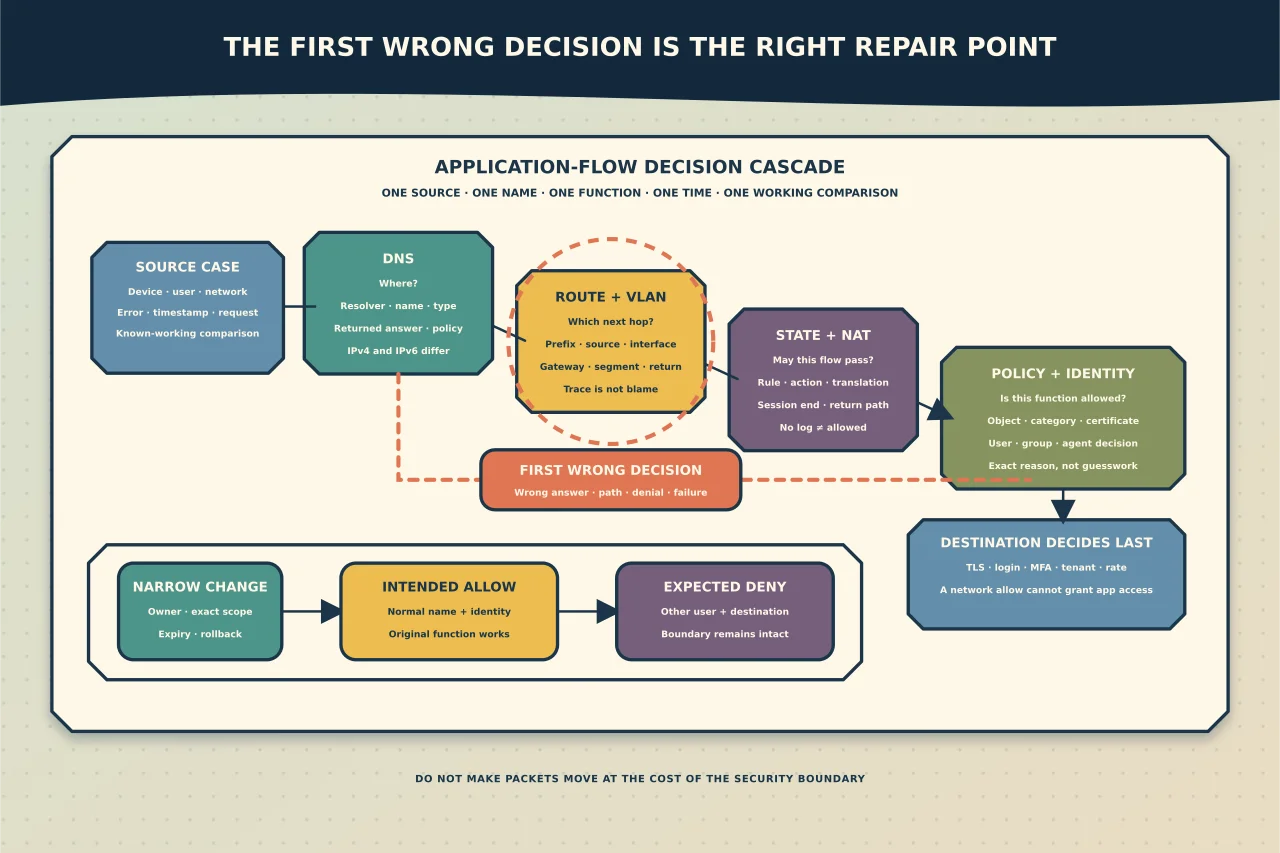
An application does not pass through “the firewall” as one yes-or-no event. A user enters a name, DNS returns one or more addresses, the source chooses a route, stateful policy evaluates a flow, NAT may translate it, a proxy or security service may classify it, TLS identifies and protects the remote service, and the application then applies its own authentication and authorisation.
Changing the wrong layer can make the symptom disappear while leaving the real failure—and a new security hole—behind.
Define one failing flow
Start with a sentence precise enough that another person can reproduce the observation:
From this managed source on this network, this named user cannot reach this application name and function at this time. This comparison source or function still works.
Record:
- source device, user and network/VLAN/VPN context;
- destination name as entered by the application;
- expected service and port or application function;
- resolved IPv4 and IPv6 answers;
- expected egress interface, gateway and public/NAT identity;
- observed error, timestamp and correlation/request ID;
- working comparison device, network, user or function; and
- recent changes to DNS, routes, firewall, proxy, identity or the application.
Avoid “the website is blocked” as the complete fault description. A login page may load while an API, content host, certificate check, update endpoint or identity redirect fails separately.
Draw the policy path
For the exact flow, sketch:
source -> local/endpoint policy -> VLAN/gateway -> route/NAT/firewall -> proxy or security service -> internet/private path -> destination service -> return path
Add DNS and identity as their own dependencies. This small diagram prevents a common mistake: inspecting the obvious perimeter appliance even though the source uses a VPN route, secure web agent, explicit proxy, alternate DNS resolver or different gateway.
Separate the control layers
DNS answers “where?”
DNS can fail, return a stale answer, choose a private rather than public destination, return IPv6 when only IPv4 is routed, or apply a security policy response. Compare the exact fully qualified name and record type using the resolver configured on the affected source. Then compare with the approved authoritative or known-good answer.
Do not replace organisation-wide DNS because one name fails. First establish whether the answer is wrong, unreachable, policy-blocked or simply different by design.
Routing answers “which next hop?”
The source chooses a route based on the destination prefix and its effective route table. VPNs, virtual adapters, overlapping private networks and multiple defaults can select a valid but unintended path.
Inspect the route for the exact resolved destination. Confirm the chosen interface, next hop and source address. A route problem happens before an application-aware firewall or URL policy can make a meaningful decision.
VLANs answer “which Layer 2 segment?”
A device can have a plausible IP address while sitting in the wrong VLAN or receiving the wrong DHCP options. Confirm the intended access/tagging state and gateway reachability. Communication between VLANs still requires a Layer 3 gateway and policy; VLAN membership alone neither permits nor explains inter-VLAN application access.
Stateful firewall policy answers “may this flow pass?”
A stateful firewall commonly evaluates source, destination, service, zone/interface, identity or application context, then tracks the permitted conversation. Rule order, object membership and the return path matter. A log showing “allow” at one device does not prove that a later proxy, downstream firewall or destination accepted the traffic.
Find the policy decision for the exact timestamp and flow. Record the matched rule, action, reason, translated addresses and session end state. “No deny log” is not proof of an allow: logging may be disabled, sampled, stored elsewhere or absent because the packet never reached that device.
NAT changes addresses, not intent
Source NAT can make many devices appear under one public address. Destination NAT can publish a service under a different external address. Confirm the pre- and post-translation values and the return route. An asymmetric return path or conflicting translation can make an outbound session appear to time out even when the first packet left correctly.
Do not add another translation as a speculative fix. Multiple overlapping NAT rules make ownership and logging harder to interpret.
URL, DNS or application policy answers “is this destination/function allowed?”
Web and application controls may use names, categories, reputation, user identity, client agents, proxies or product-specific application signatures. What they can see in encrypted traffic depends on the architecture and current product behaviour. A domain-level allow does not guarantee every host, redirect, API or content dependency needed by the application, and a broad category allow may permit far more than the intended service.
Use the product’s current decision log to identify the exact object and reason. Distinguish:
- DNS/security-policy response;
- explicit proxy error;
- category or reputation denial;
- certificate or TLS inspection failure;
- application-control denial;
- identity/group mismatch; and
- endpoint-agent policy.
Do not disable encrypted-traffic inspection, reputation or the entire web filter solely because an application has a certificate or login problem. Confirm the owner, supported application requirements and smallest necessary exception.
The destination still makes the final decision
A permitted network flow can reach a service that returns an HTTP error, rejects the account, requires MFA, denies the source location, rate-limits the client or expects a different tenant/URL. Use the destination’s response and service logs. Turning a destination authorisation failure into a broad firewall allow cannot fix it.
A disciplined diagnostic sequence
1. Preserve the before-state
Capture effective addresses, routes, DNS configuration, proxy/agent state, relevant policy revision and a timestamped reproduction. Do not flush caches, reset the stack or reboot the firewall before preserving evidence.
2. Compare name and direct service evidence
Resolve the exact name from the affected source. If an authorised known address exists, compare service reachability by name and address without bypassing certificate validation. An IP connection may help separate DNS from transport, but many TLS and hosted applications require the correct name and will not function safely by raw IP.
3. Prove the selected route
Inspect the effective route and first reachable gateway. Trace information can help locate where responses stop, but filtered trace probes are not proof that the last visible hop is faulty.
4. Prove the required transport
Check the actual TCP or UDP service rather than relying on ping. ICMP can be filtered while the application works, or succeed while the required port is denied.
5. Correlate every enforcement point
Use the timestamp, source/destination addresses, user and request ID across endpoint, DNS, firewall, proxy/security service and destination logs. Account for NAT when correlating internal and external records.
6. Identify the first wrong decision
The first component that returns an incorrect answer, chooses the wrong path or denies a flow is the best correction point. Later timeouts are often consequences rather than causes.
Design the smallest safe correction
A defensible exception records:
- business/application owner;
- exact source identity/device/network;
- exact destination name/address/function;
- required service and direction;
- current denial reason;
- why the standard policy is unsuitable;
- expected successful and denied cases;
- expiry/review date;
- monitoring and alert owner; and
- rollback action.
Prefer a specific application or destination object over a whole category, a managed identity group over every user, and a time-bounded exception over permanent bypass. If a cloud service publishes an official endpoint list, understand its scope and update mechanism rather than copying a stale list from a forum.
Verify both allow and deny outcomes
After an authorised change, confirm:
- the original function now works by its normal name and identity path;
- the policy/log shows the intended rule or exception;
- unrelated destinations and unauthorised users remain denied;
- DNS, route and NAT follow the documented path;
- no certificate warning or security-agent failure was normalised; and
- monitoring will expose expiry, policy drift or renewed failure.
Success is not merely “the page opened”. It is the intended function working while the original security boundary remains intact everywhere else.
Common changes that create bigger problems
Avoid:
- allowing an entire URL category for one application;
- allowing all addresses owned by a large cloud provider;
- disabling a firewall, endpoint agent, proxy or TLS control;
- forcing public DNS on a managed device;
- adding a default or broad private route without overlap analysis;
- changing both outbound and return routing simultaneously;
- publishing an internal service directly because private access is difficult; or
- leaving a temporary rule without an owner or expiry.
These are troubleshooting shortcuts only in the sense that they shorten the time to a new incident.
When to escalate
Stop and involve the relevant network, security, identity or application owner when the failure affects many sites, the active policy source is unknown, logs suggest compromise or data leakage, the destination requires disabling a security control, certificate trust is disputed, the change could interrupt core routing, or no out-of-band recovery path exists.
Good application-access troubleshooting is evidence reconciliation. The objective is not to make packets move at any cost; it is to prove the intended path and correct the first wrong decision without granting anything else.