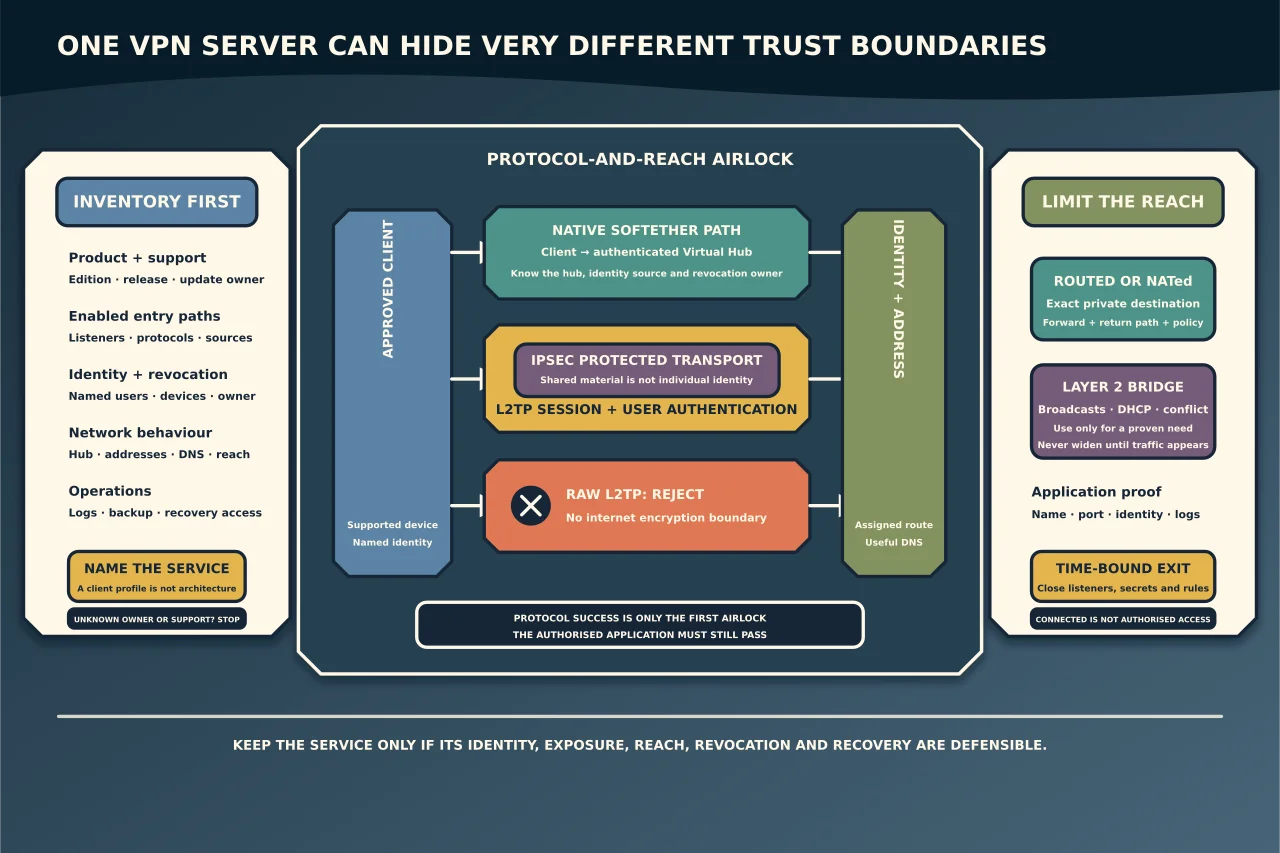
“SoftEther VPN” can describe several materially different access paths. One deployment may use the SoftEther client and protocol. Another may expose L2TP/IPsec for built-in operating-system clients. Another may bridge a Virtual Hub directly onto an office Ethernet segment. Those choices do not share the same identity, encryption, routing or blast radius merely because one server offers them.
The first job is therefore not to make a failing client connect. It is to identify which service you are operating and whether it still matches the business outcome.
Inventory the real service
Record the current state before changing it:
- product edition, installed version and supported update path;
- enabled listeners and compatibility protocols;
- public hostname/address ownership and certificate state;
- Virtual Hubs and their intended user groups;
- authentication source for each path;
- local bridge, routed or SecureNAT/virtual-DHCP design;
- address pools, DNS and reachable internal networks;
- firewall/NAT exposure and source restrictions;
- logging, monitoring, backup and recovery access; and
- every active user/device plus its revocation owner.
Do not rely on a client profile as the architecture record. It shows what one device attempts, not what the server exposes or what the internal network accepts.
Separate the protocol choices
SoftEther’s own access path
The native SoftEther model connects a client to a Virtual Hub. The hub may then be linked to a LAN through local bridging or another network function. Authentication can be local to the product or tied to an external identity/certificate design, depending on the selected mode and current release.
This can be flexible, but flexibility increases operational responsibility. The owner must know which hub a user enters, how that identity is revoked, and what the hub can reach.
L2TP over IPsec
L2TP by itself does not provide the internet encryption boundary expected of a business VPN. In an L2TP/IPsec design, IPsec protects the transport and L2TP carries the tunnel session. The SoftEther manual separately exposes L2TP over IPsec and raw L2TP with no encryption. Do not confuse or enable the latter as an internet compatibility shortcut.
An IPsec pre-shared key and a user sign-in solve different problems. The PSK allows clients that know a shared secret to participate in the IPsec exchange; it does not identify an individual user. The manual also requires a user object for the L2TP/IPsec session. If many people share one PSK, changing or containing it is an estate-wide event rather than individual revocation.
Current Windows VPN supports L2TP and multiple authentication choices, but client support does not make every server-side combination equally strong. Prefer individual, attributable authentication and stronger certificate/EAP or modern identity options where the complete platform design supports them. Treat a password plus a widely shared PSK as a compatibility constraint, not an ideal new standard.
Layer 2 local bridging
A local bridge can make a remote client behave as though it were attached to the target Ethernet segment. That may allow protocols that depend on broadcasts or same-segment behaviour, but it also expands what crosses the boundary:
- broadcast and discovery traffic;
- the internal DHCP domain;
- local-segment reach beyond one application;
- address conflicts and loops; and
- the failure/security scope of a compromised client.
Layer 2 reach is not equivalent to a narrowly routed application grant. Use it only when there is a documented requirement that cannot be met safely with a smaller routed or application-level path.
Decide whether to keep it
An inherited service earns continued operation only if you can answer yes to the relevant questions:
- Is the software release maintained and patchable?
- Can each person or device be identified and revoked separately?
- Can strong authentication or MFA be enforced by the complete access design?
- Is exposure limited to required listeners and approved sources?
- Is reach limited to the applications or networks users actually need?
- Are secrets, certificates and accounts owned and rotated?
- Are connection and destination events visible to a responsible operator?
- Can you restore configuration without relying on the one running server?
- Is there a supported client path for the devices that still need access?
If the only defence is obscurity, a shared secret that nobody can rotate, an unpatched server or a broad bridge into the office LAN, plan replacement rather than polishing the client instructions.
Diagnose the connection in layers
1. Confirm the selected client type
Establish whether the client is using SoftEther’s client/protocol, Windows built-in L2TP/IPsec or another enabled compatibility listener. A server log for one protocol cannot explain a failure on another.
2. Confirm public reachability without broadening exposure
Verify the approved hostname/address, certificate where relevant, current NAT owner and intended listener. Check server and perimeter logs before adding ports. A vendor document listing protocol ports is not permission to expose them universally or from every source.
3. Separate IPsec establishment from user authentication
For L2TP/IPsec, determine whether failure occurs before the protected transport is established or after the user session reaches the Virtual Hub. A wrong or stale PSK, NAT traversal problem and blocked listener fail at a different layer from a disabled user, wrong hub name or rejected user authentication.
Do not reset both shared and individual credentials together. That hides the failed stage and may disconnect every working user.
4. Confirm hub selection and user ownership
SoftEther can host multiple Virtual Hubs, and the documented username format may include the target hub depending on the authentication mode and default-hub configuration. Check the current server configuration rather than guessing a suffix or prefix from an old profile.
Verify that the user object or external identity exists, is active, belongs in that hub and has an accountable owner. Avoid creating a broad generic user merely to prove connectivity.
5. Confirm address, gateway and DNS assignment
The L2TP/IPsec path needs an address for the client. The SoftEther documentation describes assignment from DHCP on the destination segment or the product’s virtual DHCP function. A session that authenticates but receives no useful address, DNS server or route will feel connected but cannot reach the intended service.
Record the client’s assigned values and compare them with the documented design. Do not add a second DHCP service to a bridged production segment as an ad hoc repair.
6. Confirm the bridge or routed path
For a local bridge, confirm the intended physical adapter, Virtual Hub and target segment. Look for adapter changes, VLAN mismatch, DHCP failure, loop protection or host firewall policy. Do not bridge additional adapters until traffic appears; that can join networks that were meant to remain separate.
For a routed/NATed design, confirm the exact private destination, forward path, return path and translation policy.
7. Prove the destination application
Test the authorised application and port, then inspect its logs and access policy. Ping is not application proof. A working VPN may still deliver traffic to a service that rejects the identity, requires a different name/certificate or permits only a smaller source range.
Common misleading fixes
Avoid these tempting shortcuts:
- enabling raw L2TP because the encrypted path is difficult;
- publishing every documented protocol port;
- replacing individual identities with one generic account;
- widening a hub or bridge to the entire office network;
- turning on another DHCP service without mapping the broadcast domain;
- disabling host firewalls rather than identifying the required flow;
- accepting an old client screenshot as current server truth; or
- keeping an unsupported service solely because one legacy device still connects.
Each may turn one error into apparent success while making the real security and recovery position worse.
Migrate without a blind cutover
When replacing the service, define the new identity, device, route, DNS, application and logging outcomes first. Build new individual access, move a small representative group, reconcile every active user/device, then revoke the old path. Keep coexistence time-bounded so two remote-access systems do not become permanent, unowned entry points.
Retirement is complete only when old listeners are closed, shared secrets and unused certificates are retired, stale accounts are disabled, firewall/NAT rules are removed, documentation is current and monitoring confirms that nobody still depends on the old path.
SoftEther and L2TP/IPsec can solve real compatibility problems. They should be retained because the current, supportable design is understood—not because an old profile still says “Connected”.