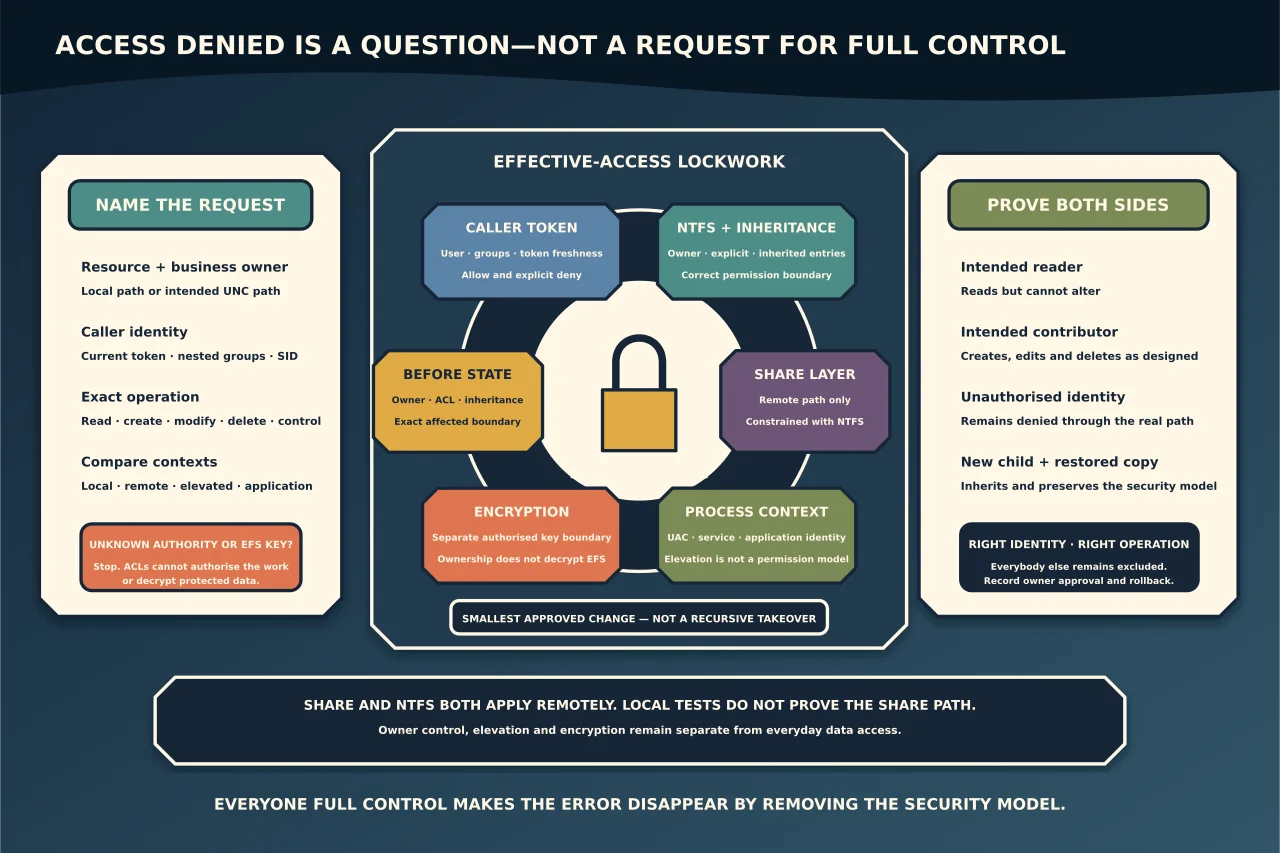
“Access denied” does not automatically mean the user needs Full Control. Windows may be applying NTFS permissions, share permissions, group membership, an explicit deny, elevation rules, application identity or encryption. The correct repair starts by identifying the resource, identity and access path.
Name the exact request
Record:
- the file or folder and its business owner;
- local path or UNC share path used;
- the user and security groups in the current sign-in token;
- the required operation—read, create, modify, delete, change permissions or take ownership;
- whether the same action works locally, remotely, elevated or as another authorised user; and
- recent moves, restores, migrations or group/ACL changes.
Do not ask only “Does the user have access?” A person may read files but not create them, create but not delete child items, or modify locally but be blocked by the share over the network.
Understand the controls
An NTFS access-control list contains entries for users and groups, with rights that may be explicit or inherited. Windows evaluates the caller’s access token against applicable allow and deny entries. Group nesting and token freshness matter: a new group membership may require sign-out/in before it appears.
The owner can change permissions even when not otherwise allowed. Ownership is administrative control, not a recommended everyday access grant.
Over SMB, both share and NTFS permissions apply. The effective result is constrained by both layers. Evaluate the resource through its UNC path when diagnosing remote access; a local test bypasses share permissions.
UAC also changes process context. Membership in Administrators does not mean every unelevated process uses an unrestricted administrative token. Conversely, routinely running applications elevated is not a safe permissions fix.
EFS or another encryption layer is separate. Changing ownership or ACLs cannot decrypt data without an authorised key.
Read before you write
Capture the current owner, ACL, inheritance state and relevant group membership. Identify where the first unexpected permission enters the path. A child may inherit from a parent; a direct entry may override the intended pattern; an explicit deny may be inherited from higher up.
Use Windows effective-access tools as evidence, but verify with a real allowed and denied test through the intended path. Remote effective-access calculations need share context and may depend on claims/groups not available to an offline calculation.
Compare the current ACL with the approved permission model—not with another random folder that merely works.
Prefer groups and intended inheritance
For managed business data, grant access to role-based groups and place users in those groups. Keep permissions at the highest correct boundary and let inheritance carry them to children. Direct per-user entries accumulate exceptions and make offboarding harder.
Choose rights from the work required. Most collaborators need Modify, not Full Control; Full Control includes changing permissions and ownership.
Use explicit deny sparingly. Denies can be valid for a precise segregation requirement, but they are difficult to reason about across nested groups. Removing a deny without understanding why it exists can expose an entire tree.
Make one bounded correction
Before changing an ACL, export or otherwise record the before-state, enumerate the exact target and estimate the affected item count. Test the change on a representative subset when inheritance or recursion is involved.
Examples of bounded fixes include:
- add the user to the approved access group;
- restore inheritance on one tree that was accidentally protected;
- remove one stale direct entry after identity validation;
- correct the share layer while preserving the NTFS model; or
- repair ownership on one orphaned administrative object, then assign the intended ACL.
Microsoft’s takeown exists to let an administrator recover ownership, but recursive use can replace ownership and—with some options—permissions across a large tree. Do not use it as a generic “access denied” cure. If ownership recovery is necessary, transfer control to the proper administrative owner and then restore the designed permissions; do not leave a technician as owner of business data.
Never solve a denial by disabling UAC, running every application as administrator or granting Everyone Full Control. Those changes expand the attack surface and hide the actual requirement.
Account for moves, copies and restores
Permission results can change when data moves between volumes, is copied to a new parent, restored by backup software or crosses filesystems. Preserve ACLs deliberately during migrations and independently verify them. A successful byte-for-byte copy does not prove the security descriptor or encryption key moved.
When an old user was recreated, its visible name can match while its SID differs. Granting access to the new identity may be correct; replacing every unknown SID without validating ownership is not.
Verify positive and negative access
After the correction, test through the real path and application:
- intended reader can read but cannot alter;
- intended contributor can create, edit and delete as designed;
- unauthorised user remains denied;
- owner/administrator duties work without giving routine users control;
- share and NTFS effective access agree with the model;
- inheritance on new child objects is correct; and
- backup/restore retains the security model.
Record the group or ACL change, owner approval, affected boundary and rollback—not sensitive filenames or user data.
The best permissions fix is not the one that makes the error disappear fastest. It is the smallest change that gives the right identity the right operation through the intended path while everybody else remains correctly excluded.