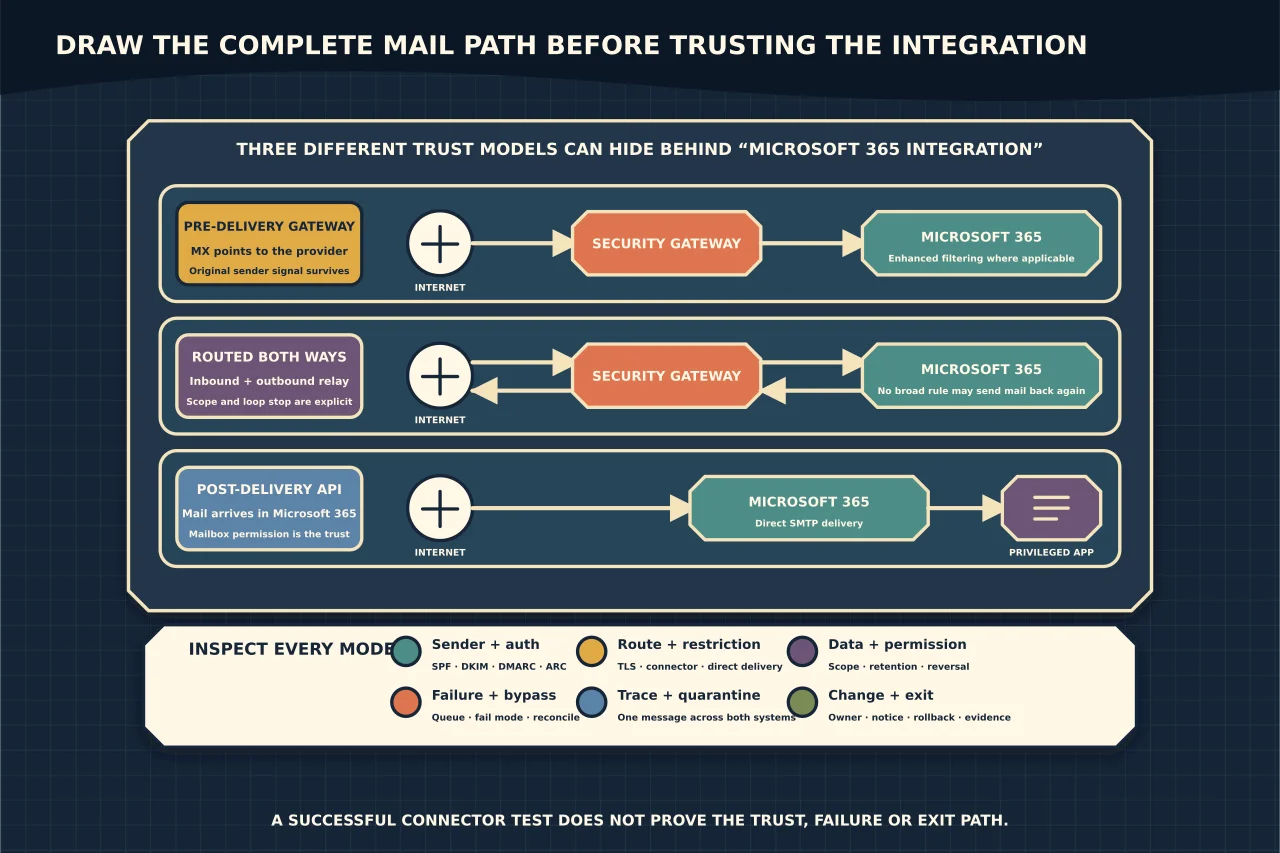
A third-party email-security product can sit in front of Microsoft 365, route messages out and back, or inspect mail through APIs after it reaches a mailbox. Those designs have different permissions, failure modes and effects on email authentication.
Do not begin by creating the connector shown in a vendor screenshot. Draw the actual message path first.
Identify the integration model
A gateway before Microsoft 365
The domain’s MX records point to the third-party service. It accepts inbound messages, filters them, and relays permitted mail to Exchange Online Protection.
This design can stop messages before they reach Microsoft 365, but it inserts an intermediary into the sender path. Without correct configuration, Microsoft 365 may see the gateway—not the original internet sender—as the apparent connection source.
Inbound and outbound routed through the service
Inbound mail arrives through the gateway, and Microsoft 365 sends outbound mail back through it before internet delivery. This can centralise filtering or continuity features, but it adds connector, loop-prevention, authentication and outage dependencies in both directions.
Post-delivery or API-based inspection
Mail flows directly to Microsoft 365, while a service uses Microsoft Graph or another supported API to inspect, move or remediate messages. The DNS and SMTP path may be simpler, but the application can require broad and persistent access to mailbox data.
Some products combine these models. Ask the provider to describe each flow precisely rather than accepting “Microsoft 365 integration” as an architecture.
Draw every message route
Document at least:
- internet sender to an internal recipient;
- internal sender to an internet recipient;
- internal sender to internal recipient;
- application or device relay;
- partner or line-of-business connectors;
- journaling or archive routes, if used;
- quarantine release;
- provider outage; and
- rollback or emergency bypass.
For each hop, record the sending host, receiving host, TLS expectation, how the peer is identified, which system filters the message and where an administrator can trace or quarantine it.
If nobody can explain the path of internal mail, the design is not ready.
Preserve the original sender signal
When a third-party service sits before Microsoft 365, a simple trusted connector can cause Exchange Online Protection to treat the gateway as the connection source. That can weaken Microsoft’s ability to evaluate the original sender and can distort filtering.
Microsoft’s Enhanced Filtering for Connectors, also called skip listing, is designed for supported scenarios in which a non-Microsoft service receives inbound mail first. It allows Microsoft 365 to identify the original source through the received chain instead of considering only the last gateway hop.
Configure it only against the correct inbound connector and current provider architecture. Validate message headers and Microsoft 365 authentication results with real test messages; do not infer success from connector status.
Understand SPF, DKIM, DMARC and ARC together
Mail intermediaries can alter the path or content used by email authentication:
- SPF evaluates whether the sending infrastructure is authorised for the envelope-from domain. Forwarding and intermediate relays can break alignment or change the observed sender.
- DKIM verifies a signature over selected headers and content. Body or signed-header modification can invalidate it.
- DMARC evaluates alignment of the visible From domain with an authenticated SPF or DKIM identity. A message can pass SPF yet fail DMARC when alignment is wrong.
- ARC can preserve authenticated-results information across a trustworthy intermediary, but it does not make an untrustworthy message safe by itself.
Ask how the service handles existing DKIM signatures, whether it signs outbound mail, whether it implements ARC correctly, and how Microsoft 365 evaluates messages after the hop. Review DMARC aggregate reports after cutover for unexpected new sources or alignment failures.
Restrict connectors to the intended service
An inbound connector should not become an unauthenticated shortcut around normal filtering. Follow Microsoft’s and the provider’s current guidance to identify the service with supported IP addresses, certificates or other required restrictions.
Clarify:
- what happens when the provider changes an address range or certificate;
- who maintains those values;
- how changes are announced;
- whether direct delivery to the Microsoft 365 tenant is prevented or monitored;
- whether all accepted domains follow the same route; and
- how partner and application connectors remain distinct.
For outbound connectors, confirm the correct smart host, TLS certificate/name expectations, scope and route priority. Ensure the service cannot relay arbitrary unauthorised mail through the tenant.
Prevent loops and duplicate handling
A loop can occur when the third party returns a message to Microsoft 365 and a broad outbound rule sends it straight back. Use the provider’s documented routing markers, connector scopes or transport-rule conditions, then test them.
Also check overlapping security transformations. A third party and Microsoft Defender for Office 365 may both rewrite links, detonate attachments, add banners or quarantine the same message. Double link wrapping can break one-time links and obscure the original destination. Duplicated banners or disclaimers can damage signatures and user confidence.
Decide which system owns each function and which Microsoft protections remain enabled. Do not disable layers automatically simply because the provider has a similarly named feature.
Treat API access as privileged access
A post-delivery service may request application permissions that allow it to read, modify or delete messages across many mailboxes. Evaluate the exact permissions and whether they can be scoped.
Ask:
- What message content and metadata leave Microsoft 365?
- In which countries and subprocessors is it handled?
- Is data retained for model training, threat research or support?
- Can the service delete or move messages, and can that action be reversed?
- How are administrator actions and automated remediations audited?
- What happens when consent is removed?
- How is historical provider-held data exported or deleted at exit?
“No MX change required” does not mean low risk. It may mean the trust boundary moved from SMTP into application permissions.
Decide what happens during failure
For every route, define whether an outage causes mail to queue, fail closed, fail open or bypass the service. Establish the queue duration, retry behaviour and responsibility for monitoring.
An emergency bypass that exists only in a support article is not a recovery plan. Record:
- the exact trigger and authorised decision-maker;
- current DNS, connector and routing values;
- which protection is lost during bypass;
- how direct delivery is secured;
- how queued and duplicate messages are reconciled; and
- how the normal route is restored and verified.
DNS time-to-live affects MX rollback, but cached DNS is only one dependency. Connector propagation, provider queues and remote-sender retry behaviour also matter.
Test more than successful delivery
A useful acceptance test includes:
- normal inbound and outbound messages;
- internal-to-internal mail;
- an authorised application relay, if present;
- malformed or deliberately suspicious test content through approved test methods;
- a spoofed From-domain scenario;
- SPF, DKIM, DMARC and ARC header inspection;
- URL and attachment handling without destructive payloads;
- quarantine, release and false-positive workflow;
- message tracing across both platforms;
- a controlled provider-failure or route-disable scenario; and
- rollback to the documented prior state.
Use synthetic messages and accounts. Never test security controls by sending live malware or impersonating a real executive.
Compare providers on operations, not feature counts
A credible comparison asks:
- Does the architecture fit the organisation’s real mail flows?
- Are permissions and data processing proportionate?
- Are authentication results preserved and visible?
- Can administrators trace one message end to end?
- Who owns quarantine and false positives?
- What is the measured failure behaviour?
- Can the service be removed without losing mail or historical evidence?
- Are support response, documentation and change notification adequate?
- What ongoing staff time and specialist knowledge are required?
The strongest integration is not the one with the longest feature list. It is the one whose trust, routing, failure and exit behaviour remain intelligible under pressure.