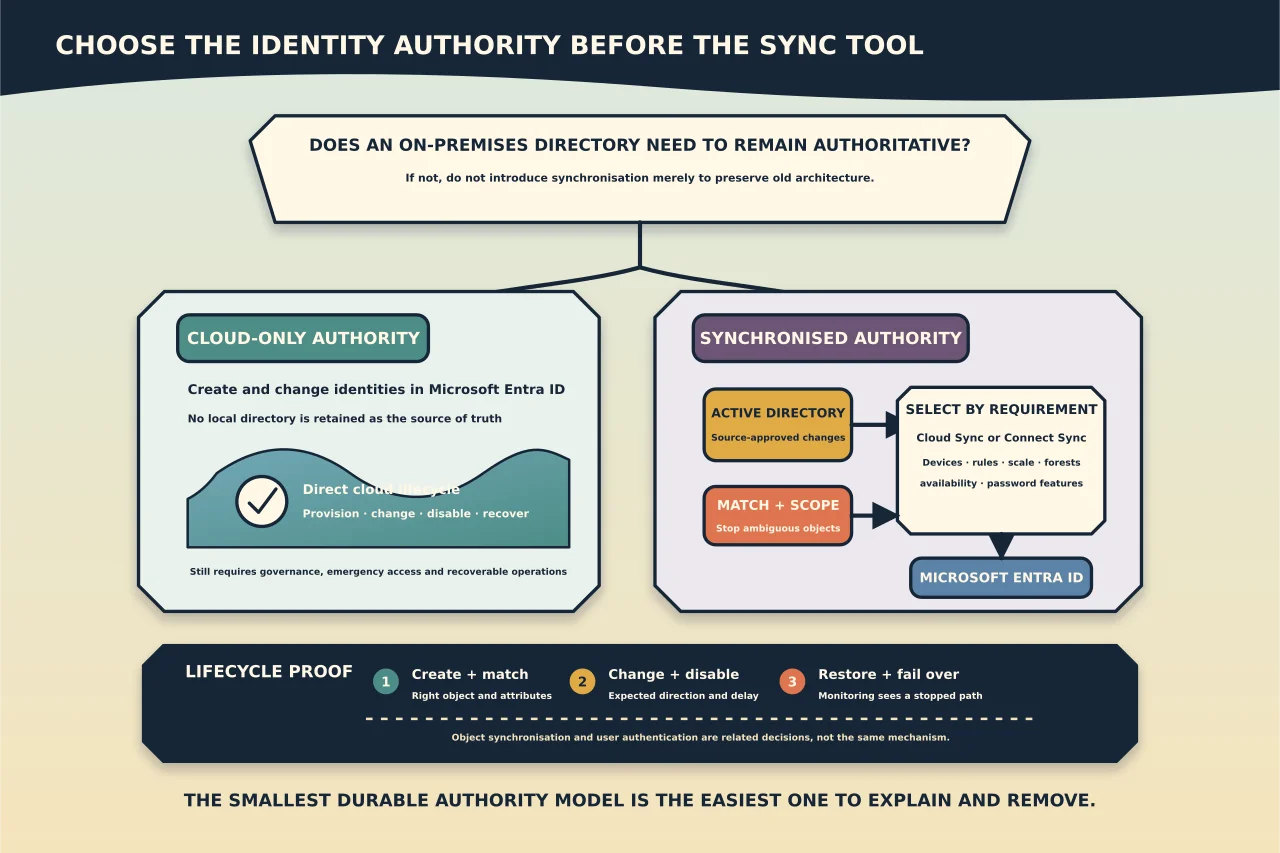
Directory synchronisation solves a specific problem: an organisation wants selected identities and attributes in an on-premises Active Directory to remain authoritative while those identities use Microsoft 365.
It is not a Microsoft 365 prerequisite. If there is no directory that must remain the source of truth, a cloud-only identity design is often simpler, easier to recover and less dependent on local infrastructure.
The right first question is therefore not “Cloud Sync or Connect Sync?” It is “Should we synchronise at all?”
Choose the source of authority first
For every identity population, decide where administrators should make each meaningful change:
- creation and deletion;
- sign-in name and primary email address;
- display name and contact attributes;
- group membership;
- password or authentication method; and
- account disablement and departure handling.
When an object is synchronised from Active Directory, many attributes must be corrected at the on-premises source and allowed to flow to Microsoft Entra ID. Trying to edit the cloud copy can fail, be overwritten, or create confusing split administration.
Document the answer in operational language: “Employees are created in Active Directory and synchronised; cloud-only contractor accounts are created in Microsoft Entra ID.” That is more useful than saying simply that the tenant is “hybrid.”
When cloud-only identity is the cleaner design
Cloud-only identity deserves serious consideration when:
- the organisation has no on-premises Active Directory;
- legacy directory-dependent systems are being retired;
- users and devices can be managed directly through cloud services;
- keeping local domain controllers alive would add complexity rather than continuity; or
- the population is new and does not need to inherit an old identity lifecycle.
Do not introduce synchronisation solely to preserve an architecture the organisation no longer needs. A sync engine creates dependencies on source-directory hygiene, network reachability, matching rules, agent health, monitoring and staff knowledge.
Cloud-only does not mean unmanaged. It still needs controlled provisioning, role separation, authentication policy, emergency access, lifecycle automation and recoverable administrative procedures.
Cloud Sync and Connect Sync are not interchangeable labels
Microsoft currently positions Entra Cloud Sync as the recommended direction for most supported synchronisation scenarios. Its lightweight agents and cloud-managed configuration can simplify multi-forest and high-availability designs.
Microsoft Entra Connect Sync remains necessary for some requirements that Cloud Sync does not currently support, including device synchronisation and certain advanced rules or large-scale scenarios. Product capabilities and documented limits change, so the live comparison—not an old blog table—must be part of the design record.
Choose from requirements:
| Requirement | What to establish before choosing |
|---|---|
| Devices must synchronise | Confirm the current supported device path; do not assume Cloud Sync parity. |
| Multiple or disconnected forests | Confirm agent placement, object uniqueness and failover behaviour. |
| Complex attribute transformation | List every required rule and test whether the chosen tool expresses it. |
| Large directory | Validate current object and throughput limits with growth headroom. |
| High availability | Define how another agent or server takes over and how that is tested. |
| Password integration | Choose the supported sign-in method and understand its outage behaviour. |
Avoid choosing a tool because it is newer, already installed, or familiar to one technician.
Inventory both sides before enabling sync
Export the authoritative properties of every in-scope on-premises identity and every relevant cloud object. Look for:
- duplicate user principal names or proxy addresses;
- unverified or inconsistent domains;
- cloud accounts that may match on-premises users;
- stale, disabled and shared accounts;
- mail contacts or groups that collide with planned recipients;
- invalid characters or malformed attributes;
- privileged cloud-only accounts that must never be matched; and
- users whose sign-in name and email address intentionally differ.
Matching is consequential. A convenient-looking match can connect the wrong cloud mailbox or identity to the wrong directory object. Define the match method, review ambiguous candidates and exclude emergency administrator accounts from synchronisation.
Scope narrowly before the first cycle
Do not begin with the whole directory. Use a dedicated pilot organisational unit or similarly controlled scope containing representative, non-critical test users. Include cases that exercise the real design: new identity, pre-existing cloud identity, changed attribute, password flow, disablement and restoration.
Keep default filtering and custom rules documented. A broad filter that silently expands when an administrator moves an organisational unit can provision or delete far more than intended.
Enable accidental-deletion protection and understand exactly what happens when its threshold is reached. A stopped export is a protective signal to investigate, not an obstacle to bypass automatically.
Decide the sign-in and password model separately
Directory object synchronisation and user authentication are related but distinct. Establish whether the design uses password hash synchronisation, pass-through authentication, federation or another supported route, and document:
- what users depend on during an internet or site outage;
- where password changes originate;
- how disabled accounts are handled;
- whether password writeback or self-service reset is required;
- which agents or servers are critical; and
- how emergency cloud-only administration remains available.
Do not let a requirement such as password writeback emerge after the tool has been selected. It can change licensing, permissions and architecture.
Validate the lifecycle, not just the first sync
A successful initial cycle proves very little. In the pilot scope, test:
- create a new user at the approved source;
- confirm the expected cloud object and attributes;
- change a safe attribute and measure propagation;
- test group or scope behaviour;
- disable the source account and verify the cloud effect;
- restore it through the documented path;
- simulate agent or sync-server unavailability; and
- confirm monitoring detects stalled or failing synchronisation.
Review both connector or agent health and the resulting cloud objects. Record expected delays so that administrators do not “fix” normal propagation by creating duplicate accounts.
Migrating from Connect Sync to Cloud Sync
Treat a tool migration as a source-of-authority change, not a software upgrade. Microsoft’s decision guidance includes staged approaches for assessing requirements and moving scope.
Before migration:
- inventory every enabled feature and custom rule;
- identify unsupported dependencies;
- establish object matching and scoping equivalence;
- deploy and validate the required agents;
- define which engine owns each population during staging;
- prevent simultaneous conflicting exports; and
- document rollback and stop conditions.
The goal is not merely that users can still sign in. Attribute ownership, new-object provisioning, deletions, password behaviour and monitoring must all remain correct.
Operational ownership after go-live
A durable design names who will:
- monitor synchronisation health and alerts;
- approve scope or rule changes;
- repair source attributes;
- maintain agents or the Connect server;
- review accidental-deletion events;
- test failover and recovery;
- recheck Microsoft support and feature changes; and
- retire synchronisation when the on-premises source is no longer needed.
The best synchronisation architecture is the smallest one that preserves a genuinely required authority boundary—and one the organisation can explain, monitor and eventually remove.