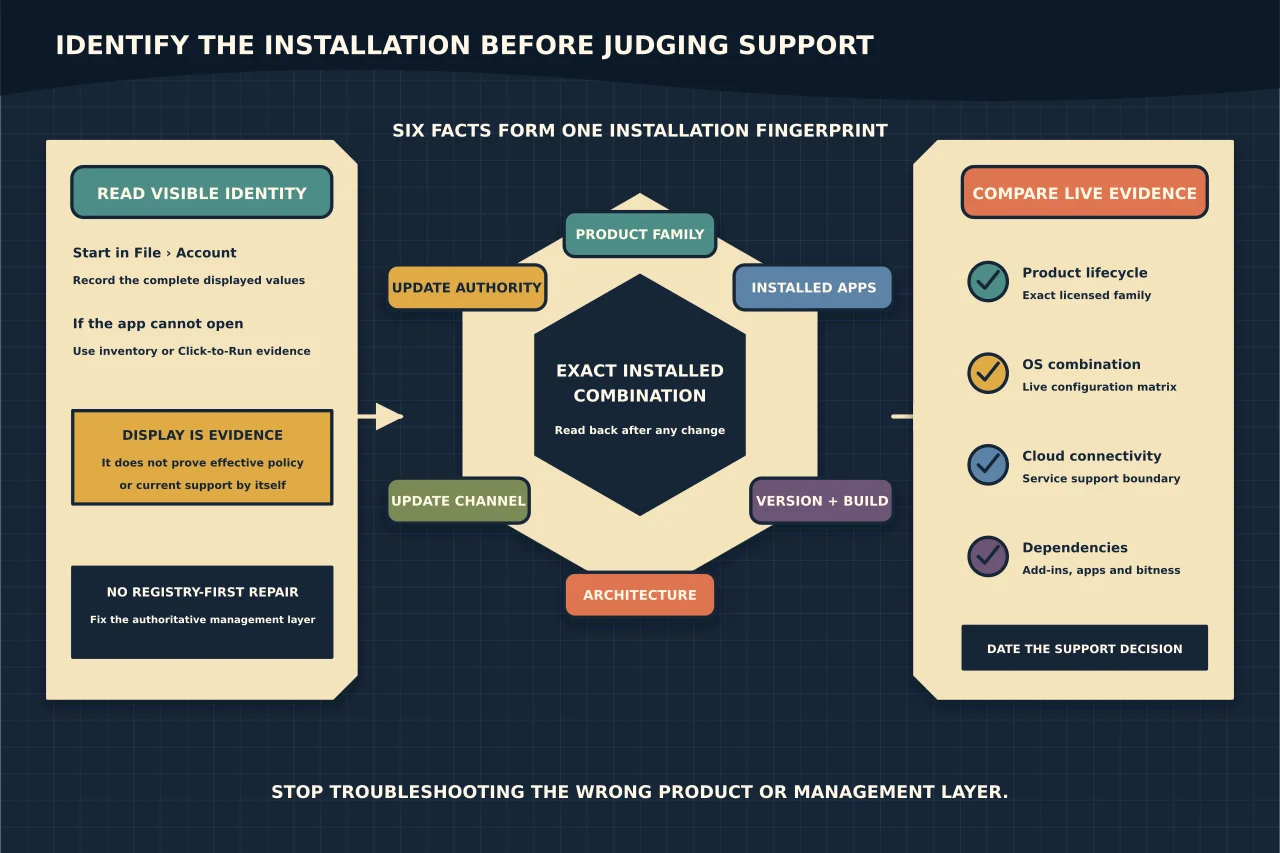
“Office 365 is installed” is not enough information to diagnose an update, compatibility or support problem.
You need six separate facts:
- product and licence family;
- installed applications;
- version and build;
- 32-bit or 64-bit architecture;
- update channel; and
- which management system controls updates.
Two PCs can both show Microsoft Word and still receive different features, builds and support outcomes.
Read the user-visible identity first
Open an Office desktop application such as Word or Excel and go to File > Account. In Product Information and About, record the displayed product name, version, build, update channel and bitness.
Take the values as evidence, not the whole diagnosis. The product name may distinguish subscription Microsoft 365 Apps from a perpetual release such as Office LTSC. The channel explains the intended servicing stream. The build identifies what is actually installed now.
If the application cannot open, inventory tooling or the Click-to-Run configuration can provide evidence, but do not begin by editing configuration values.
Keep product, version, build and channel separate
- Product describes the licensed family and edition.
- Version is the feature-version identifier used by Microsoft 365 Apps.
- Build identifies a particular compiled release and patch level.
- Architecture is 32-bit or 64-bit.
- Channel controls the release cadence and supported-build window for subscription Apps.
“Version 16” is especially unhelpful on its own because many modern Office generations share internal 16.x versioning. Record the complete UI value.
Identify the effective update authority
The channel requested in an old installation XML may not be the channel controlling the device today. Microsoft 365 Apps can be managed through Cloud Update, policy, Intune, Configuration Manager, the Office Deployment Tool or unmanaged Click-to-Run settings.
Policy has precedence over some local settings. A channel-change instruction can therefore complete without changing effective behaviour. Microsoft also notes that the displayed channel updates only after the assignment is processed and a build from the new channel installs.
Ask:
- Is the device present in the Microsoft 365 Apps inventory or Cloud Update?
- Is Intune or Configuration Manager managing Apps updates?
- Is an Office update policy applied?
- Is the Office Automatic Updates scheduled task enabled where the chosen method requires it?
- Does the effective update path point to the Microsoft CDN or an organisation-managed source?
Do not force a registry value merely to make the screen match the desired answer. Fix the authoritative management layer.
Compare with the live channel history
Microsoft’s update-history page shows current and supported builds for each channel. Match the installed channel, version and build to that live record.
Do not use an undated screenshot or a build number copied from another machine. Channels intentionally progress at different times. A build that is current for one channel may be wrong for another.
If the device is behind, establish whether:
- an update is available but not yet applied;
- the device has missed the supported window;
- policy points at an unavailable source;
- the update task or service is disabled;
- disk, network or security controls are blocking the update; or
- the device is assigned to a staged rollout that has not reached it.
Determine support at three levels
Product lifecycle
Microsoft 365 Apps follows Microsoft’s Modern Lifecycle Policy and requires a current supported configuration. Perpetual Office releases have fixed support dates. Read the live lifecycle page for the exact product; do not infer a date from its marketing name.
Operating-system combination
The Office and Windows configuration matrix shows whether the installed Office family is supported on the operating system. A product can still launch on an unsupported operating system without being a supported combination.
Microsoft 365 service connectivity
Perpetual Office support and support for connecting that release to Microsoft 365 cloud services are not always the same boundary. If Exchange Online, SharePoint Online or OneDrive connectivity matters, check the current connectivity requirement as well as the desktop product lifecycle.
Check architecture and application dependencies
64-bit is not automatically better for every existing environment, and 32-bit is not automatically obsolete. Consider large Excel models, legacy COM add-ins, Access components, line-of-business integrations and automation that depends on a particular architecture.
Record installed Visio, Project, language packs, proofing tools, classic Outlook and new Outlook separately. They may have distinct installation or support implications.
Produce an evidence record
A useful inventory row looks like this:
| Field | Example |
|---|---|
| Device | Managed asset identifier |
| Product | Microsoft 365 Apps for enterprise |
| Version/build | Complete value from File > Account |
| Architecture | 64-bit |
| Intended channel | Monthly Enterprise Channel |
| Effective channel | Confirmed after update/read-back |
| Update authority | Cloud Update policy name |
| OS | Edition, version and build |
| Support result | Supported / action required, with dated source |
| Exceptions | Add-in or application dependency |
Avoid collecting user identities or licence tokens when they are not needed for the decision.
Act on the cause, then read back
If the problem is a stale build, repair update delivery. If it is the wrong channel, change the authoritative assignment. If the product or operating-system combination is out of support, plan a tested upgrade. If a legacy add-in blocks the supported target, treat that as an application-remediation project—not a reason to leave an unrecorded exception indefinitely.
After the change, reopen an app and confirm product, version, build, channel and architecture. Then test a representative document, add-in and sign-in workflow.
The point of identification is not to collect trivia. It is to stop troubleshooting the wrong product and to make the support decision reproducible.