Small businesses often inherit infrastructure one purchase at a time: a server in a cupboard, a UPS added after an outage, an old switch kept because “it still works”, and laptops replaced only when someone cannot start work.
The problem is not simply old hardware. It is unknown business dependency and unmanaged transition risk.
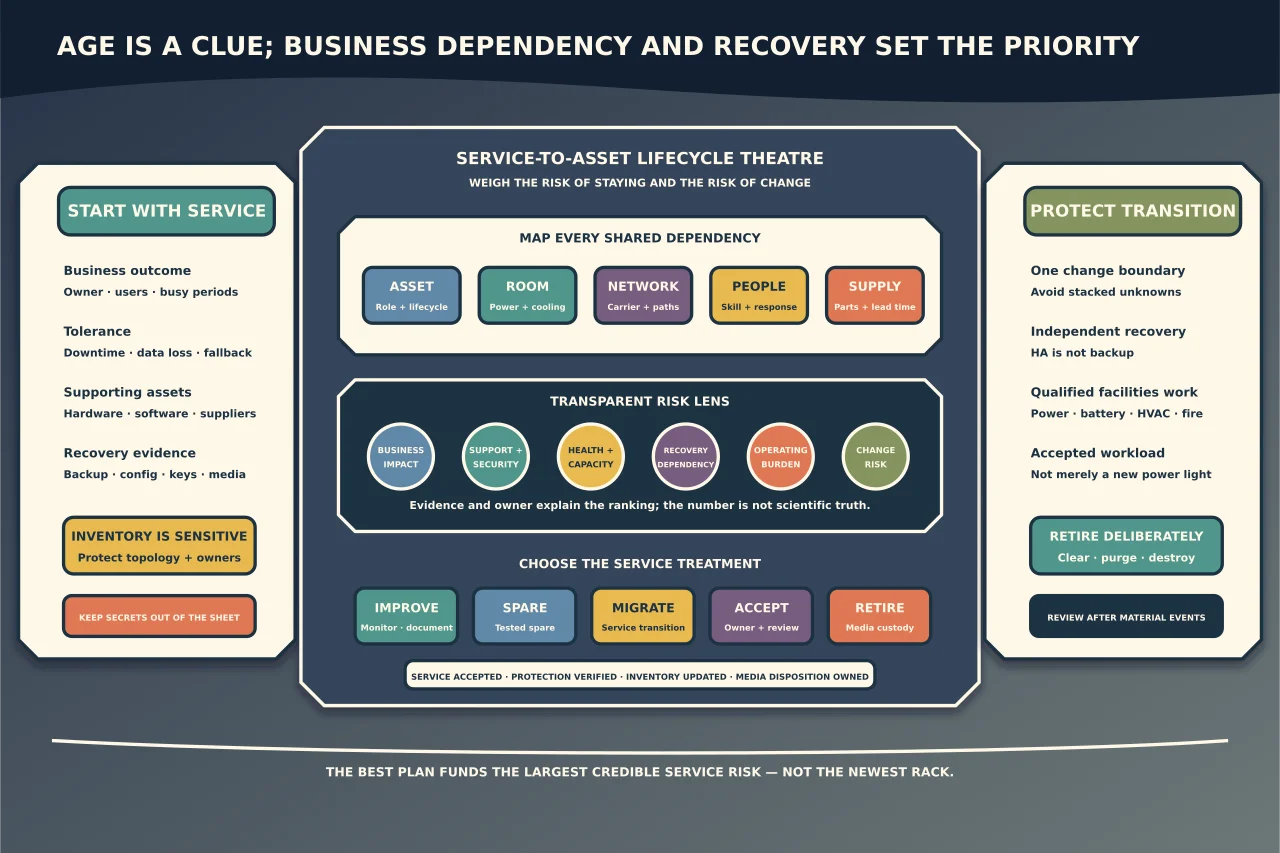
A useful lifecycle plan answers five questions: what service does each asset support, what happens when it fails, how is it protected and recovered, when does risk justify change, and how will the change be completed without losing the service or its data?
Inventory services before shopping for hardware
Begin with business outcomes:
- identity and access;
- internet and remote connectivity;
- line-of-business applications and databases;
- file, print and collaboration;
- voice and customer channels;
- backup and recovery;
- physical access, monitoring or other site systems; and
- user endpoints and specialist devices.
For each service, identify the owner, users, acceptable downtime/data loss, busiest periods, external dependencies and manual fallback. Then link every supporting asset and configuration.
NIST CSF 2.0 explicitly treats hardware, software, systems, services, suppliers and data as assets to identify and manage according to business importance. A serial-number list without those relationships cannot prioritise investment.
Create an asset record that supports decisions
For each item, capture only what the organisation needs and protect the inventory because it reveals valuable topology:
- asset ID, type, manufacturer/model and serial;
- physical/logical location and accountable owner;
- service role and business criticality;
- purchase, lease, warranty and support dates;
- firmware/OS/hypervisor/application versions;
- CPU, memory, storage, interface and expansion configuration;
- storage-media identity and data classification;
- power feeds, UPS/cooling/network dependencies;
- cluster/redundancy/failover relationships;
- backup scope and last accepted recovery evidence;
- monitoring/management coverage;
- health, fault and repair history;
- licensing/subscription/support dependencies;
- replacement lead time and compatible spares; and
- approved lifecycle state: active, constrained, transition, spare, archive or retired.
Keep credentials, recovery keys and detailed access instructions in an appropriate secret system, not the asset spreadsheet.
Age is a clue, not a verdict
Do not replace a reliable supported device solely because it passed a generic birthday. Do not retain it solely because its power light is on.
Assess several dimensions:
Supportability
Can the firmware, operating system and critical software receive security and reliability fixes? Is the deployed version supported in this exact combination? Can the vendor or maintainer supply parts and expertise within the required recovery time?
Health and failure evidence
Review hardware-management alerts, storage health, corrected/uncorrected errors, battery tests, thermal events, unexpected resets, interface errors and repair history. One warning may be a sensor issue; repeated correlated faults deserve action.
Capacity and performance
Use business workload evidence, not headline specifications. Look at sustained and peak CPU, memory pressure, storage capacity/latency, network use, backup windows and growth. A service can be slow because of software or storage even when the server has spare CPU.
Resilience and recoverability
Redundant components reduce some hardware failures. They do not replace independent backups, known configuration, current credentials/keys, installation media or a proved restore. A newer server with untested backups can be a worse business risk than an older recoverable one.
Operational burden
Count specialist knowledge, out-of-hours care, manual checks, energy, spares, contracts, firmware complexity and time to recover. A cheap device that only one departed technician understands is not cheap.
Change risk
Replacement can introduce compatibility, downtime, licensing and data-migration risk. Score both the risk of staying and the risk of transition.
Map the room as a service dependency
The room or enclosure is part of every hosted service. Record:
- controlled physical access and visitor/maintenance handling;
- rack/enclosure and cable identification;
- utility feeds, distribution, UPS and generator dependencies;
- cooling/airflow and environmental monitoring;
- water, dust, vibration and location hazards;
- fire detection/suppression arrangements;
- network/carrier entry and redundant paths;
- lighting and safe maintenance access; and
- alert routing and response ownership after hours.
This inventory is not an engineering approval. Qualified electrical, HVAC, fire, structural and safety specialists must assess and maintain those systems under manufacturer requirements, insurer conditions and local codes. Never improvise mains distribution, battery work or fire suppression from an online checklist.
Separate high availability from recoverability
Ask what happens when each shared dependency fails:
- one disk, power supply, fan or network port;
- one host or switch;
- the storage array or hypervisor cluster;
- the UPS, cooling, room, building or carrier;
- administrator credentials or encryption keys; and
- a cyber incident that affects all online systems.
Mirroring and failover may preserve service through a component fault, but they can also reproduce deletion, corruption or compromise. Backups need sufficient separation, protected administration, retention and recovery evidence.
Where a single room hosts primary and “backup” copies, document that shared failure. The honest plan may accept it for a low-impact service, but it should not be labelled site-resilient.
Prioritise with a transparent risk score
Use a simple decision table rather than a vendor-driven refresh cycle:
| Factor | Low concern | High concern |
|---|---|---|
| Business impact | Convenient/non-critical | Safety, revenue, legal or business-stopping |
| Support/security | Supported and maintained | Unsupported/unpatchable combination |
| Health | Stable, monitored | Repeated/degrading faults |
| Capacity | Forecast headroom | Limits affect service or recovery |
| Recovery | Current accepted recovery evidence | Unknown, slow or impossible restore |
| Dependency | Spare/failover available | Unique part/skill/single point |
| Transition | Routine, rehearsed | Complex migration/compatibility risk |
Record evidence and owner rather than pretending the numbers are scientifically precise. The ranking should explain why one service comes first.
Typical actions are not limited to “buy a replacement”:
- improve monitoring or documentation;
- establish a compatible cold/warm spare;
- repair a known component;
- upgrade supported firmware/software;
- add backup/recovery capability;
- remove a single dependency;
- move the service to supported hosted infrastructure;
- migrate/re-platform the workload; or
- accept the risk for a defined period with a trigger date.
Define a replacement as a service transition
For each approved change, document:
- business outcome and acceptance owner;
- current and target architecture;
- workload/data/configuration inventory;
- compatibility and licensing evidence;
- capacity and growth assumptions;
- network, identity, DNS, certificate and integration changes;
- backups and independent recovery point;
- trial/rehearsal evidence;
- cutover, outage and communication plan;
- validation of application and protection workflows;
- rollback boundary and point of no return; and
- old-asset retention/sanitisation decision.
Avoid upgrading firmware, hypervisor, storage layout and application at the same moment unless that combination is the only supported route and has been rehearsed. Fewer simultaneous variables make failures diagnosable.
Stock spares by recovery need
A cupboard of random retired equipment is not a spares strategy. For each failure class, decide whether recovery relies on:
- redundant installed components;
- a tested compatible spare;
- vendor on-site replacement;
- supplier stock/lead time;
- workload failover or restore to alternate hardware; or
- an agreed manual business workaround.
Track spare firmware compatibility, battery/storage condition and test cadence. A ten-year-old unpowered spare with unknown data is both uncertain recovery and an information risk.
Retire hardware as carefully as you deploy it
Before equipment leaves service:
- confirm the workload and data have moved and are accepted;
- remove it from monitoring, backup, licensing and identity systems deliberately;
- capture required configuration/history without retaining unnecessary secrets;
- identify every storage medium, including removable/embedded flash and failed drives;
- choose an approved clear, purge or destroy method based on data sensitivity, media technology and disposition;
- record chain of custody, method, result and exception; and
- update the inventory and service map.
NIST SP 800-88 Rev. 2 treats media sanitisation as a lifecycle activity, including repair, return, reuse and disposal. A failed device can still contain recoverable data. Do not send it to a vendor or recycler without the accountable disposition decision.
Recycling and disposal must follow local environmental and hazardous-material requirements. Batteries require appropriate handling; do not dismantle packs or improvise storage.
Review the plan on events, not only annually
Update it after:
- a new service, site or acquisition;
- significant workload/data growth;
- end-of-support announcements;
- repeated faults or near misses;
- a failed recovery exercise;
- supplier/contract changes;
- room, power or cooling changes; and
- an incident or major migration.
A regular review date remains useful, but the event triggers prevent a plan from staying neat while reality moves on.
The best hardware lifecycle plan is not the one with the newest rack. It is the one that makes business dependencies visible, funds the largest credible risks first, preserves recovery throughout each transition and disposes of old equipment without disposing of accountability.