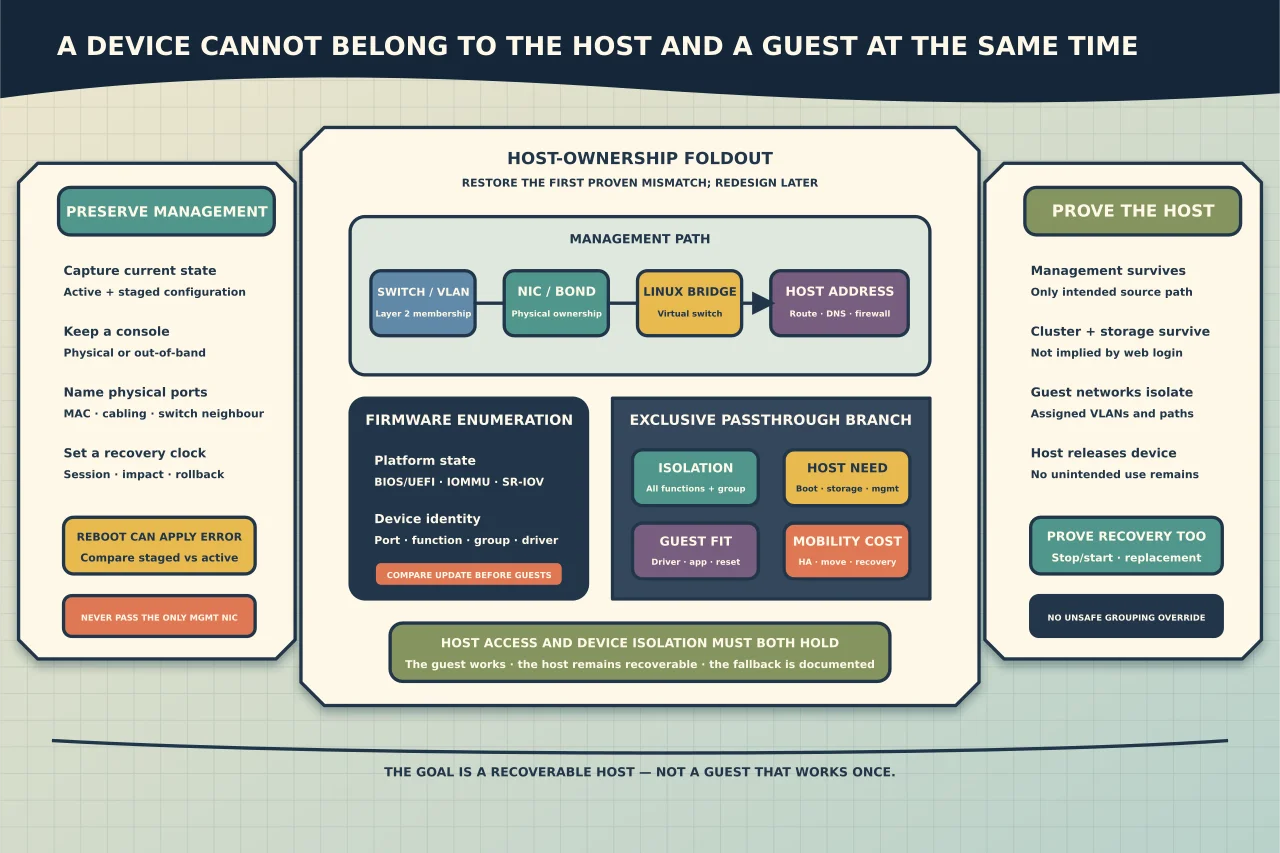
Three changes that look unrelated can produce the same Proxmox symptom:
- a bridge or VLAN change cuts off host management;
- a firmware or kernel update changes how a network or PCI device appears; or
- passthrough removes a device from the host and gives it exclusively to a guest.
The fix is not to paste a new interfaces file or add every IOMMU option found online. First reconstruct ownership: which device belongs to the host, which bridge carries management, which networks guests should reach, and which recovery route remains if the change is wrong.
Map the four networking layers
Physical interface
This is the host’s actual NIC or port. Predictable Linux names often encode hardware location, which means a BIOS, PCIe, driver or kernel change can affect enumeration. Match ports by MAC address, switch neighbour and physical cabling rather than relying on a remembered name alone.
Bond
A bond combines interfaces for redundancy or capacity according to a defined mode. Some modes require matching switch configuration. Two cables in a bond do not provide redundancy when they connect to the same failed component or when the switch-side aggregation is wrong.
Linux bridge
A Proxmox bridge acts like a virtual switch. The host can have an address on it, and guest virtual NICs can connect to it. A bridge with no intended uplink can provide an isolated network; a bridge tied to a physical interface can extend a guest onto the external network.
VLAN and Layer 3 configuration
VLAN tagging decides which Layer 2 network a frame belongs to. Addresses, gateways and routes operate above that. A correct bridge can still carry the wrong VLAN, and a valid address can still have an incorrect gateway or policy path.
Draw the intended path:
management client -> switch/VLAN -> physical NIC/bond -> Linux bridge -> host address
For a guest, extend it:
... -> Linux bridge -> guest virtual NIC/VLAN -> guest address and gateway
Preserve the working state
Before changing anything, capture:
- Proxmox VE, kernel and package versions;
- physical NIC names, MAC addresses, driver/firmware and link state;
- switch ports, VLANs and bond/aggregation design;
- active and staged network configuration;
- bridges, ports, VLAN awareness and host addresses/routes;
- VM/container adapters and assigned tags;
- management, cluster, storage and migration networks;
- BIOS/UEFI, Secure Boot, IOMMU and SR-IOV state;
- PCI devices, drivers and IOMMU grouping; and
- a tested local, IPMI/iKVM or other out-of-band console.
Do not put this raw inventory in a public forum post. It can disclose topology, management addresses and hardware identity.
Diagnose lost management without random resets
Confirm the node is alive locally
Use the console to establish whether the host booted, storage is available and the management services are running. A dead web interface is not proof that the node or guests are down.
Identify the effective interface names
Compare current devices and MAC addresses with the saved design. If a name changed, update the mapping deliberately. Do not rename every interface until you know which physical port carries management, storage or a bond member.
Compare active and staged configuration
Proxmox can stage changes before applying them. Determine which configuration is currently active and what would take effect on an apply or reboot. A reboot can commit a pending mistake as efficiently as a fix.
Check the management path in order
Verify link, switch port, bond state, bridge membership, VLAN, host address/prefix, route/gateway, name resolution and firewall path. Use the console while testing from one authorised management source.
Restore the smallest known-good path
Correct the first proven mismatch. Avoid redesigning bonds, VLANs and management addressing during outage recovery. Once access is stable and documented, schedule any improvement separately.
Apply network changes with a recovery clock
Use Proxmox’s supported GUI/staging and current ifupdown2 workflow for the installed version. Review the diff and keep the console open. State in advance:
- which session should remain reachable;
- which guests or cluster/storage paths may briefly interrupt;
- how long you will wait before declaring failure; and
- which saved configuration restores the prior state.
Do not use traditional interface-down commands casually on a live bridge. The official Proxmox network guidance warns that they can interrupt guest traffic without reconnecting it as expected.
After application, verify the host management path, cluster communication where applicable, storage access and representative guest networks. A successful web login does not prove guest VLAN isolation or storage reachability.
Treat firmware as part of the host configuration
BIOS/UEFI, CPU microcode and device firmware affect virtualisation, IOMMU, NIC enumeration, storage and device-reset behaviour. Proxmox recommends regular software and firmware maintenance, but the vendor’s release notes and method govern the actual hardware.
Before firmware work:
- record every relevant setting rather than relying on “defaults”;
- back up the host and guest configuration required for recovery;
- confirm current guest backups and migration/shutdown plan;
- review known dependencies for storage, boot mode, Secure Boot, IOMMU and SR-IOV;
- obtain the supported rollback/recovery method; and
- keep console access available after reboot.
Afterward, compare settings and device enumeration before starting every guest. Firmware updates can reset settings; a device visible under a new identifier or group can invalidate network and passthrough assumptions.
Decide whether passthrough is the right architecture
PCI(e) passthrough gives a VM direct use of a physical device. It can be appropriate for a workload that needs a GPU, specialised controller, accelerator or network function the virtual device model cannot provide.
It also changes the operational contract:
- the host must reserve and isolate the device;
- the VM becomes tied to compatible hardware or a mapped equivalent;
- live migration and high availability may be reduced or unavailable;
- backup does not capture the physical device or its external state;
- host and guest drivers/firmware become coupled;
- device reset after guest stop/restart may be unreliable; and
- a large IOMMU group can make safe isolation impossible.
If the workload’s recovery objective requires easy movement to different hardware, virtualised devices or a network-attached service may be a better design.
Verify passthrough prerequisites as a chain
Platform and firmware
Confirm that the CPU, chipset, mainboard firmware and Proxmox kernel support the intended IOMMU path. Enable only the documented settings for the actual platform.
Device isolation
Inspect IOMMU grouping and every function of a multi-function device. Do not override unsafe grouping merely to make the GUI accept the device. Passing one function while the host or another guest controls a tightly coupled function can break isolation or reliability.
Host ownership
Confirm which driver currently owns the device and that the host does not need it for boot, storage, management, console or another guest. Record how host ownership will be restored.
Guest compatibility
Check guest OS, firmware/VM machine type, driver, licensing and vendor support. “Linux sees the PCI ID” is not proof that the application can use the device safely.
Recovery and mobility
Document what happens if the host, card or slot fails. Identify a compatible replacement, cold-migration path or service fallback. A passthrough workload without a replacement plan has accepted a single-node dependency whether or not the cluster is highly available.
Introduce the device in stages
- Prove the host remains stable with IOMMU enabled before assigning hardware.
- Select the exact device and all required functions from the saved inventory.
- Keep management and host storage on separate devices.
- Attach the device to one powered-off, authorised test or maintenance instance.
- Start the guest and inspect host/kernel and guest evidence.
- Exercise normal use, guest restart, guest shutdown/start and host maintenance behaviour.
- Confirm monitoring, backup and documented fallback still work.
Do not test production resilience by unexpectedly rebooting a host. Use scheduled, owner-approved maintenance and the article’s source-based validation boundary for planning.
Verify both access and isolation
After any network or passthrough change, confirm:
- the host is reachable only through the intended management path;
- cluster and storage networks remain healthy;
- each representative guest reaches only its assigned network/VLAN;
- an isolated/guest network cannot reach host management unless designed;
- the passed device is absent from unintended host use;
- the intended guest and application can use it;
- stop/start and recovery behaviour match the documented limits; and
- configuration, monitoring and recovery records are current.
The aim is a host you can still recover, not merely a guest that benchmarks well once.