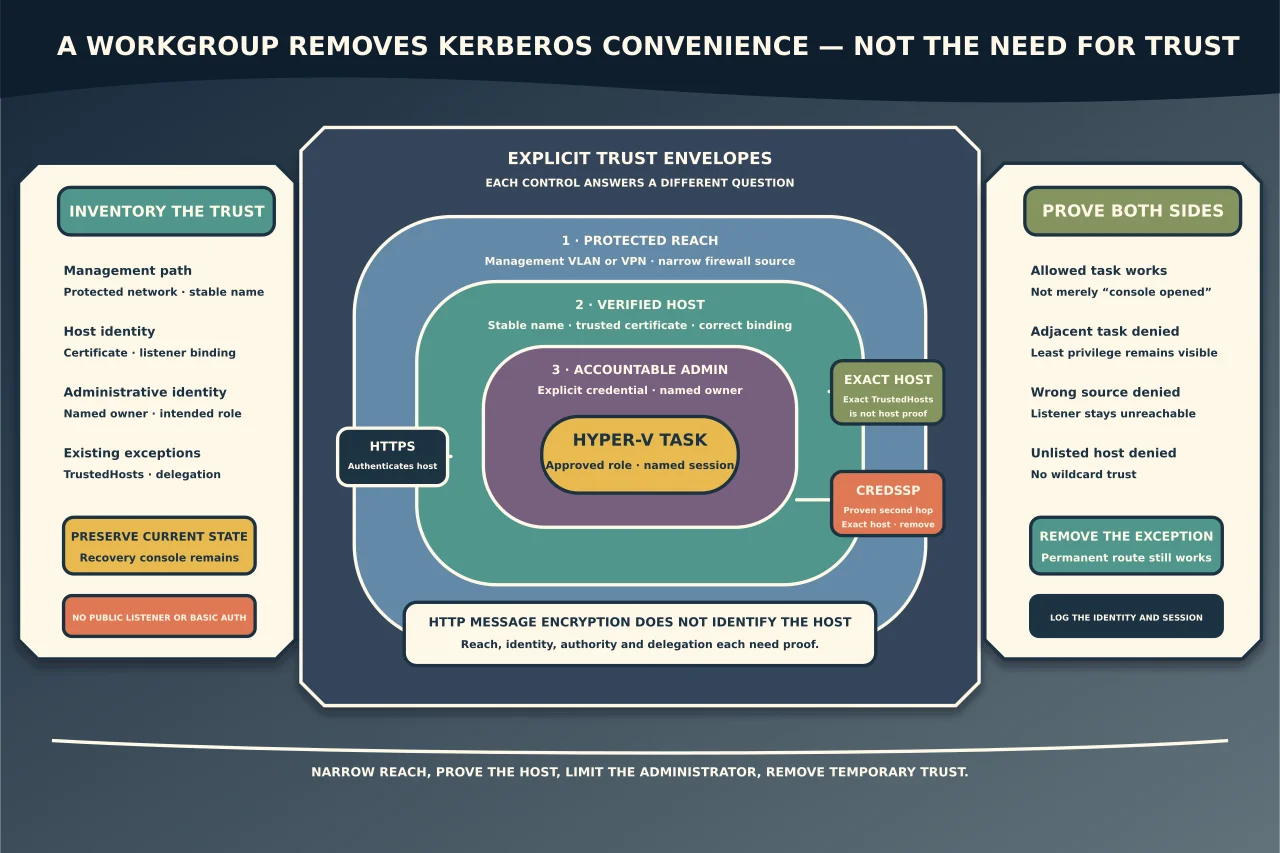
Remote Hyper-V management is easiest when the management computer and host share a working domain trust: Kerberos can provide mutual authentication without asking you to maintain a separate list of trusted targets. A workgroup removes that convenience. It does not remove the need to authenticate the host, protect the session and limit who can administer it.
The question is not “which command makes Hyper-V Manager connect?” It is “what trust replaces Kerberos, where are credentials exposed, and which network can reach the management service?”
Understand the parts before configuring them
Hyper-V authorisation
The account used on the host needs the intended administrative rights. Membership in Hyper-V Administrators can be more appropriate than full local Administrators for people who only manage VMs and switches, although the exact task may still require additional privileges.
WinRM and PowerShell remoting
WinRM is used by PowerShell remoting and parts of remote administration. After authentication, PowerShell remoting messages are encrypted even when the WinRM transport is HTTP. That does not make every HTTP/workgroup design equally trustworthy: the client still needs confidence that it reached the intended host, and the firewall still determines who can attempt authentication.
HTTPS transport
WinRM over HTTPS adds TLS server authentication and transport protection when the client trusts a suitable certificate whose name matches the host. A self-signed or mismatched certificate that users simply ignore does not solve the identity problem.
TrustedHosts
TrustedHosts tells the WinRM client which non-Kerberos destinations it is willing to send credentials or negotiate with. It is not proof that the destination is genuine. Microsoft explicitly warns that a computer in TrustedHosts might not be authenticated.
TrustedHosts * turns a narrow exception into trust of any destination name presented to the client. Do not use it.
CredSSP
CredSSP delegates credentials to a remote computer so that it can use them during the session. Microsoft’s workgroup Hyper-V Manager procedure may require it, particularly for operations that encounter a second-hop credential problem. Delegation increases the consequence of a compromised host. Scope it to the exact host, enable it only where the supported workflow requires it, and remove it when the dependency ends.
Prefer one of these management designs
1. Join an appropriate trust boundary
For an organisation with identity infrastructure, putting the host and management workstation in the intended domain or trusted administrative architecture normally provides the clearest identity, policy and audit model. Do not join a domain during an incident without understanding host ownership and restart impact.
2. Use a protected management network with WinRM HTTPS
For a legitimate standalone/workgroup host, use a stable DNS name, a trusted server-authentication certificate, a restricted management VLAN or VPN, narrow source firewall scope and explicit named credentials. This is usually easier to reason about than trusting an unauthenticated target over a broad network.
3. Use a deliberately scoped Microsoft workgroup path
Where Hyper-V Manager’s supported workgroup procedure requires TrustedHosts and CredSSP, bind both to the exact fully qualified host name, use a protected network, restrict the firewall, and document the credential-delegation decision. Treat it as an exception with an owner and review date—not a workstation-wide convenience setting.
4. Use an administered management gateway
Windows Admin Center or another approved management plane can centralise access, auditing and role assignment. It becomes a privileged system and must itself have protected identity, updates, certificates, network placement, backup and ownership. A gateway is not safer just because it has a web interface.
Keep a local console or out-of-band route for recovery whichever design you choose.
Gather the facts first
Record:
- host Windows Server and Hyper-V versions;
- management-client version and supported compatibility;
- domain, workgroup or Entra-only identity state;
- stable host name and DNS resolution from the management network;
- current network profile, listener and firewall scope;
- existing HTTPS certificate name, issuer, validity and trust chain;
- current TrustedHosts value on the management computer;
- current CredSSP client/server and delegation-policy state;
- administrative group membership and account owner;
- network path/VPN and source addresses; and
- recovery route if the remote path is lost.
Preserve existing values before running a command that replaces a list. Some TrustedHosts examples overwrite rather than append to the current setting.
Build the trust chain in order
Establish protected reachability
Put the host on the intended management network or behind the approved VPN. Confirm name resolution to the expected address. Do not open management from every network to compensate for uncertain routing.
Establish the host’s identity
Prefer a stable fully qualified name. For HTTPS, obtain a server-authentication certificate through the organisation’s approved authority, with the required name, trust chain, validity and private-key protection. Verify that the listener uses the intended certificate rather than simply confirming that a listener exists.
Enable only the required management service
Use the current Microsoft procedure for the host version. Review what enabling remoting changes: service state, listener and firewall rules. Constrain the rule to the management network or specific administrative sources. A public network profile is a warning to revisit placement, not an invitation to allow the world.
Create an accountable administrative identity
Use a named account with a strong unique password stored in the approved credential system. Do not share the built-in Administrator password between hosts. Grant only the group membership required for the management tasks.
Add exceptions narrowly
If TrustedHosts is required, add the exact host rather than a wildcard, preserving existing authorised entries. If CredSSP is required for Hyper-V Manager, delegate only to the exact service/host described by the supported procedure and document why.
Do not enable Basic authentication or AllowUnencrypted to make an error disappear.
Diagnose failures without widening the boundary
The host cannot be reached
Check the protected route, name resolution, address, network profile, listener and source-scoped firewall rule. A ping failure does not prove WinRM is down, and a successful ping does not prove authentication.
The client reports access denied
Confirm which identity was actually presented, whether an explicit credential is required, and which local groups or endpoint permissions apply. Workgroup local accounts with identical names are not automatically the same identity.
The client reports a trust or authentication error
Determine whether the connection used a name or IP address, which authentication method was negotiated, whether HTTPS was used, and whether the certificate and host name match. Do not respond by setting TrustedHosts to *.
Hyper-V Manager connects but an operation fails
Separate base WinRM/management connectivity from credential delegation and authorisation. A second-hop operation may be the first one that requires delegated credentials. Prove that dependency before enabling CredSSP.
HTTPS fails certificate validation
Correct the name, certificate purpose, validity, trust chain or listener binding. Suppressing validation defeats the reason for choosing HTTPS.
Verify the design, including the denials
From the authorised management computer, confirm:
- the name resolves to the intended host;
- the certificate identifies that host and chains to a trusted authority;
- the intended account can perform its approved Hyper-V tasks;
- a non-administrative account cannot change VM or switch state;
- an unauthorised source network cannot reach the management listener;
- an unlisted workgroup host is not silently trusted;
- CredSSP and delegation are absent unless explicitly required; and
- local/out-of-band recovery remains available.
Then inspect logs for the management session and ensure the identity is attributable. “Hyper-V Manager opened” does not prove least privilege, source restriction or safe delegation.
Remove temporary trust
After recovery or migration, remove obsolete TrustedHosts entries, CredSSP roles and delegation policy; close temporary firewall scope; revoke unused certificates/accounts; and update the management record. Confirm the intended permanent route still works before removing the recovery path.
Workgroup Hyper-V management can be made defensible, but it requires more explicit decisions than domain management. Protect the path, authenticate the host, narrow trust and delegation, use accountable credentials, and keep the host’s management plane off the public internet.