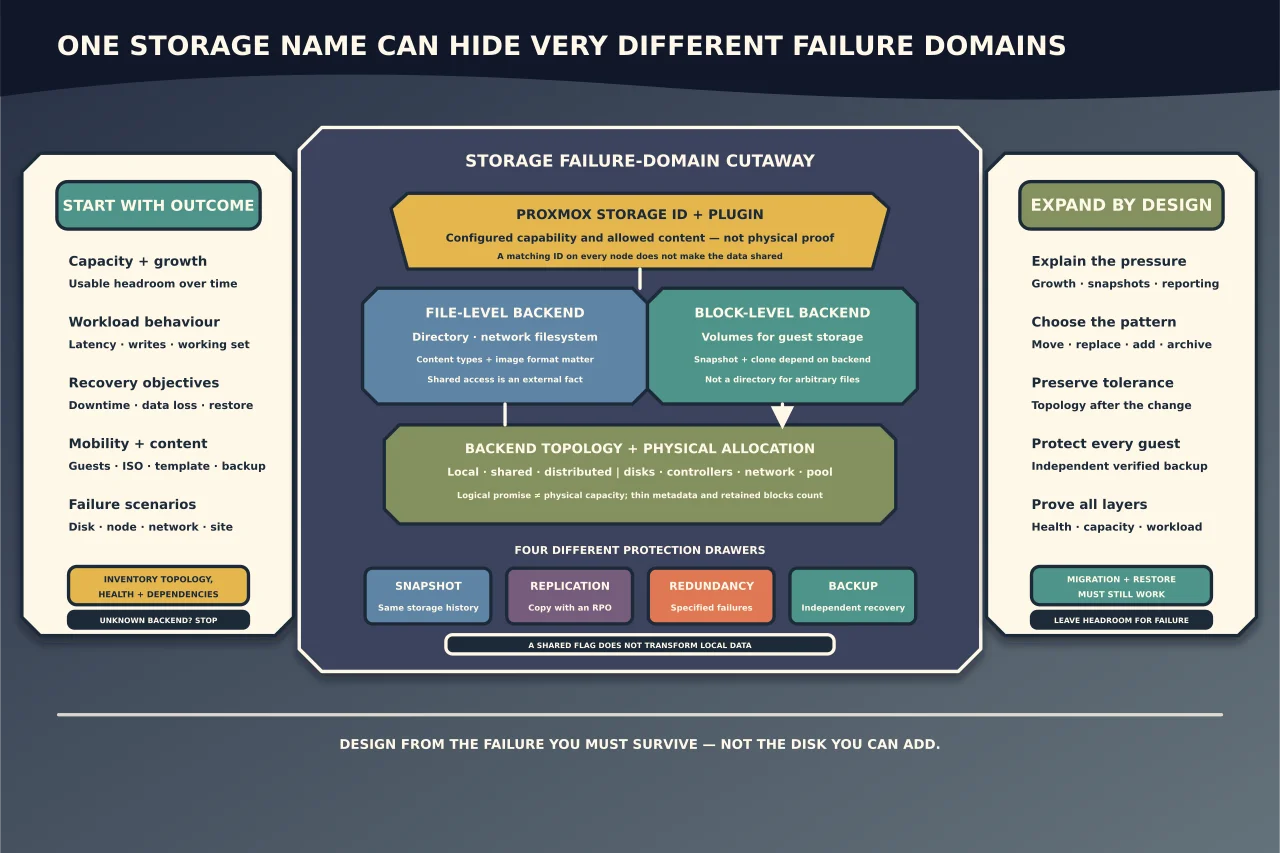
Proxmox VE can present many storage technologies through one interface. That convenience can hide important differences.
A storage can be local or shared, file or block, thick or thin, snapshot-capable or not, redundant or not, and suitable for VM disks but not backups. Two entries with similar names may offer completely different recovery behaviour.
Design from the workload and failure you need to survive—not from the disks that happen to be available.
Start with the required outcomes
For each workload, define:
- usable capacity and expected growth;
- working-set performance, latency and write pattern;
- acceptable downtime and data loss;
- single-host, cluster or live-migration needs;
- snapshot and clone requirements;
- backup frequency, retention and restore target;
- encryption and data-location obligations;
- hardware and administrative support; and
- what happens when a disk, controller, node, network or site fails.
“Fast and redundant” is not specific enough. A mirror can survive one class of disk failure while remaining vulnerable to deletion, corruption, controller failure, theft and fire.
Understand Proxmox’s storage model
Proxmox uses storage plugins to expose a common set of operations, but each backend advertises its own capabilities.
File-level storage
Directory, NFS and similar backends expose a filesystem. They can often store several content types—VM images, container templates, ISO images, snippets and backups—depending on the plugin configuration. VM image format can influence snapshot and clone behaviour.
Block-level storage
LVM, LVM-thin, ZFS volumes, Ceph RBD and similar backends expose block devices for guest disks or container volumes. The storage layer supplies features such as snapshots or thin allocation where supported. Block storage generally does not act like a directory for arbitrary ISO or backup files.
Local storage
Local means the data belongs to a node unless another mechanism moves or replicates it. A storage ID can exist on every cluster node while pointing to physically different contents. Matching names do not make the data shared.
Shared storage
Shared storage presents the same content to multiple nodes through an external or distributed mechanism. The shared property is an assertion to Proxmox about reality; selecting it does not transform a local disk into shared storage.
Shared access can simplify migration, but it can also create a common dependency. Assess the storage service, network and fencing/locking design rather than assuming multiple hosts remove the single point of failure.
Content type is part of the design
Record what each storage is allowed to hold:
- VM disk images;
- container root filesystems;
- ISO images;
- container templates;
- backup archives; and
- snippets or other supported content.
Do not let “local” become a dumping ground for ISOs, exports and backups until the root filesystem fills. Separate capacity and retention where a failure would affect host operation.
Thin provisioning changes what “free” means
Thin storage can allocate a large logical disk without consuming all physical capacity immediately. This is useful, but it creates two numbers:
- logical capacity promised to guests; and
- physical capacity actually available in the pool.
Snapshots, clones, deleted-but-still-referenced blocks and guest growth can increase physical use unexpectedly. If the underlying pool fills, guests may receive I/O errors and filesystems or applications can be damaged.
Monitor the physical allocation layer, not only free space reported inside the guest. Define warning, critical and emergency thresholds early enough to act without deleting the evidence you need.
Snapshots, replication, redundancy and backups solve different problems
Snapshot
A snapshot records a point in a volume’s history using the same underlying storage system. It is valuable for short rollback and backup workflows, but can share the same failure, compromise and capacity domain.
Replication
Replication places another copy or representation elsewhere according to a schedule or synchronous design. It can improve availability, but may also replicate deletion or corruption and has a measurable recovery point.
Redundancy
Mirrors, RAIDZ/RAID and distributed replication can keep storage operating through specified component failures. They do not preserve an earlier clean version after a user, application or attacker changes the data.
Backup
A backup is a recoverable, retained copy governed by recovery objectives. Its value depends on separation, integrity verification, retention, access control and a proven restore. Proxmox Backup Server treats verification, pruning, garbage collection and synchronisation as distinct operations because each solves a different part of backup operations.
Use more than one mechanism when the outcomes require it. Never label a snapshot or redundant pool “the backup”.
Inventory before expanding
Build a current storage map:
- Proxmox storage ID, plugin/type and allowed content;
- nodes where it is enabled and whether it is genuinely shared;
- physical disks, controllers, enclosures and network paths below it;
- filesystem, volume group/thin pool, ZFS pool/vdev or distributed-storage topology;
- guest disks, templates, snapshots, clones and backups stored there;
- total, allocated, physically used and safely usable capacity;
- health, errors, wear and degraded/rebuild state;
- performance and latency during normal and peak periods;
- backup/replication destinations and last verified recovery evidence; and
- encryption keys, support contracts and replacement stock.
Use stable device identity from the platform and hardware rather than relying only on /dev/sdX-style ordering, which can change.
Identify why capacity is disappearing
Before buying or attaching a disk, separate:
- genuine guest-data growth;
- snapshots or clones retaining changed blocks;
- abandoned VM/container disks;
- backup retention;
- ISO/template accumulation;
- thin-pool metadata or allocation pressure;
- replication/rebuild overhead; and
- a reporting mismatch between logical and physical layers.
Do not delete an “unused” volume based on its name. Reconcile it with the guest configuration, backup catalogue and storage graph.
Choose an expansion pattern
Move selected workloads
Adding a new storage and migrating chosen guest disks can be lower risk than altering the existing pool. It also creates a clean opportunity to assign content types and monitoring. Confirm that the target supports required snapshot, migration and backup behaviour.
Replace members with larger devices
Some redundant topologies can grow through sequential replacement and rebuild/resilver. The precise order, minimum redundancy, final expansion step and failure risk are backend-specific. Maintain backup and adequate redundancy throughout; do not start while the pool is degraded.
Add capacity to the existing topology
LVM, thin pools, ZFS and Ceph have different legal growth units. An added device may become a new failure domain, vdev, OSD or extent—not “more space” with the same resilience. Model the resulting layout before execution.
Add shared or distributed storage
This can improve mobility or aggregate capacity but adds network, authentication, quorum, latency and operational dependencies. A small environment may be more reliable with simple local storage plus excellent backups than with a distributed system nobody can operate.
Retire or archive cold data
Moving old backups or inactive workloads can be valid when ownership, retention and restore access are preserved. Do not turn an unmonitored external disk into an archive and then assume it will be readable years later.
Write an expansion change record
Before execution, document:
- exact backend, topology and health;
- capacity problem and required headroom;
- selected expansion mechanism and why it preserves failure tolerance;
- affected guests and maintenance/migration plan;
- current verified backups and independent recovery location;
- device identities and replacement order;
- expected duration, rebuild load and performance impact;
- stop conditions;
- recovery path if a second fault occurs; and
- how Proxmox and monitoring should look afterward.
If the plan says “add disk and see,” it is not ready.
Verify after expansion
Check every layer:
Physical and backend health
All intended devices are present under stable identity, the pool/volume/file system is healthy, no unexpected degraded state exists and the resulting topology matches the plan.
Capacity
Proxmox, the backend and monitoring agree on total and used space within explainable differences. Thresholds and growth forecasts use the physical constraint, not only logical guest allocations.
Guest service
Representative VM and container disks read and write normally, latency is acceptable and snapshots/clones operate only where the backend claims support.
Cluster and migration
Node restrictions and shared/local semantics are correct. An intended migration works through its supported path; a node without the storage is not falsely told it has it.
Protection
Backups resume to the intended independent destination, new backups verify, retention/prune/garbage-collection jobs are healthy, and at least the proportionate restore check succeeds through the documented process.
Leave room for failure
Do not plan steady-state utilisation at the point where one snapshot, rebuild, backup or guest burst fills the pool. Headroom is an operational control: it buys time to investigate without deleting recovery points under pressure.
A good Proxmox storage design makes its limits visible. You should be able to say where each guest disk lives, which failures it survives, how much capacity is truly available, where its independent backup is, and how it will be recovered before the next disk is added.