“The internet is down” may mean one browser cannot open one site, a whole office lost its gateway, DNS returns the wrong address or the destination application is refusing valid connections. The fastest safe diagnosis begins by making the complaint precise.
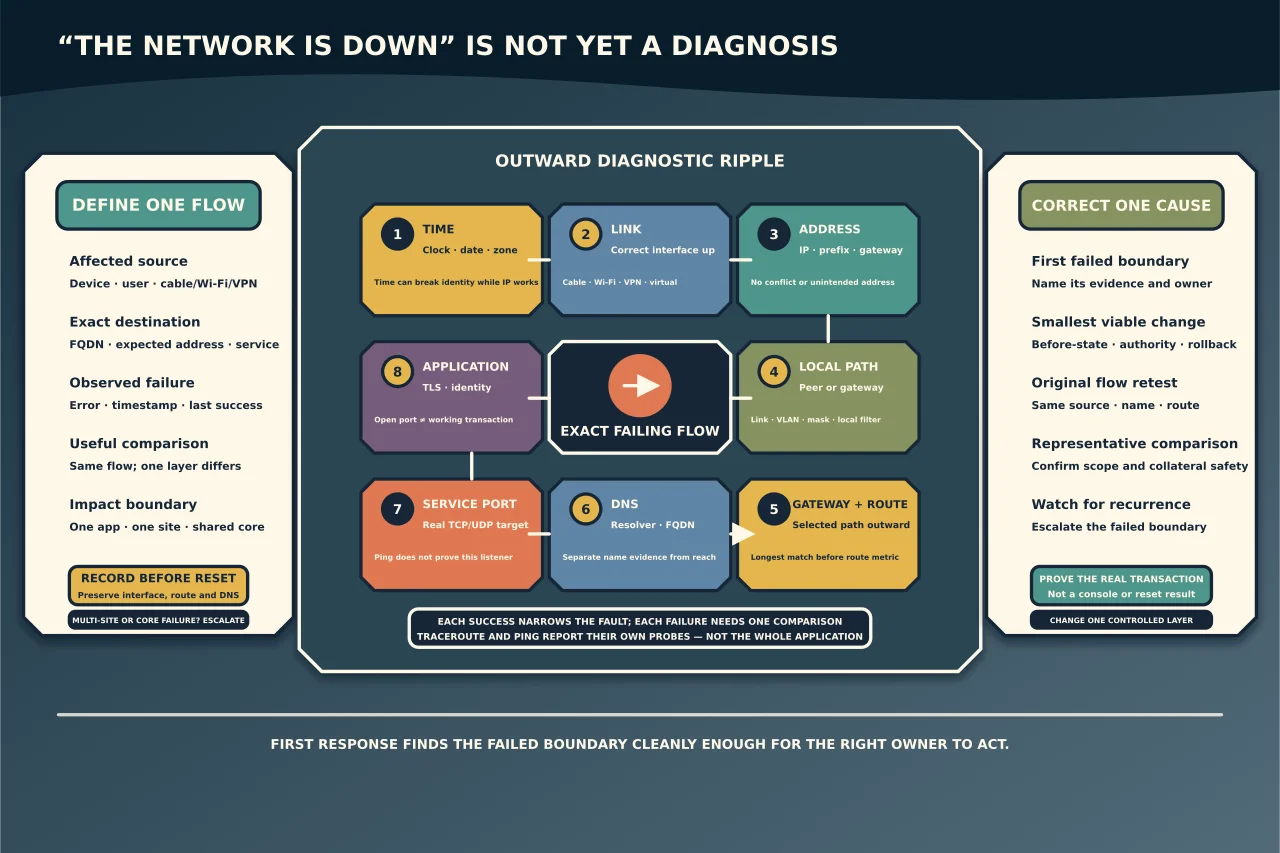
Define one failing flow
Record:
- source device, user and connection (cable, Wi-Fi, VPN or virtual adapter);
- destination name and, if known, address;
- application and protocol/port;
- exact error and timestamp;
- when it last worked and what changed; and
- whether another source, destination or service works.
Use the same source and destination for the first comparison. Testing a public website from your laptop does not prove that a server can reach its database.
Check clock, date and time zone. Large time error can break certificates and identity while IP reachability remains healthy.
Inspect before resetting
Record interface link/state, IP addresses, prefix/subnet mask, default gateway, configured DNS servers and suffixes, routes, proxy and VPN status. Look for an automatically assigned address, duplicate address warning, unexpected virtual adapter or missing gateway.
Do not start with a TCP/IP/Winsock reset, DNS flush or router reboot. These change evidence and can disrupt other users. Microsoft recommends understanding the topology and collecting configuration/traces; reset is a cause-specific later action.
Walk outward from the source
Test in layers:
- Local stack: confirm the intended interface is up and the local address/prefix fits the connected network.
- Same subnet: reach a known local peer or gateway. Failure points toward link, Wi-Fi association, VLAN, address conflict, mask or local filtering.
- Routed address: test a known remote address. If local works but remote does not, inspect gateway and route selection.
- DNS server: confirm the configured resolver is reachable and answers a deliberate query.
- Destination name: query the exact FQDN and record answer, record type and resolver used.
- Destination service: test the real TCP/UDP port from the affected source.
- Application: validate TLS, authentication and application response.
Each successful layer narrows the fault. Each failure needs one comparison before a change.
Interpret ping correctly
Ping tests ICMP echo, not “the network.” A host or firewall can drop ICMP while HTTPS works. A successful reply proves an address responded to ICMP from that source at that moment; it does not prove DNS, the intended route, TCP 443, TLS or the application.
Compare the real service port. On Windows, Test-NetConnection can combine destination and TCP-port evidence. On other systems use a supported equivalent. Avoid telnetting arbitrary ports and interpreting any blank screen as application health.
Keep DNS separate from connectivity
Query the exact fully qualified name through the client’s configured resolver. Compare it with the expected authoritative record or a known-good client. If an address works but the name fails, focus on resolver reachability, suffix/search behaviour, record type, split DNS, cache and authoritative data.
A short name and FQDN are different tests. A cached negative answer can persist after a record is corrected. Flush only the affected client’s cache after preserving the answer and confirming the upstream record is now correct.
Do not point a domain-joined device permanently at a public resolver to “fix the internet.” Internal identity and service discovery can depend on organisational DNS.
Check route and path
Inspect which route and interface the operating system selects for the destination. Longest matching prefix wins before metrics decide among otherwise suitable routes. VPN clients and virtual switches can install more-specific routes or DNS rules.
Traceroute can show some responding hops, but missing hops do not necessarily identify the fault: routers may rate-limit or ignore probe traffic, and forward/return paths can differ. Compare traces from a working source and use device/firewall evidence where the path is managed.
Make one evidence-backed correction
Examples include renewing an invalid DHCP lease, correcting one static prefix/gateway, restoring the intended DNS assignment, removing a stale specific route through its owner, fixing one switch/VLAN port or permitting the documented application flow.
Record before/after state and rollback. Do not make simultaneous client, firewall and server changes—you will not know what fixed it or what new risk was introduced.
Prove the actual service
Retest the original flow from the original source. Confirm name resolution, selected address/route, port connection, certificate/identity and application transaction. Then compare another representative source and monitor for recurrence.
The aim of first response is not to solve every network problem. It is to identify the first failed boundary cleanly enough that the right owner can solve it without collateral damage.