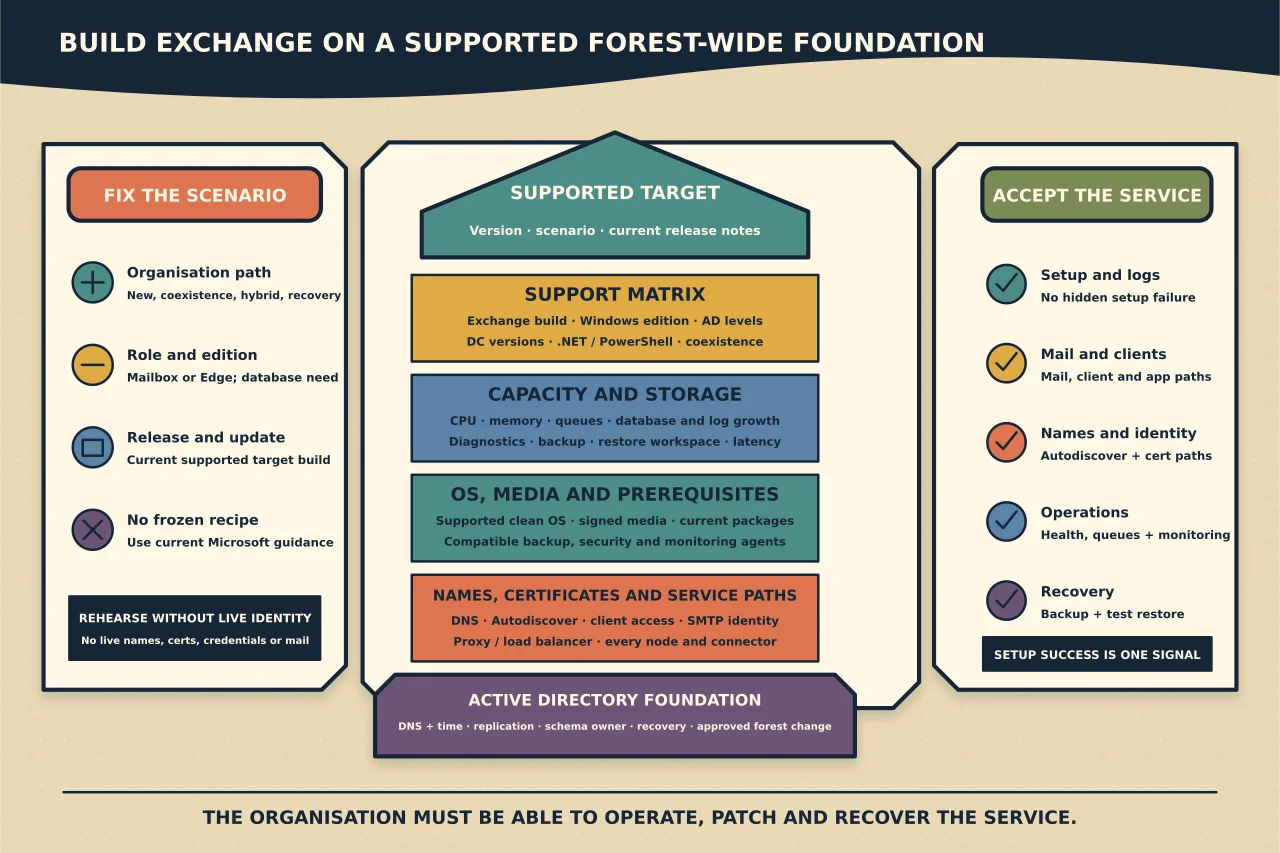
Exchange Server installation changes more than one Windows machine. It extends and configures Active Directory, creates organisation-wide objects and introduces mail, client-access and security dependencies.
The prerequisite phase is therefore an architecture and forest-readiness check—not a command copied from an older build guide.
Fix the target version and scenario
Define:
- new organisation, additional server, coexistence, hybrid or recovery;
- Mailbox or Edge Transport role;
- Exchange Server release and current update level;
- Windows Server version and Server Core/Desktop Experience option;
- Standard or Enterprise edition/database requirement; and
- intended namespaces, certificates, databases, transport and backup.
Use Microsoft’s current Exchange Deployment Assistant and release notes for that exact scenario. Do not use Exchange 2016/2019-era prerequisite commands for Subscription Edition without a current comparison.
Validate the support matrix
Check together:
- Exchange build and supported upgrade path;
- Windows Server version/install type;
- Active Directory forest/domain functional level;
- domain controller/global catalogue versions;
- .NET and PowerShell versions;
- supported clients and coexistence; and
- third-party backup/security/monitoring compatibility.
Exchange supports the PowerShell version included with the supported Windows Server release; do not install an arbitrary standalone Windows Management Framework/PowerShell build on the server.
Record the source and access date because the supported matrix changes.
Design server capacity and storage
Use Microsoft’s current sizing and system requirements rather than a generic minimum. Plan CPU, memory, paging, disk latency/capacity, filesystem and growth for:
- Exchange binaries;
- transport queues;
- mailbox databases and transaction logs;
- logging and diagnostics;
- backups and restore working space; and
- operating-system updates.
Separate failure domains where the design requires it. A lab that boots with tiny resources does not validate production sizing.
Prove Active Directory health
Before any schema or organisation preparation:
- verify DNS and time;
- verify replication across every relevant domain/site;
- identify schema master and required connectivity;
- confirm no lingering directory errors;
- inventory existing Exchange organisation state;
- verify required permissions through an approved change window; and
- take and prove the organisation’s directory recovery approach.
Schema extension is not reversed by uninstalling one server. Treat it as a separately approved, forest-wide change.
Prepare the Windows server cleanly
Build the supported OS with the intended name, network, storage and domain membership. Apply current supported Windows updates, but avoid introducing unsupported applications or roles.
Install only the prerequisites specified by Microsoft’s current article for the exact Exchange role, version and Windows installation option. Feature names and external redistributable requirements change; downloading an old package from a blog is not a shortcut.
Check endpoint protection, backup and monitoring vendor exclusions/agents against current Exchange support. “It installs” does not mean Microsoft or the vendor supports co-residence.
Plan names and certificates before setup
Define internal/public DNS, Autodiscover, client-access namespace, load balancer/proxy, SMTP identity and certificate names. Obtain or schedule the trusted certificate and plan how it reaches every server/service.
Default self-signed certificates support internal Exchange functions but are not the finished external client identity. Do not delete them during post-installation tidying.
Prepare installation media and evidence
Obtain Exchange media and current updates from Microsoft. Record hashes/signature, release notes and the configuration choices.
For unattended setup, generate the command from current Microsoft parameter documentation and review it. Never embed product keys, passwords or organisation secrets in a broadly readable script/log.
Ensure setup logs have protected storage and enough disk space. A failed setup may still have changed Active Directory and installed components.
Rehearse in an isolated test environment
Microsoft recommends an isolated Exchange test environment. Use it to validate:
- prerequisite sequence;
- directory preparation;
- setup and update duration;
- security controls such as Extended Protection as appropriate;
- post-installation URLs/certificates;
- mail flow, clients and applications;
- monitoring and backups; and
- failure/rollback procedures.
An isolated lab should not reuse production namespace, certificates, credentials or route real mail.
Run production setup only from the approved state
At the change window, recheck replication, free space, support matrix, media, backups and current release notes. Stop on unexpected prerequisite warnings rather than suppressing them from an old workaround.
Capture setup outcome and logs. If setup fails, use the logged failed stage and Microsoft’s current recovery guidance; do not clean Exchange objects manually to make a rerun start.
Complete post-installation work
After setup:
- install the intended current supported update level;
- configure databases and transport deliberately;
- configure namespaces and trusted certificates;
- establish client access and Autodiscover;
- configure mail flow/connectors without creating open relay;
- apply documented security configuration;
- configure backup, monitoring and log retention; and
- run the current Microsoft Health Checker.
Review findings rather than applying every recommendation blindly.
Accept the service
Test internal/external mail, queues, message trace, Outlook/OWA/mobile access, Autodiscover, address book, free/busy, relay/application paths, database mount/failover where relevant, backup and a representative restore.
Verify every load-balanced node and certificate path. Document ownership, patch cadence, certificate renewal, recovery and monitoring handoff.
Exchange installation is complete only when the organisation can operate and recover the service—not when setup reports success.