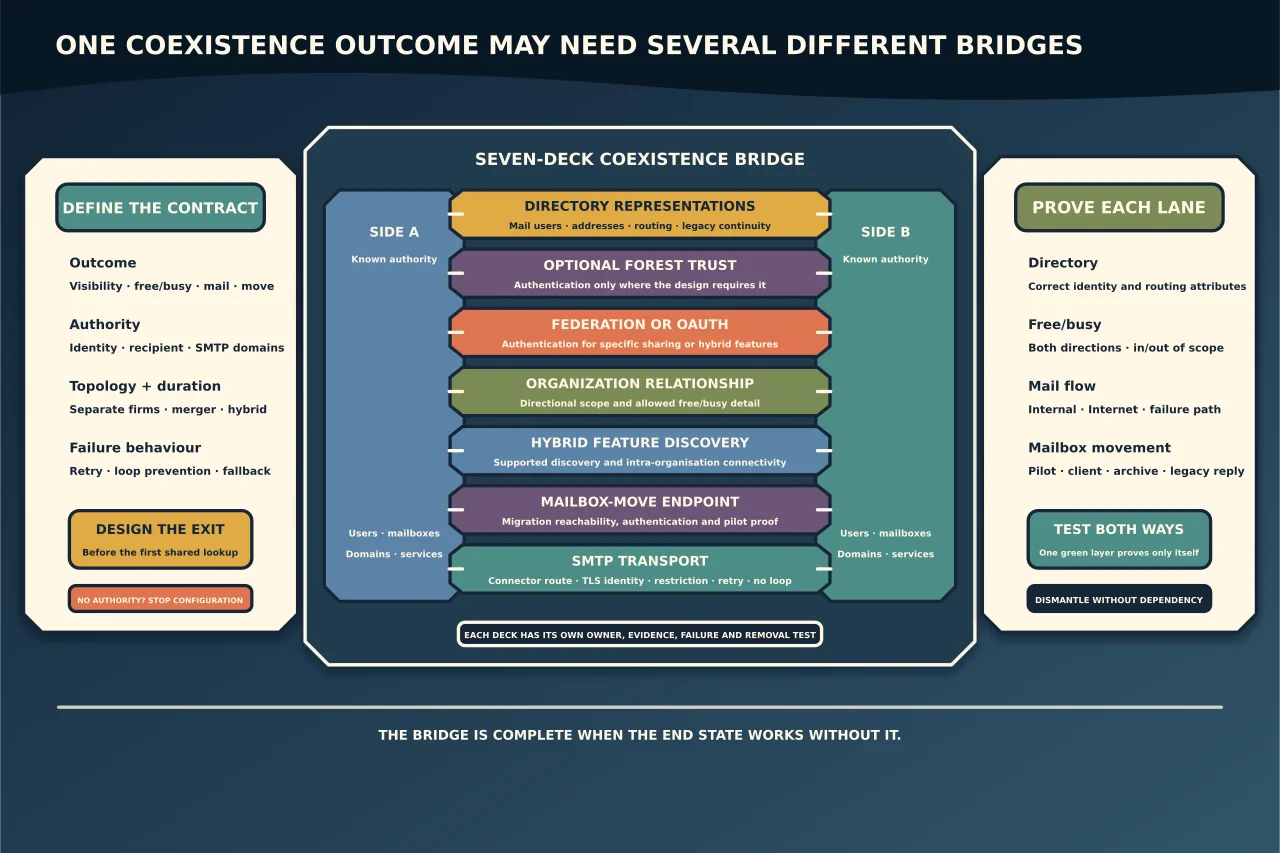
Exchange coexistence is often described as “set up a trust”. That phrase hides several unrelated mechanisms.
An Active Directory forest trust can let identities authenticate across forests. It does not create Exchange recipients, route mail, share calendars or move a mailbox. An Exchange federation trust supports federated sharing through Microsoft’s authentication system. An organization relationship defines what one Exchange organisation exposes to another. Hybrid OAuth and intra-organization connectors support richer cross-premises features. Migration endpoints move mailbox data. Send/receive connectors route messages.
Start with the reader-visible outcome and select only the components that outcome requires.
Define the coexistence contract
Before configuring anything, answer:
- Are the parties separate businesses sharing availability, two forests in a merger, a resource/account-forest design, or one organisation moving to Exchange Online?
- Which system creates and disables identities and mail-enabled recipients?
- Which SMTP domains are authoritative on each side during each phase?
- Must users see a unified address list, free/busy, MailTips, profile photos or delegated calendars?
- Does mail route directly, through a central organisation or through a security gateway?
- Are mailboxes merely discoverable, or will they move between organisations?
- How long will coexistence last, and what is the exit state?
A permanent resource-forest design and a short migration bridge may use similar components but have different lifecycle, support and failure requirements.
Keep the layers separate
| Layer | What it provides | What it does not prove |
|---|---|---|
| Directory/identity | Users, contacts, mail users and selected attributes on the correct side | Mail routing or calendar access |
| AD forest trust | Cross-forest authentication where the design needs it | Exchange federation or recipient correctness |
| Federation/OAuth | Authentication used by specific Exchange sharing or hybrid features | Permission to expose all data |
| Organization relationship | Directional Exchange-to-Exchange sharing policy, commonly free/busy | Mailbox movement or SMTP routing |
| Intra-organization connector | Rich cross-premises discovery for supported hybrid features | General Internet mail transport |
| Migration endpoint/MRS Proxy | Remote mailbox-move connectivity and limits | Correct target recipient or final mail flow |
| Send/receive connectors | SMTP path, authentication and restrictions | Directory synchronisation or calendar sharing |
Do not use one green layer as evidence that the others work.
Design directory coexistence first
Every mailbox on one side normally needs a usable mail-enabled representation on the other when address-list visibility, routing or free/busy depends on it. Define which attributes are authoritative and which synchronisation process writes them.
At minimum reconcile:
- object GUID/anchor and mailbox GUID where the move model requires them;
- primary and proxy SMTP addresses;
- external/target routing address;
- legacy Exchange distinguished name and X500 continuity;
- recipient type and remote-recipient state;
- hidden-from-address-list and moderation settings; and
- manager, group and delegate relationships that actually need to cross.
Block duplicate proxy addresses and ambiguous matches before bulk synchronisation. A script that creates mail users successfully can still attach the wrong identity or overwrite an authoritative value.
Microsoft’s current cross-forest move procedure requires a valid mail user in the target forest with a minimum attribute set. Use the script shipped with the installed Exchange build or a deliberately governed identity tool; do not paste an old synchronisation script into both directories.
Choose the sharing model
For two separate Exchange organisations that need calendar availability, an organization relationship is directional. Each side decides what it exposes, and the other side configures its own relationship if sharing must work both ways. The levels range from no access to availability only or limited details such as time, subject and location.
Use the narrowest level and scope that meets the business need. A security group can limit participating users where supported. Confirm whether individual calendar permissions further restrict what a user exposes.
On-premises federated sharing also depends on the applicable federation configuration and reachable Autodiscover/EWS services. Do not confuse this with an AD forest trust.
Treat Exchange hybrid as a managed configuration
Exchange hybrid coexistence with Exchange Online is more than an organization relationship. Microsoft’s Hybrid Configuration Wizard can configure components such as OAuth trust, intra-organization connectors, organization relationships, migration endpoints and mail flow according to selected features.
Record the exact HCW choices and resulting objects. Re-running HCW is a configuration change, not a generic repair button. Preserve intentional custom settings and compare before/after state.
Current hybrid deployments also need Microsoft’s current dedicated hybrid application and certificate guidance for supported rich coexistence. Do not rely on a historical shared service-principal design or an expired Exchange OAuth certificate because old free/busy instructions still mention it.
Design mail flow independently
Draw every message path during coexistence:
- user on side A to user on side B;
- each side to and from the Internet;
- replies to messages sent before a move;
- applications, devices, journaling and compliance copies;
- non-delivery and retry behaviour when either side is unavailable; and
- the path after the final mailbox or domain moves.
Assign authoritative and internal-relay domain behaviour deliberately. Define connector scope, TLS identity, certificate lifecycle, accepted sender/recipient restrictions and loop prevention. Avoid broad IP-based trust or an open relay.
Directory routing attributes must agree with connector design. A valid connector cannot fix a target address that sends a recipient back to the wrong organisation.
Validate free/busy as a route
Test free/busy in both directions with synthetic users homed on opposite sides. For each request trace:
- the requester’s organisation and mailbox location;
- the target mail-enabled object’s external/routing address;
- the domain matched by the intra-organization connector or organization relationship;
- Autodiscover or configured sharing endpoint;
- TLS and OAuth/federation authentication; and
- the sharing level and user/calendar permission returned.
Microsoft documents cases where an incorrect synced TargetAddress changes ExternalEmailAddress in Exchange Online and sends free/busy to the wrong relationship. That is why endpoint, domain and recipient evidence must be checked together.
A single administrator test from one side is not acceptance. Test Outlook/OWA scheduling from each side, users in and out of scope, limited/no-detail outcomes and a deliberate endpoint or permission failure.
Prepare cross-forest moves deliberately
Cross-forest moves may be initiated as a pull from the target or a push from the source. The direction determines where MRS Proxy and the remote-move endpoint are used. Confirm that the source and target Exchange versions form a supported move path before preparing users.
For a pilot mailbox:
- snapshot source and target recipient attributes;
- prove the target mail user and routing address;
- test migration endpoint connectivity;
- pre-stage with manual completion where appropriate;
- review move reports and skipped-item decisions;
- finalise in the agreed window; and
- validate client access, mail flow, free/busy, archive, permissions and legacy replies.
The accompanying mailbox-operation guide covers the request evidence in detail. This article’s concern is that the surrounding coexistence architecture remains correct before, during and after the move.
Monitor coexistence as temporary infrastructure
Monitor directory sync failures, duplicate attributes, certificate expiry, OAuth/federation health, Autodiscover/EWS reachability, connector queues, free/busy probes and migration endpoint health. Assign owners and alert thresholds.
Maintain a dependency register for applications, relay devices, groups, delegates, public folders and accepted domains. Coexistence accumulates exceptions; without a register, temporary routes become permanent and nobody knows whether they are safe to remove.
Design the exit before the bridge
Define how each component will be retired:
- stop or narrow directory projection;
- remove obsolete target/routing values without breaking mail;
- complete mailbox and archive moves;
- change authoritative domains and Internet flow;
- remove migration endpoints and temporary access;
- disable organization relationships/connectors only after negative tests; and
- retain evidence for the agreed operational and legal period.
After removal, test that mail, free/busy and sign-in no longer depend on the retired side. A coexistence bridge is complete when the intended end state works and the bridge can be safely dismantled—not merely when the first cross-forest lookup succeeds.