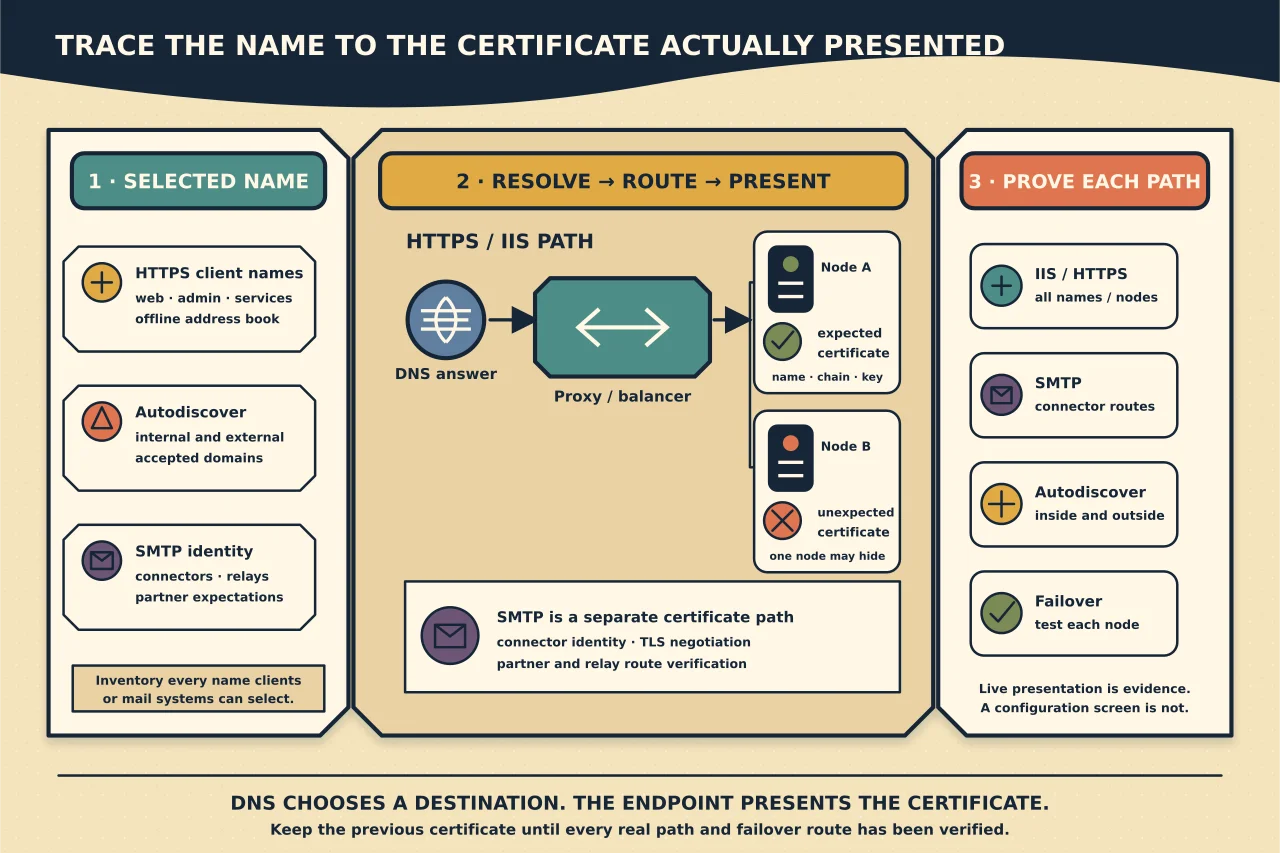
An Exchange certificate problem is often a namespace problem wearing a certificate warning.
A certificate can be valid and trusted yet wrong for the hostname a client selected. A URL can be configured correctly yet resolve to a load balancer presenting an old certificate. A new certificate can be imported on one server while another node continues to serve the expired one.
Plan names, routes, services and certificates as one system.
Build a namespace inventory
List every name used by:
- Autodiscover;
- Outlook on the web and Exchange admin centre;
- Exchange Web Services;
- MAPI over HTTP and Outlook Anywhere where present;
- Exchange ActiveSync;
- offline address book distribution;
- PowerShell administration;
- SMTP receive/send paths; and
- load balancer or reverse proxy health/routing.
For each name, record internal/public DNS, target IP or load balancer, configured Exchange URL, certificate expected by the client and owning service.
Do not include backend server names on a public certificate merely because a default internal URL exposes them. Prefer a deliberate client namespace and correct the service URL.
Separate HTTPS and SMTP requirements
Exchange assigns certificates to services. IIS covers the HTTP client services hosted under the Exchange websites, so client-used DNS names must fit the certificate presented by that IIS path.
SMTP certificate use depends on receive/send connector behaviour, TLS negotiation and partner requirements. A certificate suitable for a browser does not automatically satisfy a connector expecting a particular SMTP name, and assigning IIS does not prove SMTP uses the intended certificate.
Exchange self-signed certificates support internal Exchange functions. Do not remove or replace them casually. Use a certificate trusted by the intended external clients/services for the published path.
Reduce certificate names through sane namespaces
Modern Exchange client-access architecture can use fewer namespaces than old Exchange designs. A small, stable set is easier to validate and renew.
Before requesting a certificate:
- remove names that no supported client uses;
- retain every current service and coexistence name still required;
- account for all accepted email domains that need Autodiscover;
- decide whether a redirect or CNAME design changes the certificate need;
- avoid internal-only suffixes that public CAs cannot issue; and
- map cutover dependencies for old and new names.
The certificate should represent the approved namespace design, not compensate for years of unresolved aliases.
Inventory current certificates and bindings
On every Exchange server and relevant proxy/load balancer, record:
- subject, SANs, issuer and validity;
- thumbprint as sensitive operational evidence;
- private-key availability;
- services assigned;
- IIS binding/presentation;
- SMTP connector dependencies; and
- renewal/ownership route.
Protect private keys and exported PFX files. Do not place passwords, certificate archives or thumbprints in public documentation.
Validate the request before issuance
Check the proposed name set against the inventory. Confirm key algorithm/size and CA policy fit the supported Exchange version and clients. Establish who controls domain validation and how renewal will occur.
Test whether security appliances, legacy devices or partners impose certificate-chain or algorithm constraints. Do not weaken the whole service for an unsupported client without an approved exception and retirement plan.
Import and assign deliberately
Follow Microsoft’s current Exchange procedure to import the certificate with its private key onto each server that must present it. Then assign it only to intended Exchange services.
Microsoft notes that service assignment is replaced by assigning another certificate rather than simply removing an assignment. Preserve the existing certificate until rollback and all service validation are complete.
If a load balancer or reverse proxy terminates TLS, deploy the appropriate certificate there as well. Confirm whether traffic is re-encrypted to Exchange and what certificate that internal hop expects.
Verify presentation, not configuration screens
From relevant internal and external networks, connect to every namespace and record the certificate actually presented. Verify:
- hostname match;
- validity period;
- trusted chain and intermediates;
- expected issuer and fingerprint;
- TLS negotiation;
- correct target/service response; and
- consistent behaviour across load-balanced nodes.
Test with multiple requests or temporarily target nodes through a controlled diagnostic method so one healthy node cannot hide another node’s old binding.
For SMTP, perform a controlled TLS session/message test through every partner/relay route and inspect the certificate and connector result.
Include Autodiscover and failover
A user may browse successfully to the main mail name while Autodiscover still selects a different hostname. Test internal domain-joined and external discovery separately, including all accepted domains.
Fail over the load balancer or remove one node in the approved test window. The certificate and service must remain correct when traffic moves.
Retire the old certificate safely
After all paths use the new certificate:
- confirm no connector or device pins the old identity;
- preserve renewal and rollback evidence;
- remove the old certificate through supported Exchange/proxy procedures only when no service needs it;
- securely remove unnecessary exported private-key copies; and
- schedule expiry monitoring for the new certificate and its chain.
Do not wait for an expiry alert to discover that certificate ownership left with a supplier.
Diagnose common mismatches
- Name mismatch: client selected a host absent from the SANs; fix selection or the approved certificate name set.
- Untrusted issuer: deploy the correct chain/trust for the client population; do not disable validation.
- Old certificate intermittently: inspect every load-balanced node and proxy.
- HTTPS fixed, SMTP broken: validate SMTP assignment, connector certificate-name expectations and routing separately.
- Internal warning only: compare split DNS and SCP/internal URLs with the external namespace.
- Renewal looks installed but expiry persists: test live presentation and process/binding state, not only certificate-store presence.
Certificate work is complete when each real path presents the intended identity and survives failover—not when a new certificate appears in the Exchange admin centre.