When an Exchange database will not mount, Eseutil is often the first word in the proposed fix. It should be much later in the decision.
A mount failure is a symptom. The cause may be missing logs, the wrong log stream, storage or filesystem failure, an interrupted restore, antivirus interference, a failed database copy, an update problem or actual database damage. Some paths are recoverable without losing data; others can discard it. The first job is to preserve your choices.
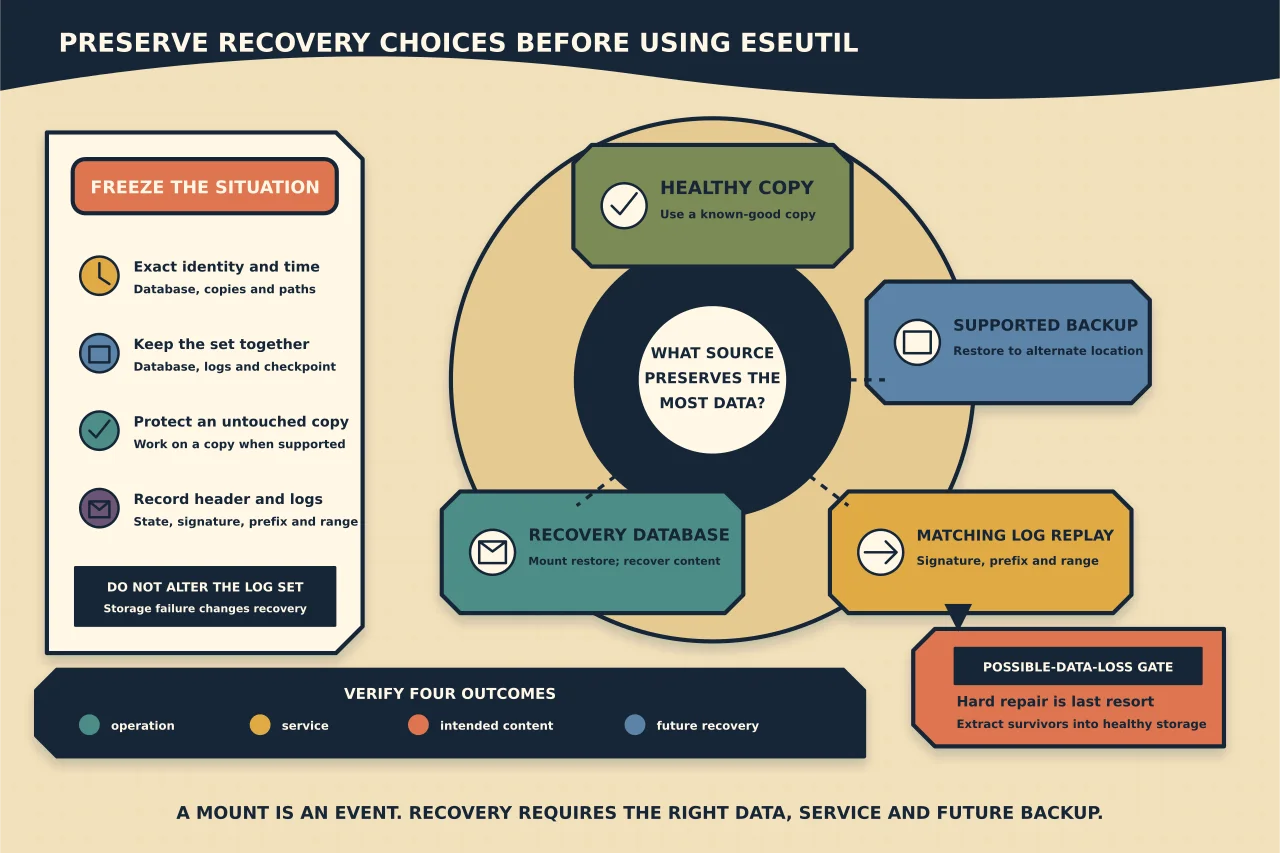
Freeze the situation before changing it
Record the failure time, exact database identity, active/passive copy state, database and log paths, available free space, recent storage or Exchange events, backup status and every recovery attempt already made.
Then protect the evidence:
- stop repeated mount and repair experiments;
- preserve the database, transaction logs and checkpoint file together;
- take a storage-level copy or supported backup where the current state permits;
- work against a copy when the documented procedure allows it;
- do not rename, mix, delete or move logs to make a command appear to work; and
- investigate disk, controller, filesystem, memory and security-software symptoms before trusting the same storage again.
If another healthy DAG copy exists, protect service from that copy and diagnose the failed copy separately. If a verified backup exists, a restore to a Recovery Database will normally preserve more choices than destructive repair.
Establish the database state
Eseutil /MH reads a database header. Run it from the Exchange binaries for the installed version and point it at a preserved working copy.
Eseutil /MH "<working-copy.edb>"Record at least the state, log signature, log generation prefix and the required log range. Do not reduce the result to “clean” or “dirty”.
- Clean Shutdown means the database header says all required transactions have been committed. It does not prove that this is the right recovery point, that mailbox content is complete or that the underlying storage is healthy.
- Dirty Shutdown means the database still requires transaction-log replay. It does not by itself mean that the database needs hard repair.
- A mismatch between the database and log signatures, missing required generations or damaged logs changes the recovery path. Do not substitute a similarly named log set.
Correlate the header with Exchange, ESE, storage and high-availability events. Confirm whether the database came from its original path, a backup, a lagged copy or another server; that context determines which documented recovery procedure applies.
Prefer a healthy copy or supported restore
Use this order of preference unless the incident evidence demands otherwise:
- activate or reseed from a known healthy database copy;
- restore a supported backup to an alternate location;
- replay the complete matching transaction-log stream through the documented soft-recovery or lagged-copy procedure;
- mount the restored data as a Recovery Database and extract or merge what is required; or
- escalate a possible-data-loss repair only when all less destructive sources are unavailable or unusable.
This order is about preserving information, not simply getting a green mount status fastest.
What soft recovery actually does
Soft recovery replays committed transactions from the matching log stream into a database. Microsoft’s RDB procedure uses Eseutil /R after a database and its logs have been restored to an alternate location.
The operator must know the correct three-character log prefix, restored database folder and log folder. A synthetic form is:
Eseutil /R <log-prefix> /L <restored-log-folder> /D <restored-database-folder>Do not copy that line into production from this article. Validate the exact syntax against the current Microsoft procedure for the installed Exchange build and recovery scenario. A wrong prefix, wrong path or incomplete set can waste the remaining recovery window or contaminate the evidence.
After replay, inspect the header again and preserve the output. If required logs are missing, stop. Do not guess that /A, /I, checkpoint deletion or log removal is appropriate because it appeared in a different incident. Microsoft documents those switches only in specific recovery contexts such as an authorised lagged-copy or MCDB restore procedure.
Use a Recovery Database to recover content
An RDB is a special Exchange database that can mount a restored database and make its contents available to recovery tools without replacing the live mailbox database. Users cannot use it as an ordinary mailbox store and mail cannot flow through it.
A controlled RDB recovery includes:
- restoring the database and correct logs to isolated paths;
- bringing the restore to the required state using the applicable Microsoft procedure;
- registering and mounting it as an RDB;
- identifying source mailbox GUIDs and intended targets;
- using mailbox restore requests to merge into an existing mailbox or recovery location;
- checking duplicates, folders, permissions and date boundaries; and
- removing the RDB only after exported evidence and business acceptance are complete.
Mount success is the start of content recovery, not its proof.
Treat lagged copies as a different recovery instrument
A lagged copy deliberately delays log replay and can provide a point before logical corruption or deletion. Activating it requires choosing the intended recovery time and controlling which logs may replay.
Microsoft’s procedure uses the database header to determine the required log generations and moves later generations outside the working set for a point-in-time recovery. Guessing from file timestamps or deleting logs in place is not an acceptable substitute. Preserve the untouched lagged copy and its complete log set before manipulation.
A lagged copy is not counted as a highly available current copy. It also needs capacity, monitoring and a rehearsed activation plan.
Why hard repair is not the next command
Hard repair reconstructs database structures by discarding data it cannot reconcile. The database may mount afterwards while messages, folders or relationships are missing. The action does not repair failing storage or prove logical consistency.
Do not run Eseutil /P as a generic response to dirty shutdown. Microsoft’s current supported recovery material does not present it as a routine mailbox-database recovery workflow. If a healthy copy, log-complete restore or other recovery source exists, use that source.
If repair appears to be the only remaining option:
- preserve immutable copies of the database and logs first;
- confirm that all backups and copies have genuinely been exhausted;
- document the accepted possible data loss and business owner;
- estimate workspace, duration and recovery destination;
- use the exact Exchange-version guidance supplied by Microsoft Support; and
- plan to extract surviving data and move it into a new healthy database rather than returning the repaired file to normal long-term service.
That is an incident-recovery decision, not a pasteable repair recipe.
Verify the recovery outcome
Verification should answer four separate questions:
Did the database operation complete?
Retain command output and confirm the expected header state, database identity, log range and absence of new storage errors.
Can Exchange serve the recovered data?
Confirm the RDB or production database state, mailbox access through supported clients, search/index state where applicable, and Exchange health without bypassing failed components.
Is the intended content present?
Sample mailboxes of different sizes and ages. Check folders, messages around the failure window, calendar items, attachments and any restore-target folder. Reconcile missing and duplicate items against the selected recovery point.
Is the system recoverable again?
Move recovered content to healthy storage where required, take and validate a new supported backup, restore monitoring and database copies, document the data-loss interval, and close the underlying storage or operational cause.
A mount is a technical event. Recovery is complete only when the intended data, service and future recoverability have all been proven.