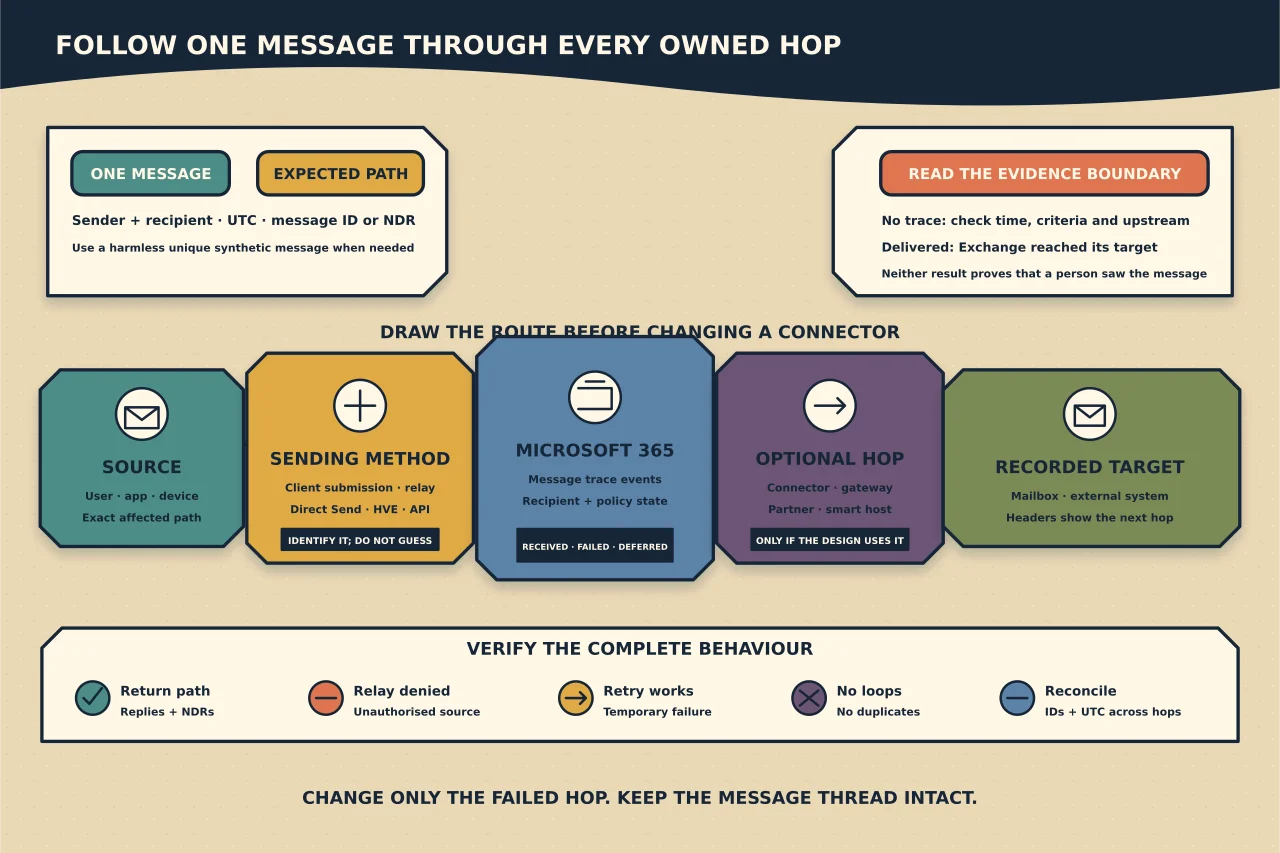
“Email is down” is not a diagnosis. Mail can fail before Microsoft 365 receives it, inside Exchange Online, after Microsoft hands it to another service, or at the final recipient.
Start with one message and one expected path.
Build a traceable example
Collect:
- full sender and recipient addresses;
- date, time and timezone;
- message subject only if policy permits;
- internet message ID or NDR details;
- whether the sender received an NDR;
- whether similar messages work; and
- the expected systems between sender and recipient.
Use UTC for cross-system searches. Protect message content and addresses in tickets and screenshots.
If no real example exists, send a synthetic message with a unique subject and harmless body through the exact affected path.
Draw the expected path
For ordinary Exchange Online mail, Microsoft 365 can deliver directly to and from the internet. Custom connectors are normally justified by a specific dependency such as:
- on-premises Exchange or another mail server;
- a partner requiring restricted TLS;
- an inbound or outbound security gateway;
- a signature or journaling service; or
- an application/device relay.
Record the MX target, connector or smart host, TLS identity and filtering system at each hop. If the design cannot be drawn, changing a connector is premature.
Read the NDR as evidence
An NDR usually identifies the reporting system, enhanced status code and reason. Distinguish:
- permanent rejection from temporary deferment;
- recipient-not-found from routing failure;
- authentication/relay denial from content filtering;
- policy rejection from remote reputation rejection; and
- TLS/certificate failure from simple network timeout.
Do not search only the human sentence. Record the SMTP status, reporting host, generating server and any diagnostic block, then compare with the current Microsoft explanation or remote provider evidence.
Use Exchange Online message trace
Message trace can show whether Microsoft 365 received, rejected, deferred or delivered a message and which actions occurred inside the organisation. Search a narrow time window with exact participants or message ID.
Interpret the boundary:
- No trace for inbound mail: it may never have reached Microsoft 365, or the search criteria/time window may be wrong.
- Received then failed: inspect the detailed event, connector, rule, recipient and policy evidence.
- Delivered: Exchange delivered to its recorded target; investigate mailbox rules, junk/quarantine, forwarding, client sync or the next external hop.
- Pending/deferred: identify the retry reason and whether the target or connector is available.
A Delivered event is not proof that a person saw the message.
Compare DNS with the intended architecture
Check current public MX, SPF and relevant mail host resolution from more than one resolver when DNS is suspect. Confirm the domain is accepted and healthy in Microsoft 365.
An MX that points to a third-party gateway means “no Exchange Online trace” may be expected until that gateway relays the message. Inspect the gateway’s trace first. Do not repoint MX merely to simplify diagnosis.
Inspect connectors only when the path uses them
For the relevant connector, verify:
- enabled state and direction;
- source and destination organisation type;
- domains or transport-rule scope;
- smart hosts or MX routing;
- certificate-name or IP restrictions;
- TLS requirements;
- validation result and recent changes; and
- whether another connector matches first.
Do not broaden a connector to “all mail” to make one test pass. Test connector changes with the platform’s validation plus a real synthetic message and independent trace.
Diagnose application and device sending by method
First identify the configured method:
- client SMTP submission;
- connector-based SMTP relay;
- Direct Send;
- High Volume Email; or
- an external sending service/API.
These differ in endpoint, port, TLS, authentication, sender identity, recipient reach and limits. Verify the device/application actually supports the chosen method.
For relay, confirm that the source presents the approved certificate or comes from the dedicated public IP expected by the connector. A private LAN address is not the public source Exchange Online sees. Ensure the connector cannot become an open or cross-tenant relay.
For client SMTP submission, determine whether the application supports OAuth and whether SMTP AUTH is intentionally enabled at the required scope. Do not preserve Basic authentication as an indefinite workaround.
Check policy and recipient state
When Exchange received the message, review:
- accepted-domain and recipient object correctness;
- transport rules and their priority/mode;
- anti-spam, anti-phishing and malware verdicts;
- quarantine;
- mailbox forwarding and inbox rules;
- moderation and group delivery restrictions;
- sending limits and outbound spam controls; and
- licensing or mailbox state where relevant.
Use audit evidence for recent rule or connector changes. A configuration that looks right now may have differed when the message failed.
Inspect message headers end to end
For a delivered test, preserve full headers and trace:
- Received chain and timestamps;
- SPF, DKIM, DMARC and ARC results;
- connector or transport markers;
- final delivery target; and
- any security-service transformations.
Headers can contain private infrastructure and addresses. Share them only through an authorised route.
Test the return and failure paths
After the apparent fix, test:
- inbound from an external sender;
- outbound to an external recipient;
- internal mail;
- the affected relay or partner path;
- replies and NDRs;
- an intentionally unauthorised relay attempt;
- a temporary destination failure and retry; and
- trace visibility across every owned hop.
Confirm no duplicate messages or loops appear. Where a third party is involved, reconcile both providers’ event IDs and times.
Record the actual cause
Close the incident with the failed hop, evidence, change, before/after trace and residual exception. “Recreated connector” is an action; “outbound connector required a certificate name the renewed certificate no longer presented” is a cause.
The shortest mail-flow diagnosis follows one message all the way through. Broad configuration changes without that thread usually make the system harder to understand.