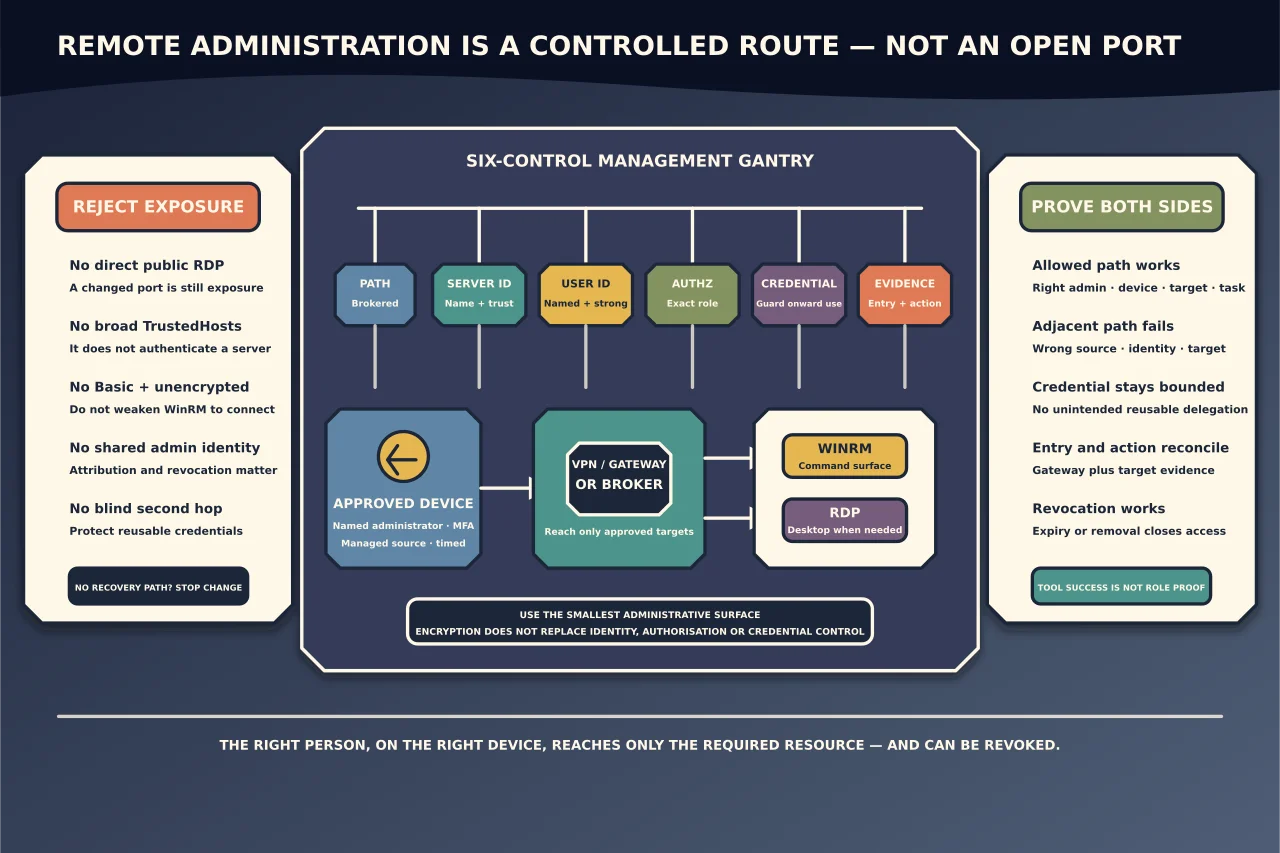
Remote administration is not one control. A secure connection must answer at least six questions:
- Path: how does an authorised administrator reach the management boundary?
- Server identity: how does the client know it reached the intended machine or gateway?
- User identity: how is the administrator authenticated?
- Authorisation: which hosts, applications and actions can that identity use?
- Credential handling: can reusable credentials be exposed on the remote host or delegated onward?
- Evidence: can the owner see who connected, what path they used and whether access was removed?
Encryption alone does not answer all six. A publicly reachable encrypted management service with a broad administrator group and reusable passwords is still a dangerous entry point.
Choose the tool for the job
WinRM and PowerShell remoting
WinRM is a management transport used by PowerShell remoting and other Windows administration tools. It is well suited to repeatable commands, configuration inspection and automation. It should normally be reachable only through an approved management network, VPN, zero-trust access path or similarly restricted boundary—not published generally to the internet.
In a healthy Active Directory environment, Kerberos commonly provides mutual identity context for domain WinRM connections. Workgroup, cross-domain and IP-address connections lose some of that automatic trust context and need a deliberately designed alternative rather than a blanket trust list.
RDP
RDP provides an interactive desktop. It is useful when a graphical application or a complete user session is genuinely required, but it also presents a high-value sign-in surface and can place administrator credentials in a more exposed context.
Microsoft’s remote-access architecture uses Remote Desktop Gateway to tunnel RDP over TLS and apply user/resource policy at a controlled boundary. An appropriate gateway design can integrate stronger authentication, including MFA, and avoids publishing every target’s RDP listener directly to the internet.
Prefer the smaller administrative surface
Use remote command/configuration tooling when the task does not need a desktop. Use an interactive session when the workflow genuinely requires it. In both cases, scope the identity, source device, destination and duration. Do not give a support operator permanent access to an entire network because one application needs occasional maintenance.
Build the access path in layers
1. Start outside the target host
Require an approved source device with current security controls and a named administrator identity. Reach management services through a controlled VPN, gateway, privileged-access workstation path or equivalent broker. Restrict which source networks and identities can even attempt management.
Direct public exposure of WinRM or RDP makes the host itself absorb internet scanning, password attacks, patch urgency and account-lockout pressure. A changed port does not remove that exposure.
2. Authenticate the destination
For domain WinRM, use the intended hostname and Kerberos-capable path. Falling back to an IP address can change the authentication behaviour and should not be treated as a harmless naming shortcut.
For WinRM over HTTPS, Microsoft requires a certificate suitable for Server Authentication whose identity matches the hostname used by the client and which chains to a trusted authority. HTTPS protects the transport and authenticates the server when certificate validation succeeds; it does not decide what the authenticated user may run.
For RDP, validate the gateway and target identities through the supported certificate and domain design. Do not train users to ignore certificate warnings as a normal connection step.
3. Authenticate the administrator strongly
Use individual administrative identities, strong authentication and MFA at the reachable access boundary where supported. Avoid shared administrator accounts: they weaken attribution, offboarding and alerting.
Separate ordinary productivity identity from privileged administration where practical. A stolen browser password should not automatically become a reusable domain-administrator credential.
4. Authorise only the required destinations and actions
Network reach is not administrative permission. Scope:
- which administrators may use WinRM or RDP;
- which source devices/networks are allowed;
- which target hosts or RemoteApps are visible;
- whether elevation is permitted;
- what PowerShell endpoints or roles are available; and
- whether onward access from the target is allowed.
For repeatable tasks, constrained administration or purpose-built tooling may be safer than an unrestricted desktop or full PowerShell endpoint.
5. Control credential delegation
The “second hop” problem occurs when an administrator connects to one host and then needs that session to authenticate to another service. Solving it by broadly delegating reusable credentials can expose them to the first remote host.
Remote Credential Guard is designed for supported RDP scenarios so credentials are not sent to the target host in the ordinary reusable form. Microsoft documents important prerequisites and limitations, including Active Directory/Kerberos topology and connection-mode constraints. It is a useful control where the scenario is supported, not a universal switch for every RDP path.
For WinRM, choose the narrowest supported delegation mechanism for the actual workflow. Do not enable broad credential delegation merely to make a multi-hop script convenient.
6. Log both entry and action
Retain gateway/VPN, Windows sign-in, WinRM/PowerShell or RDP session, endpoint-protection and destination-application evidence as appropriate. A successful gateway sign-in does not prove which target or command was used; a target event without gateway context may not show the full entry path.
Understand TrustedHosts before touching it
WinRM uses TrustedHosts when neither Kerberos nor HTTPS provides the normal server-authentication assurance for the destination. Microsoft’s documentation is explicit about the key limitation: the setting does not itself authenticate the listed host.
That means TrustedHosts * is not a harmless connectivity fix. It tells the client to accept a broad set of destinations in a context where destination identity is already weaker. A narrowly named host may be part of a bounded workgroup design, but HTTPS with a correctly validated server certificate is generally a clearer way to authenticate that server.
Before changing TrustedHosts, ask:
- Why is Kerberos unavailable?
- Can the connection use the intended hostname rather than an IP address?
- Can HTTPS authenticate this specific server?
- Is the proposed entry exact and temporary?
- Who will remove it when the task ends?
Never pair broad TrustedHosts with Basic authentication or unencrypted transport.
Diagnose WinRM without weakening it
Work through the failed layer in order.
Path and listener
Confirm the approved management path is connected, name resolution returns the intended host and the WinRM listener is reachable only from its authorised sources. Check the effective firewall and device-management/Group Policy state rather than adding a local exception that policy will overwrite.
Server identity and certificate
For HTTPS, verify the certificate’s Server Authentication purpose, subject/alternative name, validity, private-key availability and trust chain. A certificate can exist in the store yet still be unsuitable for the listener or hostname.
Authentication
Identify the method actually attempted. A domain hostname, IP address, workgroup host and cross-forest name may take different paths. Check clock, DNS, trust and SPN/Kerberos evidence before switching to a weaker method.
Authorisation
If authentication succeeds but the command is denied, inspect the user’s group/endpoint permission and elevation boundary. Do not convert an authorisation failure into a domain-wide administrator grant.
Command or application behaviour
A remoting session can work while one command fails because of local permissions, module availability, 32/64-bit context, profile differences or second-hop access. Preserve the exact error and prove the smallest failing operation.
Diagnose RDP without opening 3389
Gateway or private access path
Confirm the user reached the approved VPN/gateway and that the gateway policy permits this identity to reach this resource. A direct connection that bypasses the gateway is not a valid repair.
Target availability
Confirm the target is online, RDP is enabled by current policy, the service/listener is healthy and the host firewall permits the approved private/gateway source. Distinguish a network timeout from an authentication or session-capacity message.
Identity and sign-in rights
Check the exact account, domain context, account state, MFA/gateway result and RDP sign-in authorisation. Avoid adding the user to a broad local/domain administrator group when only remote sign-in or one application is required.
Existing session and profile state
An interactive session can fail after authentication because of licensing, session limits, a stuck session, profile problems or application startup. Do not reboot a shared server until you identify active users, workload impact and a recovery path.
Credential protection
If the workflow needs privileged RDP, evaluate whether Remote Credential Guard is supported for the connection and whether the task needs onward authentication. If it is not supported, use another controlled access pattern rather than assuming the same protection exists.
Safe change and rollback record
For any management-policy change, record:
- before-state and policy source;
- exact authorised source, user and destination scope;
- listener/certificate/gateway change;
- expected success and expected denial;
- recovery access that does not depend on the changed path;
- automatic expiry or named removal owner; and
- logs proving both access and revocation.
Validate the intended administrator path and a deliberately unauthorised path. A secure design proves not only that the right person can connect, but also that another identity, source or destination remains denied.
When to stop
Escalate rather than weakening the boundary when:
- the host may be compromised;
- the certificate or identity owner cannot be established;
- effective policy comes from an unknown domain/MDM source;
- the only recovery route is the remote service being changed;
- access requires a shared privileged account;
- a vendor application demands public RDP/WinRM or disabled security controls; or
- the requested administrator cannot be given a bounded destination and role.
Good remote administration is intentionally unsurprising: a named administrator from an approved device enters through one controlled boundary, reaches only the required resource, exposes as little credential material as possible, leaves usable evidence and can be revoked without rebuilding the environment.