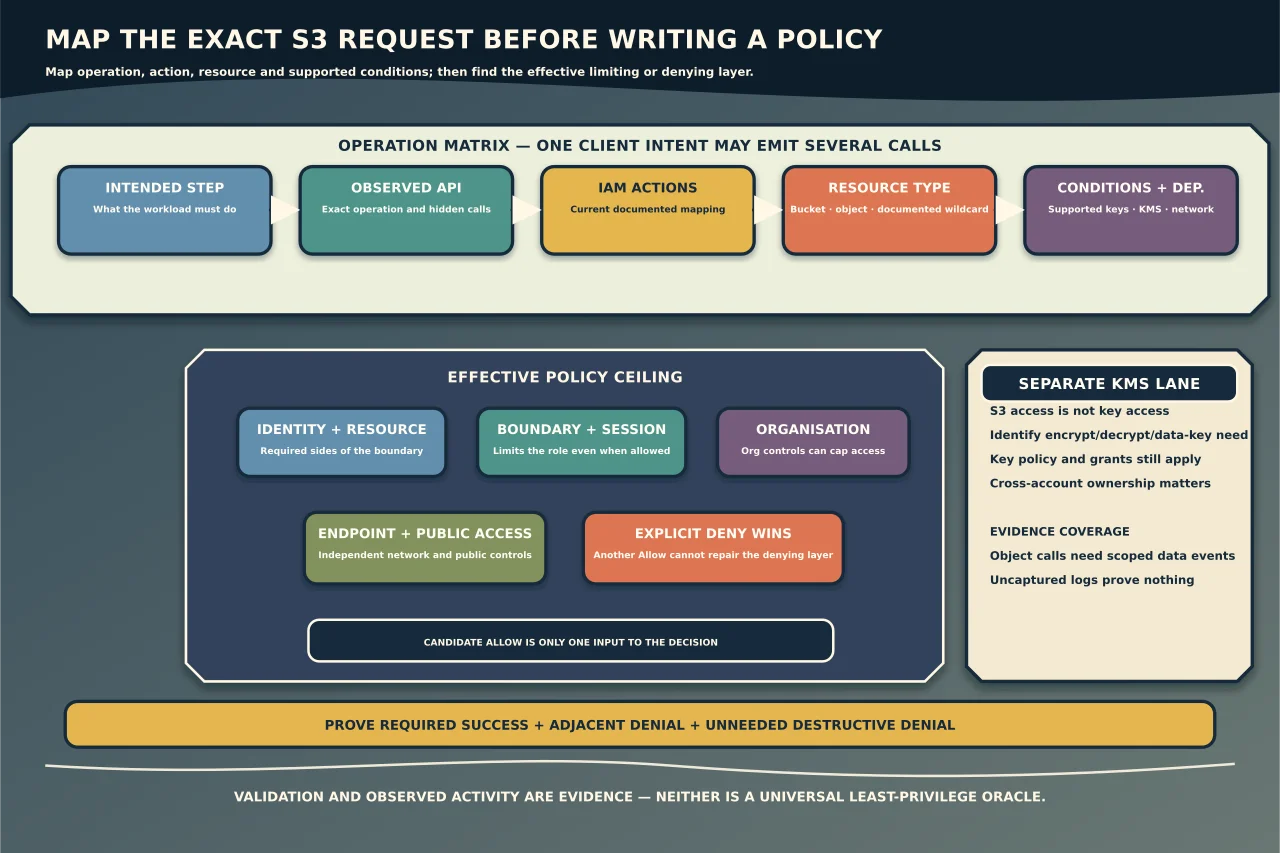
An S3 request can fail even when a policy appears to contain the obvious action. The application may call a different API first, the action may require a different resource ARN, the object may use a KMS key, or another policy layer may impose an explicit deny.
The safest response is not to attach AmazonS3FullAccess. Map the exact request, principal and resource through AWS’s current service authorization reference, then grant only the access the workload actually needs.
Start with the request, not the error message
Record:
- the application operation the user intended;
- the exact AWS API operation, if known;
- the caller’s account, role/session identity and region;
- bucket, access point and object-key scope;
- read, list, write, tag, delete or management outcome;
- encryption method and KMS key ownership;
- source network, VPC endpoint and relevant request conditions;
- the full error code, request ID and time; and
- all recent policy, bucket, key, endpoint or organisation changes.
Redact account IDs, ARNs, keys and customer data before sharing evidence. “Upload failed” is not specific enough: a client may check bucket location, list multipart uploads, initiate an upload, write parts, apply tags and complete or abort the upload.
Understand the three names involved
AWS documentation may show:
- an application or SDK method;
- an API operation such as
PutObject; and - one or more IAM actions such as
s3:PutObject.
They often resemble each other, but they are not guaranteed to map one-to-one. AWS’s Service Authorization Reference includes an operations table that maps an API operation to the IAM actions it authorises. One operation can require more than one action or an action from another service.
Use the current row for the actual API operation. Do not build a policy from an old blog post, a guessed verb or the SDK method alone.
Build an operation matrix
Before writing JSON, create a small table:
| Intended step | Observed API operation | IAM action(s) | Resource type | Conditions | Dependent service/action |
|---|---|---|---|---|---|
| Discover bucket region | Confirm from trace/docs | Confirm current mapping | Bucket or * as documented |
Relevant request conditions | None/confirm |
| List one logical area | Confirm list operation | Confirm current mapping | Bucket | Prefix/delimiter if supported | None/confirm |
| Read an object | Confirm object operation | Confirm current mapping | Object | Tags, version, network or other supported keys | KMS decrypt if applicable |
| Write an object | Confirm upload sequence | Confirm every operation | Object and any required bucket resource | Prefix, encryption, tags or transport | KMS encrypt/data-key actions if applicable |
This matrix exposes hidden calls without granting them automatically. Decide whether each call is essential, an SDK convenience that can be configured away, or an unintended discovery operation.
Bucket and object ARNs are different scopes
A bucket resource and the objects inside it are distinct:
arn:aws:s3:::example-bucket
arn:aws:s3:::example-bucket/example-prefix/*
These are fictional examples. Bucket-level actions generally use a bucket ARN; object-level actions use object ARNs. Supplying an object ARN to an action that only accepts a bucket resource—or the reverse—does not grant the intended access.
Some IAM actions do not support resource-level restriction. AWS marks this with an empty resource-type entry, in which case the statement needs Resource: "*" for that action. Keep such an action in its own statement and constrain it with supported conditions where possible. Do not use that requirement as a reason to give every S3 action a wildcard resource.
For listing, the resource can be the bucket while a condition limits returned prefixes. That is different from object read permission. A principal may be able to list names but not read objects, or read a known object without listing the bucket.
Confirm supported conditions, not imagined ones
Conditions can narrow access by request context, but only where the action and resource support the chosen key. AWS’s action and resource tables identify compatible service-specific keys; global condition keys have their own rules.
Possible controls include an approved object prefix, resource account, access point, object tags, encryption headers, source network or transport requirements. The right condition depends on the API and request.
An unsupported key can make an allow statement ineffective. A condition using IfExists, a negated operator or a multi-value set operator can also behave differently from a plain equality test. Review the data type and operator semantics rather than copying a condition block.
Follow effective policy evaluation
An IAM identity policy is only one input. Relevant layers can include:
- identity-based policies attached to the user or role;
- an S3 bucket or access-point resource policy;
- an object ownership or legacy ACL path;
- an IAM permissions boundary;
- a role session policy;
- AWS Organizations service or resource control policies;
- an S3 Block Public Access control;
- a VPC endpoint policy; and
- a KMS key policy and grants for KMS-encrypted objects.
AWS denies requests implicitly unless they are allowed through the applicable evaluation path. Any applicable explicit deny overrides an allow. Boundaries, session policies and organisation controls can cap what an identity policy grants. Cross-account requests require the necessary trust/allow on both sides of the boundary.
Therefore adding another Allow does not fix an explicit deny or a missing allow in a limiting policy. Identify the denying layer.
Treat KMS as a separate authorisation system
For objects protected with a customer-managed KMS key, S3 permission alone may be insufficient. The caller may need appropriate KMS operations, and the KMS key policy/grants must allow the access in the correct account and request context.
Do not add broad kms:*. Identify whether the operation encrypts, decrypts, creates a data key, re-encrypts or merely reads metadata, then use current S3 and KMS documentation for the exact flow. Confirm that bucket-default encryption and client-supplied headers match the intended design.
Use request evidence carefully
Useful evidence can come from:
- the application’s debug/SDK trace with secrets removed;
- the AWS error’s request and host IDs;
- CloudTrail management events;
- deliberately enabled S3 data events for object operations;
- IAM Access Analyzer policy validation;
- policy simulation where its documented limitations are acceptable; and
- access-denied details available to the caller/account.
S3 object actions are CloudTrail data events. They are not included in a trail by default, can be high volume and may cost money. Scope and retain them deliberately. Event history does not substitute for a configured data-event trail or event data store.
Absence from a log is not proof the request never happened; first confirm that the relevant event type, account, region, resource and time window were captured.
Use Access Analyzer as evidence, not an oracle
IAM Access Analyzer can validate a policy and flag syntax, security or best-practice issues. It can also generate a policy template from CloudTrail activity over a selected period.
That template reflects observed activity, not every legitimate future path. Rare recovery, month-end, multipart abort, versioning or error-handling operations may be absent. Generated resource placeholders and unsupported action-level detail still require review.
Use it to reduce and challenge a manually mapped policy, then reconcile it against the operation matrix and expected edge cases.
Write the candidate policy in separable statements
Group actions only when they share compatible resources and conditions. A reviewable design often separates:
- bucket discovery/list actions;
- object reads for one prefix;
- object writes for one prefix;
- tag or version operations;
- narrowly required account-level actions; and
- KMS access in its own policy/key-policy review.
Give each statement a meaningful Sid. Avoid wildcard actions. If an action genuinely requires Resource: "*", isolate it so reviewers can see exactly what remains broad.
Do not paste a policy containing sample account IDs or buckets into production. Substitute reviewed values through the organisation’s change process and keep secrets out of policy source, logs and tickets.
Verify both success and retained denial
Use temporary credentials for the intended role/session and run the smallest non-destructive representative checks. Confirm:
- each required operation succeeds on the intended bucket/prefix;
- read, list, write, tag, version and delete behave only as designed;
- an adjacent prefix or bucket remains denied;
- an unneeded destructive action remains denied;
- encryption and KMS behaviour matches the design;
- cross-account/session/network conditions are enforced; and
- application error handling works without hidden wildcard needs.
For writes, use a controlled test key and clean it up through an approved process. Do not test deletion against business data.
Finally, monitor real workload activity for the agreed period, update the operation matrix for legitimate missed paths, and remove temporary diagnostic access. Least privilege is maintained over time; it is not proved by one successful request.