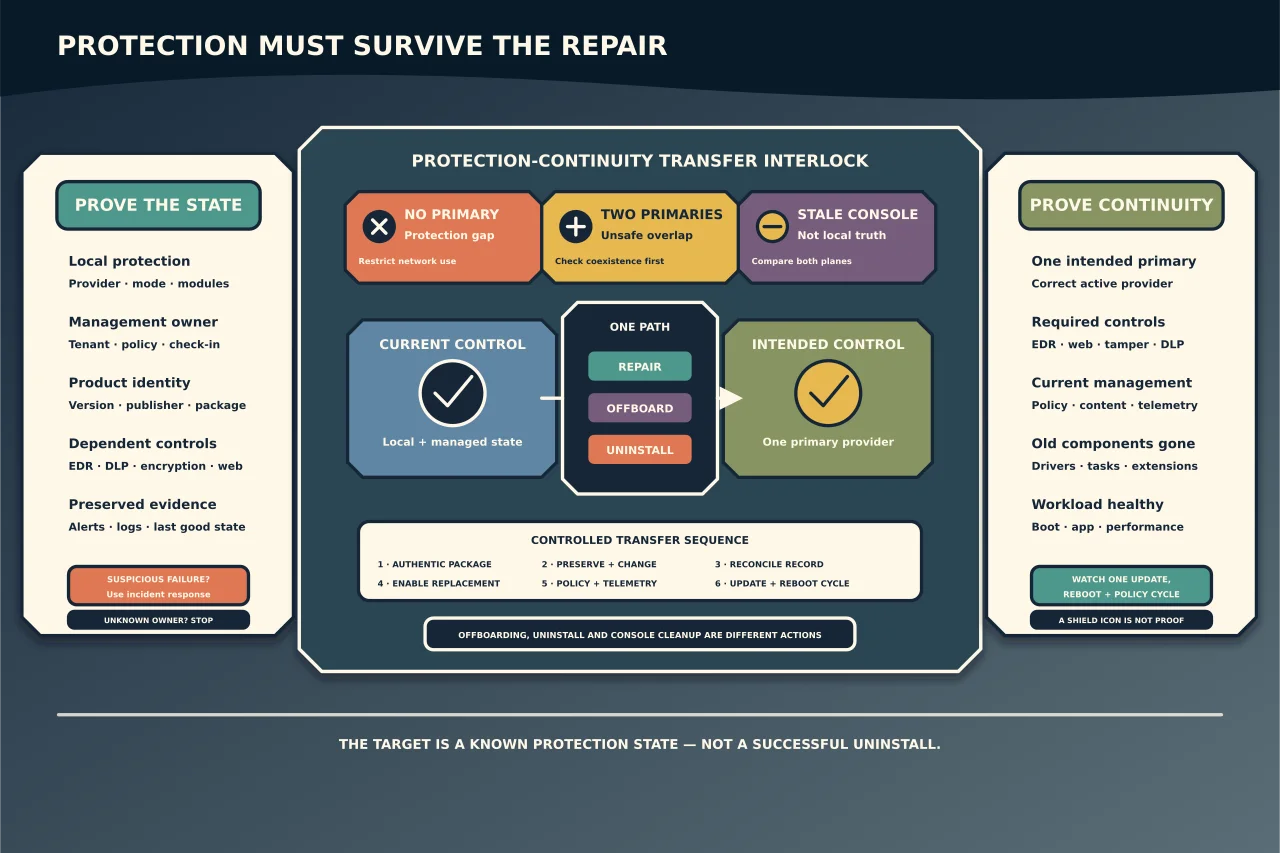
A broken endpoint-security agent creates an awkward risk: leaving it alone may mean there is no effective protection, while removing it badly may disable controls, destroy incident evidence or leave two real-time engines competing for the same files.
The right target is not “uninstalled successfully.” It is a known, supported protection state before, during and after the change.
Define what “broken” means
Separate symptoms by layer:
- Endpoint: service stopped, driver failure, corrupt update, high CPU, boot problem or local interface error.
- Protection: real-time inspection, prevention or remediation is disabled, stale or in the wrong mode.
- Management: the agent protects locally but does not receive policy or report telemetry.
- Console: the cloud/RMM record is stale, duplicated, assigned to the wrong tenant or displaying old state.
- Coexistence: two products are active, or neither is the authoritative real-time provider.
- Business application: a proven compatibility conflict exists with one workload.
An offline console icon does not prove the endpoint is unprotected, and a running service does not prove policy or telemetry works. Capture evidence from both sides.
Establish product and management ownership
Inventory the device, OS/build, security products and versions, active provider, EPP/EDR/DLP/encryption/device-control modules, management tenant, applied policy and tamper/offboarding requirements. Record installer/package source and whether the device is a workstation, server or workload with special vendor support.
Check who owns the tenant and who is authorised to disable tamper protection or remove the endpoint. Do not use leaked passwords, generic cleanup codes or tools from file-sharing sites. If ownership is unclear, stop: detaching an agent from the wrong tenant can remove an organisation’s monitoring while leaving its record and data behind.
Before changing anything, preserve relevant alerts, agent diagnostic bundle, installer logs, Windows events, protection state and last successful check-in. If the fault follows suspicious activity, treat it as possible defence evasion and use the incident-response path.
Check the Windows protection state
On Windows client, the Windows Security provider view helps identify the registered antivirus. For Microsoft Defender Antivirus, current status can also distinguish active, passive, EDR block and disabled/uninstalled states.
Microsoft documents that client and server coexistence behaviour differs. On supported clients, Defender can change state automatically when another registered product becomes primary. Windows Server may require an explicit supported configuration. Never assume that installing or removing a third-party product will produce the desired server state.
Do not disable the Windows Security app or directly delete/stop Defender, Security Center or Defender for Endpoint services to correct a display. Microsoft warns that this can create instability, stale provider reporting and an inability to reactivate protection correctly.
Prefer repair over removal when the design is still valid
If the product and tenant are correct, use its current supported repair sequence:
- Confirm OS and product support plus required free space, certificates, networking and update endpoints.
- Resolve a documented prerequisite or connectivity failure.
- Obtain the exact installer/repair package from the vendor or authorised management console and validate its signature/version.
- Use the product’s diagnostic and repair function, preserving its logs.
- Reboot when required; a pending driver replacement is not complete before restart.
- Verify local enforcement, correct policy and fresh management telemetry.
Do not copy a working agent’s program directory or registry data to another device. Agents commonly carry device and tenant identity, certificates and drivers that must be enrolled correctly.
Remove through both management and endpoint planes
When replacing or retiring the product, define the sequence in its documentation. “Offboard” and “uninstall” may solve different things: offboarding can stop cloud telemetry while leaving local components; uninstalling can remove software while leaving a stale console object, token, policy or extension.
A controlled sequence normally includes:
- export required security evidence and retention records;
- withdraw policy or put the device into an approved maintenance state;
- obtain authorised tamper-removal/offboarding material;
- offboard or release the device from its tenant as required;
- run the vendor’s supported uninstaller for that exact release;
- restart and verify drivers, services, filters, browser components and network modules are gone or deliberately retained;
- reconcile the console record and licence; and
- enable and prove the replacement protection.
Use a vendor cleanup tool only when the normal path fails and the vendor documents it for the installed product/version. Authenticate the download and understand whether it removes encryption keys, quarantine, logs, network drivers or other modules. A third-party “forced uninstaller” is not a security plan.
Maintain protection continuity
Plan the change window so a device is not returned to normal network use without an active primary control. Stage the replacement installer and policy first where the vendors support it. Understand whether the old and new engines can overlap safely; two active real-time scanners can cause performance and stability problems.
With Microsoft Defender, verify the resulting mode and effective capabilities. Passive mode is not simply a second full antivirus: Microsoft documents that several protection and remediation features differ by mode and onboarding state. If a non-Microsoft primary product is removed, confirm Defender or the replacement becomes active as designed rather than trusting the shield icon.
Restrict network access during an unavoidable gap. Do not disable every security feature “temporarily” and then depend on memory to restore it.
Handle compatibility problems with evidence
For performance or false-positive complaints, capture timing, file/process path, product event, application version and reproduction. Update both products and check their documented compatibility guidance. Measure before and after one change.
Avoid broad drive, user-profile or process exclusions. Microsoft notes that exclusions can affect multiple security capabilities, and a convenient parent-folder exclusion may create a durable attacker refuge. Prefer a narrow, documented exception with an owner, business reason, expiry/review date and compensating visibility.
Prove the final state
Success requires all of these:
- exactly one intended primary real-time antivirus state;
- expected EDR, web, behaviour, tamper, DLP and device controls functioning;
- current policy and signatures/content;
- fresh check-in and telemetry in the authoritative console;
- a harmless detection/prevention test reaches the expected local and console result;
- no unexpected old drivers, services, scheduled tasks or browser extensions;
- acceptable boot, application and performance behaviour; and
- documented rollback and evidence retention.
Watch the device through at least one update, reboot and policy cycle. Many apparent repairs fail only when the old updater returns or the replacement agent receives its full policy.
Endpoint protection is an operating system, service, driver, identity and management relationship. Repairing that relationship—with continuous protection and evidence—is safer than winning a battle against one stubborn installer.