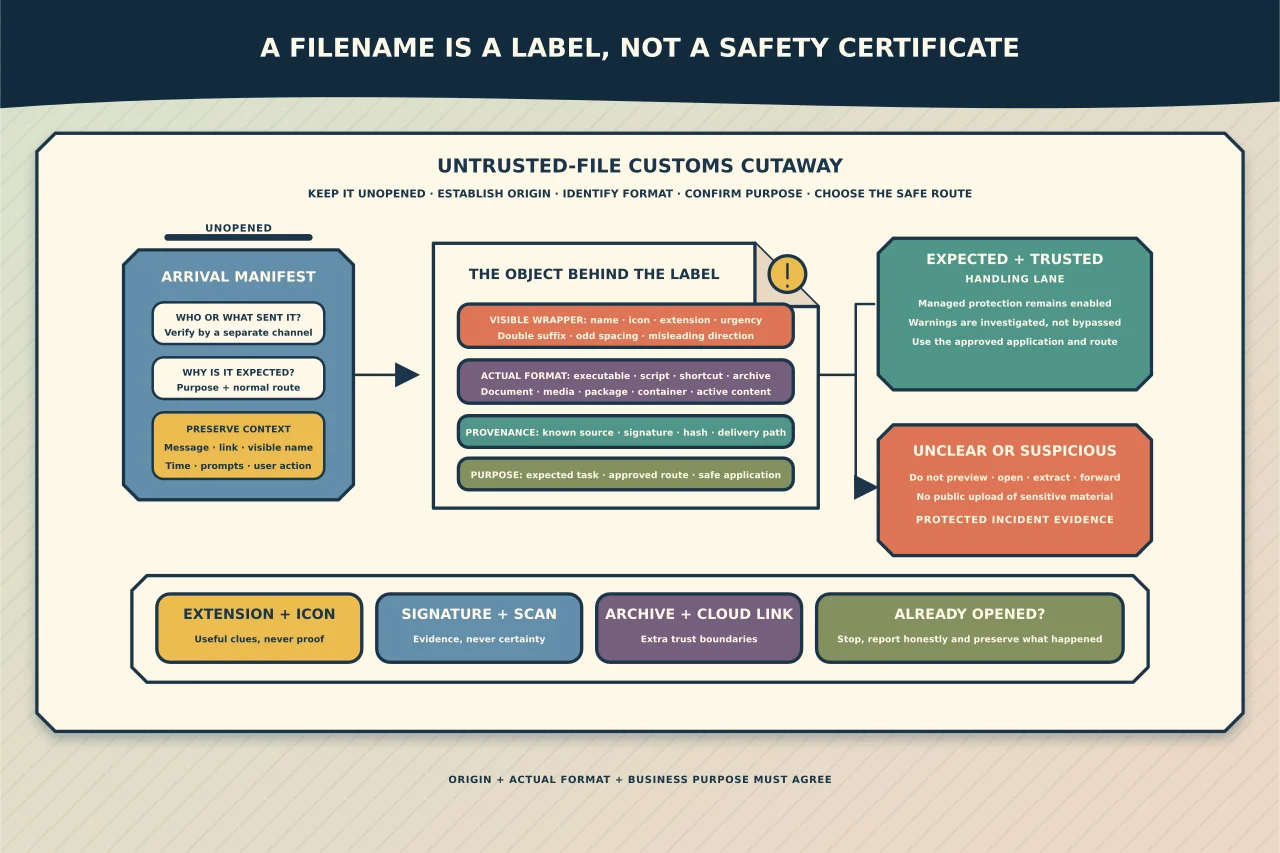
Invoice.pdf looks like a PDF. That is useful information, but it is not proof. A filename can be changed, an icon can be imitated, and a familiar document or media format can contain active content or trigger a vulnerable application.
Safe handling starts with three questions: Where did this file come from? What is it really? Why does someone need to open it?
Make the whole filename visible
Windows can display file extensions in File Explorer under View > Show > File name extensions. Keep them visible. This exposes names such as statement.pdf.exe that may otherwise appear to end at statement.pdf.
Look for:
- an unexpected second extension;
- a name with unusual spacing or punctuation near the end;
- an extension that conflicts with the claimed purpose;
- archive, shortcut, script or disk-image files presented as ordinary documents;
- a generic or unexpectedly polished icon; and
- a name that pressures you to act immediately.
Do not “fix” a suspicious file by renaming it. Microsoft notes that changing an extension changes the name association, not the underlying format. unknown.exe renamed to photo.jpg has not become a picture.
Unicode can also make text appear in an unexpected order. When a name looks odd, inspect it through an approved security tool or plain metadata view rather than relying on what the Explorer label appears to say.
Understand what an extension does—and does not—tell you
An extension helps the operating system choose an application. It is only one clue in a larger decision.
Risk is not limited to .exe. Potentially active or complex content includes:
- scripts and command files such as
.ps1,.js,.vbs,.cmdand.bat; - shortcuts such as
.lnkand internet shortcuts; - installers, libraries and packages such as
.msi,.dlland application-specific add-ins; - disk images and archives such as
.iso,.img,.zip,.7zand.rarthat can conceal another file layer; - documents with macros, embedded objects, links or templates; and
- media, font, document and compressed formats processed by complex parsers.
Conversely, an executable file can be legitimate. The question is whether this particular file, from this origin, for this purpose, is expected and verifiable.
Use provenance before technical inspection
Unexpected is the most important early signal. Verify the business context using a separate trusted channel. Do not reply to the same suspicious message or call a number contained in it.
Ask the supposed sender whether they sent the file, what system produced it and what it contains. Check whether the file arrived through the organisation’s normal document, invoicing or collaboration service. A genuine colleague whose mailbox is compromised may confirm sending a message they did not knowingly send, so context is necessary but not absolute proof.
For downloaded software, start from the vendor’s known official site or managed software catalogue. Check the publisher’s digital signature and any supplied hash through approved tooling. A valid signature identifies the signing key and whether the file changed after signing; it does not guarantee that every signed program is desirable.
Do not open a file to find out what it is
Double-clicking is execution or parser exposure, not inspection. Preview panes, thumbnail generators and archive extraction also process data, so they should not be treated as risk-free.
For a low-risk, expected business file, keep platform protection enabled, scan it using the organisation’s managed endpoint protection and pay attention to browser or SmartScreen warnings. Microsoft Defender SmartScreen uses reputation and other signals for sites and downloaded files. Do not bypass a warning merely because the sender insists the file is safe.
For an unexpected or suspicious file:
- Leave it unopened and do not forward it to colleagues.
- Preserve the original message, link and filename.
- Report it through the organisation’s security or IT channel.
- Let an authorised responder collect metadata, hashes and the sample if required.
- Analyse it only in a controlled environment designed for untrusted files.
Do not upload confidential, personal, customer or proprietary files to a public multi-scanner. Such services may retain or share samples. Use an organisation-approved private analysis route and confirm what data may be submitted.
Treat archives and cloud links as extra boundaries
An archive is packaging, not a safety seal. Password-protected archives can prevent email and endpoint services from inspecting their contents. A password supplied in the same unsolicited message does not make the archive trustworthy.
Inspect the list of contained names through approved tools before extraction. Preserve folder structure and be alert to nested archives, shortcuts and files whose visible extension changes after extraction. Do not extract suspicious material onto a normal shared drive or production endpoint.
A cloud-storage link adds identity and web-session risks. It may lead to a file, a fake sign-in page, an application-consent prompt or content that changes after the message is sent. Verify the actual domain and intended share through the normal service, and never enter credentials into a page reached from an unexpected file-delivery message.
If someone already opened it
Do not conceal the mistake. Fast reporting can materially reduce impact.
Stop interacting with the file or message. If there is a credible malware signal—security alert, unexpected process, credential prompt, disabled protection, encryption or unusual network activity—disconnect the device from wired and wireless networks and call the response contact. Do not continue changing passwords from the suspect device.
Tell the responder what was opened, when, which prompts were accepted, what credentials were entered and what happened next. Preserve the message and file. A clean antivirus scan is useful evidence but does not disprove credential theft, a browser session compromise or activity that the product did not detect.
A practical decision rule
Open a file only when its origin, purpose and handling path are all sufficiently trusted. If one remains unclear, pause and verify. The inconvenience of a separate phone call or helpdesk ticket is normally much smaller than the cost of investigating an executed payload or stolen session.
Extensions remain useful: they reveal mismatch and help route files to the right application. Their safest role is as one visible clue—not as a declaration of innocence.