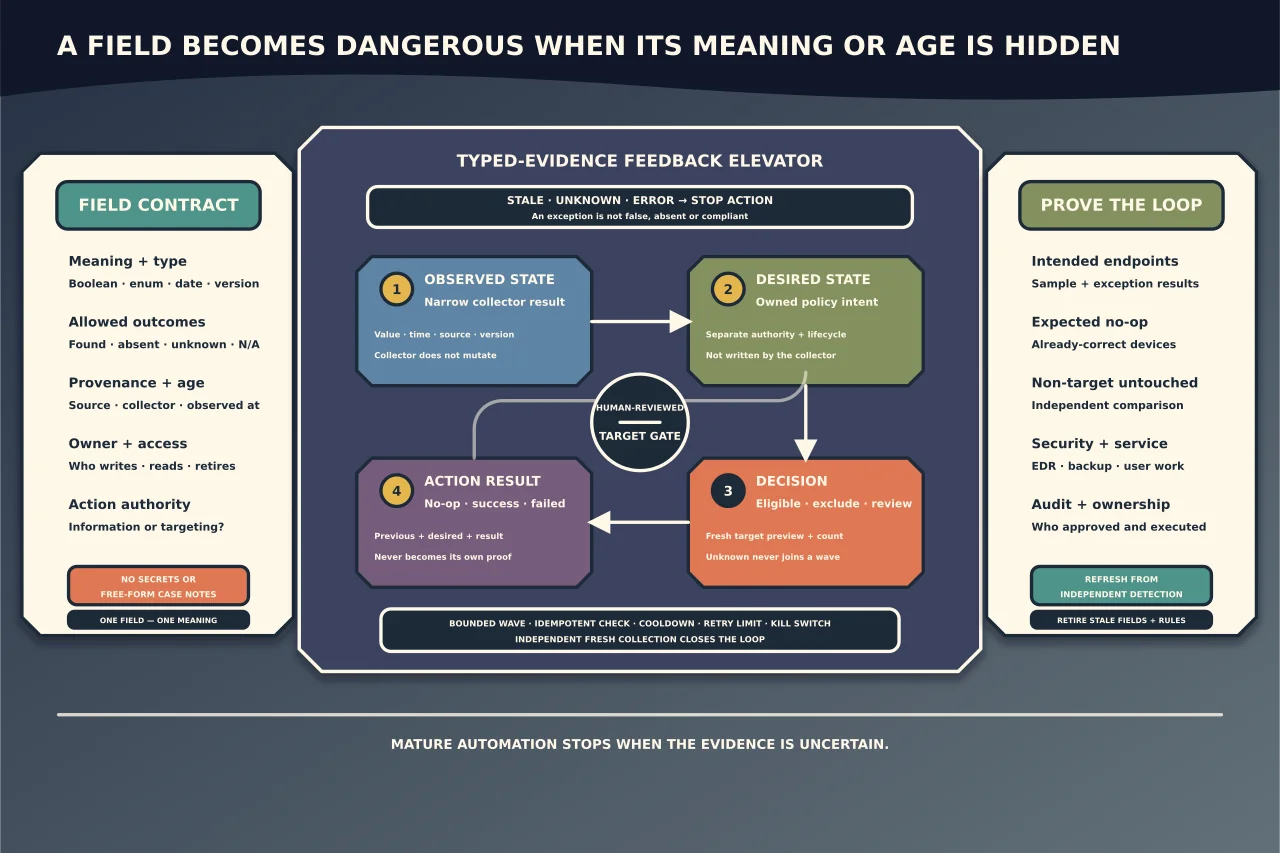
Custom attributes can turn an endpoint platform into a useful operational database—or a pile of stale strings that trigger the wrong machines.
Treat every field as a tiny contract: what it means, who sets it, when it was observed, who may read it and whether it is safe to use for action.
Start with the decision the field supports
Good examples are questions such as:
- Is this device eligible for a specific update?
- Which business owner and service depend on it?
- Is disk encryption present and reporting current?
- Was a named prerequisite detected, and at what version?
- When did the last controlled backup or agent health check succeed?
Avoid fields created “in case useful”. Each field needs an owner and retirement rule.
Define a typed schema
Record:
- stable field name and human description;
- value type: boolean, integer, date/time, enum, version, string or structured object;
- allowed values and
unknown/not-applicable/errorstates; - units and time zone;
- collector/script version and source;
- observed-at timestamp and expiry/freshness rule;
- device versus customer/site ownership;
- read/write roles and audit requirements;
- sensitivity classification; and
- whether the field may target automation or is informational only.
Do not overload one string with OK, dates, errors and technician notes. A boolean true without timestamp/provenance becomes dangerous after the environment changes.
Keep secrets and personal data out
Custom fields are often broadly visible, exported, logged and available through APIs. Never store passwords, API tokens, private keys, recovery keys or reusable credentials.
Minimise personal information. Prefer accountable business roles or internal IDs over free-form names/emails where the purpose does not require identity. Do not place ticket narratives or customer secrets in a field used for targeting.
Separate discovery from desired state
Use different fields for:
- observed state — what the endpoint collector saw;
- desired state — what policy says should be true;
- decision — eligible/not eligible/needs review; and
- action result — what an automation attempted and confirmed.
If one field is both detection and control, automation can mark its own homework. Keep authoritative policy outside the endpoint’s mutable observation where possible.
Make collectors honest
A collector should:
- validate its explicit inputs and local prerequisites;
- read the narrow source of truth;
- distinguish found, absent, not applicable and failed/unknown;
- return structured values, not prose parsing;
- record observation and collector version;
- avoid changing the endpoint; and
- never turn an exception into “false/compliant”.
An access-denied query is not evidence that the software is absent. A timed-out encryption check is not “not encrypted”.
Preview target membership
Before automation, produce a human-reviewable list with:
- customer/site and device identity;
- qualifying field values and timestamps;
- exclusions and reason;
- stale/unknown/error records;
- expected count by meaningful group; and
- business/security impact.
Compare against an independent inventory or owner expectation. A filter that unexpectedly selects every endpoint is a stop condition, not a convenient bulk action.
Stage the action
Use:
- a disposable/safe environment where meaningful;
- an internal pilot;
- a small representative customer/device ring;
- progressively larger bounded waves; and
- explicit concurrency, maintenance window and stop thresholds.
Separate detection from mutation. Support preview/WhatIf semantics for a PowerShell advanced function where practical, but remember that WhatIf only works for operations wired to ShouldProcess; it is not automatic simulation of every command or external tool.
Report outcomes structurally
Return fields such as:
- device/action/correlation ID;
- start/end time;
- previous and desired state;
- action taken or no-op reason;
- success, not-applicable, deferred or failed;
- native exit code/error category;
- reboot/user-impact state; and
- post-action verification result.
Do not call the script successful merely because it launched. If the native installer exits non-zero or the verification query fails, propagate failure/unknown distinctly.
Prevent loops and stale targeting
Define:
- minimum field freshness;
- cooldown after attempted action;
- maximum retries;
- terminal/quarantine state after repeated failure;
- idempotent check before mutation; and
- who can reset the state.
Otherwise a stale NeedsUpdate=true can reinstall the same package every schedule, or a failed collector can flip endpoints in and out of policy.
Verify business and security outcomes
After each wave confirm:
- the intended state on sampled and exception endpoints;
- expected no-op behaviour on already-correct devices;
- non-target devices remained untouched;
- monitoring, EDR, backup and user workflows remain healthy;
- field values refresh from independent detection; and
- logs/audit identify who approved and what executed.
Automation is mature when uncertainty stops action, not when every dashboard cell is green.
Maintain the data product
Review fields and automation after platform/API/schema changes, product updates, business ownership changes and incidents. Retire unused fields, remove obsolete targeting, and document migrations when changing types or meanings.
A custom attribute is useful only while people can trust its semantics and age. Build that trust before allowing it to choose where privileged code runs.