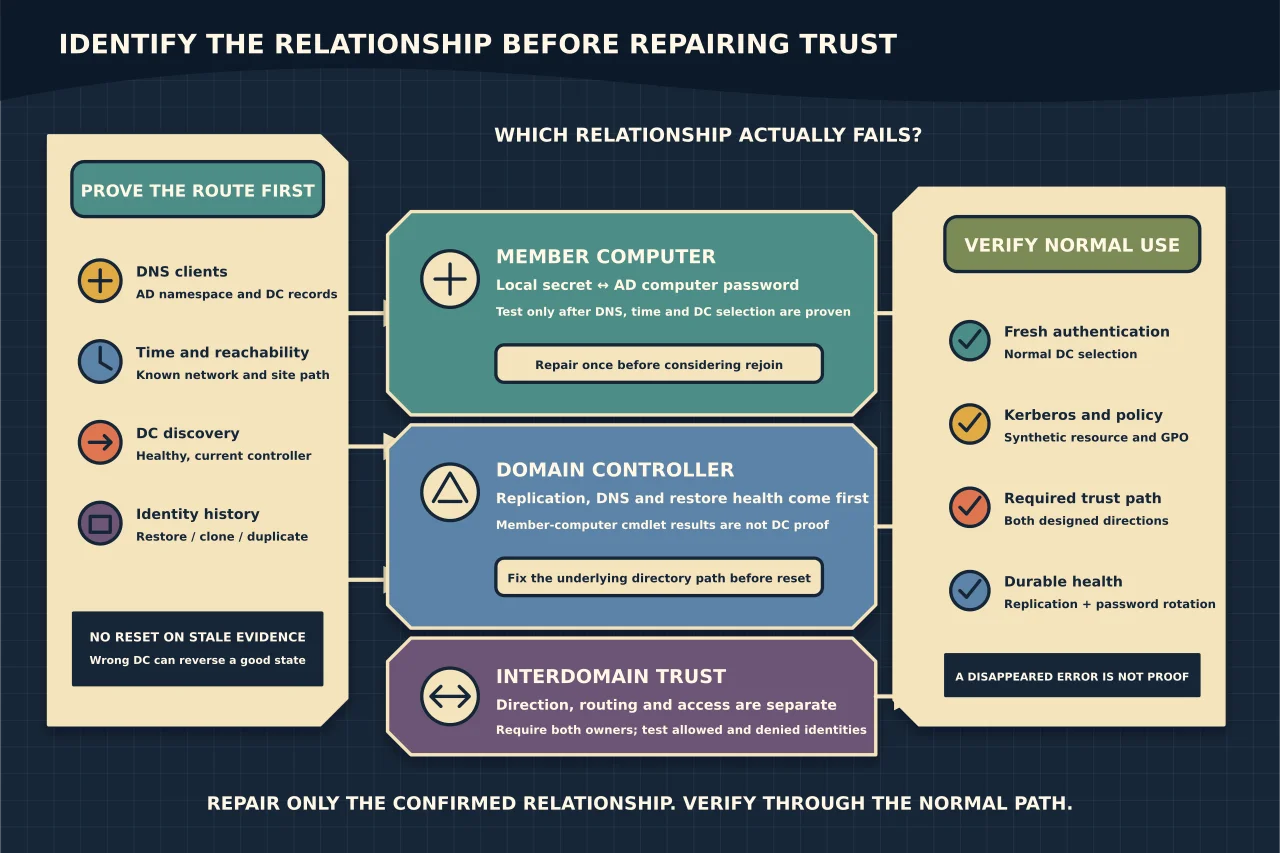
“The trust relationship between this workstation and the primary domain failed” usually means the computer and Active Directory no longer agree on their shared machine-account password. But the same user experience can begin with DNS, time, an unreachable controller or a restored/duplicated computer.
An interdomain or forest trust is a different relationship. Do not reset one because the other is broken.
Define the failing relationship
Ask which boundary fails:
- one member computer authenticating to its own domain;
- a domain controller’s secure channel;
- users crossing a domain/forest trust; or
- one application/resource with an authorisation problem.
Record when it began, recent restore/clone/rename/join work, affected sites and whether local cached sign-in still works. Preserve System/Netlogon events and the computer object’s password-last-set time before repair.
Prove DNS, time and DC location first
From the affected machine, verify its DNS clients resolve the AD namespace and locate an appropriate DC. Check time/offset and network reachability. A secure-channel test cannot be trusted if it talks to the wrong or stale controller.
Compare the local computer name, AD computer object and any duplicated VM/device identity. A machine cloned after joining can create recurring password mismatches; resetting it once hides the cause.
Test a member computer correctly
On a domain member—not a DC—Microsoft provides:
Test-ComputerSecureChannel -VerboseTrue shifts diagnosis toward DNS, user credentials, resource permissions or another trust. False supports a broken member secure channel after connectivity is proven.
Microsoft explicitly notes that this cmdlet returns false-positive errors on domain controllers. Use supported netdom/nltest evidence for DCs and fix underlying replication, DNS or restore problems before resetting a DC relationship.
Understand the two mismatch directions
The protected local LSA secret and AD computer-account password can diverge because:
- AD has a newer value than the device after rollback/reimage/long snapshot;
- the device has a newer value than the directory after AD restore or failed replication; or
- two machines use the same account/identity.
Determine which state is current from timestamps, replication and deployment history. Repairing against a stale DC can reverse a good relationship.
Repair before rejoining
For one proven member-computer mismatch, use Microsoft’s current secure-channel/password reset procedure with an explicitly selected healthy DC and an interactive, least-privileged credential. Preserve the old evidence, perform one repair, restart where required and retest.
Do not put domain passwords in command history. Do not reset the AD computer account casually: that may invalidate the existing channel without updating the local secret.
Leaving and rejoining the domain is a valid later option, but it changes more state and can complicate profiles, certificates, encryption, scheduled tasks and management identity. Use it when repair is unsupported or fails for a known reason—not as the first diagnostic step.
Diagnose interdomain/forest trust separately
For cross-domain failures, map trusting versus trusted domain, direction, transitivity, name suffix routing and selective-authentication/access rules. Test the complete trust path from the resource domain to the account domain.
Verify DNS forwarding/delegation, time, PDC/trust scanner events, secure channels and replication on both sides. A trust can validate while the user remains unauthorised to the resource; access policy is not trust health.
Resetting or recreating a trust affects both organisations and may weaken selective controls. Require owners and before-state from both sides.
Verify the outcome
After member repair, confirm secure-channel test, DC discovery, a fresh domain sign-in, Kerberos access to a synthetic resource, Group Policy and machine-password rotation over time. After trust repair, test both directions required by design, an allowed and denied identity, DNS/name-suffix routing and service authentication.
A disappeared error at one login is not durable proof. The relationship must authenticate through normal DC selection and remain healthy after replication and password rotation.