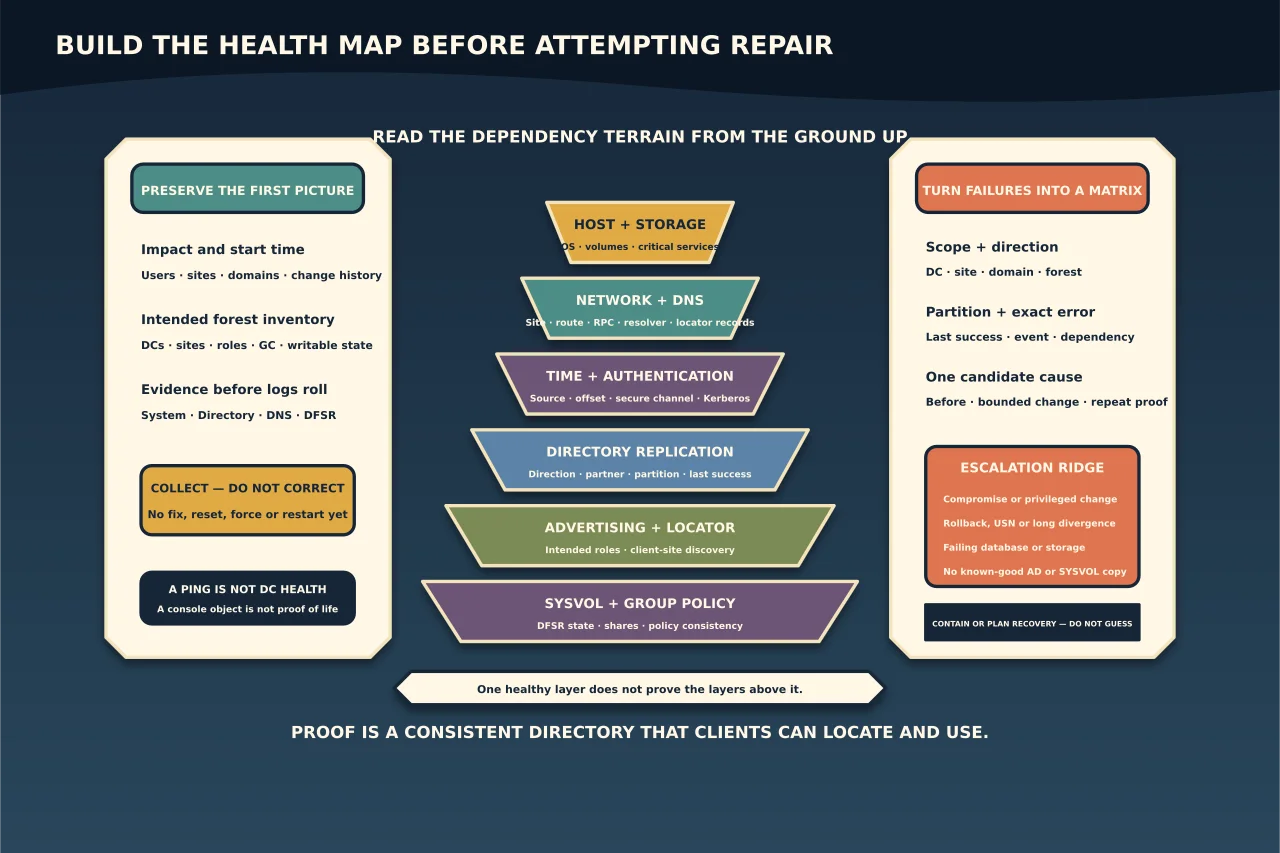
Active Directory failures rarely stay in one box. A DNS problem can look like replication failure; broken replication can leave DNS different on each controller; time drift can become Kerberos failure; SYSVOL can fail while directory replication still looks healthy.
That is why the first response should be a map, not a fix.
Start with impact and time
Write down when the problem began, who or what is affected, which sites/domains are involved and what changed beforehand. Separate symptoms such as:
- users cannot sign in;
- Group Policy is missing or stale;
- applications cannot find a domain controller;
- one DC is not advertising;
- objects differ between DCs;
- DNS answers differ; or
- administrators suspect deletion, compromise or rollback.
Record current time and time source on affected systems. Preserve relevant System, Directory Service, DNS Server and DFS Replication events before logs roll over.
Inventory the forest you think you have
From a healthy administrative workstation or DC, list domains, sites, subnets, DCs, operating systems, writable/read-only state, Global Catalog status and FSMO role holders. Compare that with monitoring and the intended design.
A server in a console is not proof it is alive. A ping response is not proof it is a functioning DC. Note controllers that are intentionally offline or in maintenance so expected failures do not bury the real one.
Capture a broad read-only baseline
Use Microsoft tools to collect, not correct:
dcdiag /e /v /f:<evidence-folder>\dcdiag.txt
repadmin /replsummary
repadmin /showrepl * /csv
Run with the minimum credentials needed for complete results and protect the output: it can expose topology, names and failure details.
Do not begin with dcdiag /fix, forced synchronisation or service restarts. First identify which DC, naming context, direction and dependency is failing.
Check the layers in dependency order
Host and storage
Confirm the OS is supported and patched, disks have headroom, NTDS/log/SYSVOL volumes are online, critical services are running and no storage, filesystem or memory errors coincide with the failure. A directory repair on failing storage is not a repair.
Network and DNS
Verify IP, subnet, site mapping, routes, firewall/RPC reachability and DNS client settings. DCs and members should use DNS that can resolve the AD namespace, not public/ISP resolvers.
Query host, LDAP/Kerberos SRV and _msdcs records from more than one AD DNS server. Compare answers rather than accepting the first response.
Time and authentication
Check time source, offset and hierarchy. Test the secure channel and Kerberos only after name resolution is credible. “Access denied” during replication may be authentication, machine-account, time or permission state—not a reason to reset everything at once.
Directory replication
Read repadmin /replsummary for breadth, then repadmin /showrepl for exact inbound partner, naming context, last success and error. Check Schema, Configuration, domain and application partitions. One successful domain-partition replication does not prove the forest has converged.
Advertising and locator
Confirm each intended DC advertises the roles it should, registers locator records and is discoverable from its client sites. Test from an affected client as well as locally on the DC.
SYSVOL and Group Policy
Confirm SYSVOL and NETLOGON shares, DFSR state/events and policy/script consistency. AD object replication and SYSVOL content replication are separate; both must work for Group Policy to be trustworthy.
Turn output into a failure matrix
For every failure record:
| Field | Question |
|---|---|
| Scope | One DC, one site, one domain or forest-wide? |
| Direction | Who is destination and who is source? |
| Partition/service | Domain, Configuration, Schema, DNS, SYSVOL or locator? |
| Last known success | Is the failure minutes old or near tombstone lifetime? |
| Exact error | What code/event and time recur? |
| Dependency evidence | DNS, time, RPC, auth, storage and topology state? |
| Candidate repair | What single cause would it address? |
| Rollback/proof | How will change and convergence be verified? |
Group repeated errors by cause. Ten replication errors caused by one dead DNS server are not ten separate repairs.
Escalate dangerous patterns early
Pause routine troubleshooting if you find:
- unexpected privileged changes or indicators of identity compromise;
- inconsistent objects that suggest unsupported snapshot rollback;
- replication gaps approaching/exceeding tombstone lifetime;
- lingering-object or invocation-ID/USN rollback evidence;
- multiple DC databases/storage volumes failing;
- no known-good SYSVOL or directory copy; or
- no restorable, trusted backup.
These require incident containment or recovery planning, not an increasingly aggressive sequence of commands.
Define proof before repair
For a narrow cause, capture before-state, change one dependency, then repeat the same evidence. Proof should include the formerly failing direction and partition, a known synthetic directory change converging through the intended topology, correct DNS answers, DC advertising and healthy SYSVOL.
A quiet event log or green dashboard alone is not convergence proof. The objective is a consistent directory that clients can locate and use, with a root cause and recovery position you can explain.