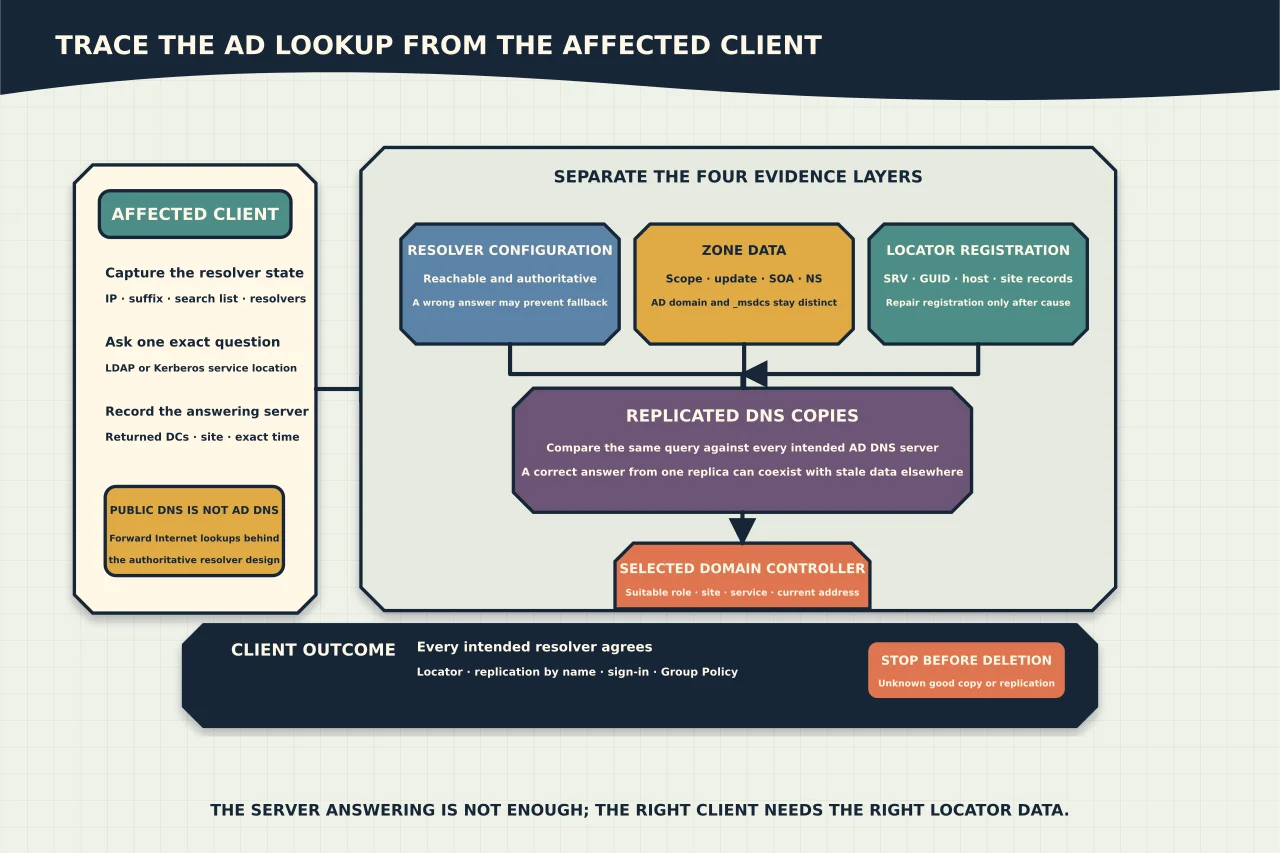
Active Directory does not discover domain controllers by guessing server names. Clients query DNS for service-location records, select a suitable controller, then use that controller for LDAP, Kerberos and other domain services.
If DNS is wrong, almost every AD symptom becomes possible. The right response is to trace the lookup—not to delete the zone and hope it grows back.
Start from an affected client
Capture the client’s IP configuration, DNS suffix/search list and DNS servers. A domain member should use resolvers that can answer the AD namespace. Public or ISP DNS belongs behind the organisation’s DNS forwarding design, not directly in the member’s resolver list.
Test:
ipconfig /all
nslookup -type=SRV _ldap._tcp.dc._msdcs.<ad-domain>
nltest /dsgetdc:<ad-domain>
Record which DNS server answered, the returned DCs and whether the selected controller fits the client’s site. Repeat against each intended AD DNS server explicitly.
Separate four kinds of DNS evidence
Resolver configuration
Can the client reach the configured servers, and are those servers authoritative or correctly forwarding/delegating the AD namespace?
Zone data
Do the AD domain and _msdcs zones exist with the intended replication scope, secure dynamic-update setting, SOA/NS records and delegation?
Locator registration
Are LDAP/Kerberos/site-specific SRV records, DC host records and GUID records present for current controllers? Netlogon registers AD locator records; the DNS Client service registers host records.
Replication
Do all DNS replicas hold the same current records? AD-integrated DNS depends on directory replication. A correct answer from one DC can coexist with stale or missing answers from another.
Run targeted Microsoft diagnostics
Use the DNS portion of dcdiag against the affected DC and then, if needed, all DCs:
dcdiag /test:dns /v /s:<dc-name> /DnsBasic /f:<evidence-file>Read the detailed failure, not just Pass or Warn. Follow with registration/dynamic-update tests appropriate to the finding. Preserve output before repair.
Check domain-controller DNS clients
Inspect ipconfig /all on every DC. Microsoft advises DNS settings that can resolve and update the AD namespace and specifically warns against pointing DCs at ISP resolvers.
Also check:
- unexpected extra NICs registering addresses;
- stale IPs after a server/network move;
- primary DNS suffix and connection registration settings;
- forwarding/root-hint behaviour for Internet names; and
- whether an authoritative but stale server prevents fallback to the alternate.
A DNS client normally switches servers when the first server does not respond—not simply because it gives a wrong answer. Redundancy without consistent data can make failures intermittent.
Repair registration only after the cause
If the zone and replication are healthy but a DC’s records are missing, compare %SystemRoot%\System32\Config\Netlogon.dns with the records expected in DNS. Correct the underlying client/zone/dynamic-update issue first.
Then use the documented registration mechanisms: ipconfig /registerdns for host registration and restart Netlogon when DC locator service records need registration. Confirm new timestamps and authoritative answers on every replica.
Do not repeatedly restart Netlogon against a zone that rejects updates or a DNS server holding stale AD data.
Diagnose stale and duplicate records
Before deleting a record, prove which live interface/server owns it and whether replication has converged. Check:
- current DC inventory and network interfaces;
- DNS aging/scavenging design;
- duplicate host records;
- old DC metadata and name-server delegations;
- DHCP ownership of client records; and
- replication of the applicable DNS partition.
Remove only records proven obsolete. A blanket zone cleanup can remove locator data for remote sites or currently unreachable controllers.
Prove the reader-visible outcome
After repair, repeat the exact client query and nltest lookup. Confirm:
- every intended DNS server returns current SRV/GUID/host answers;
- the client locates an appropriate writable/GC/KDC DC for its need;
- replication succeeds using those names;
- authentication and Group Policy work from affected sites; and
- records remain correct after normal registration and replication intervals.
DNS health is not “the server answered”. It is that the right client receives the right authoritative locator data, consistently, from every intended replica.