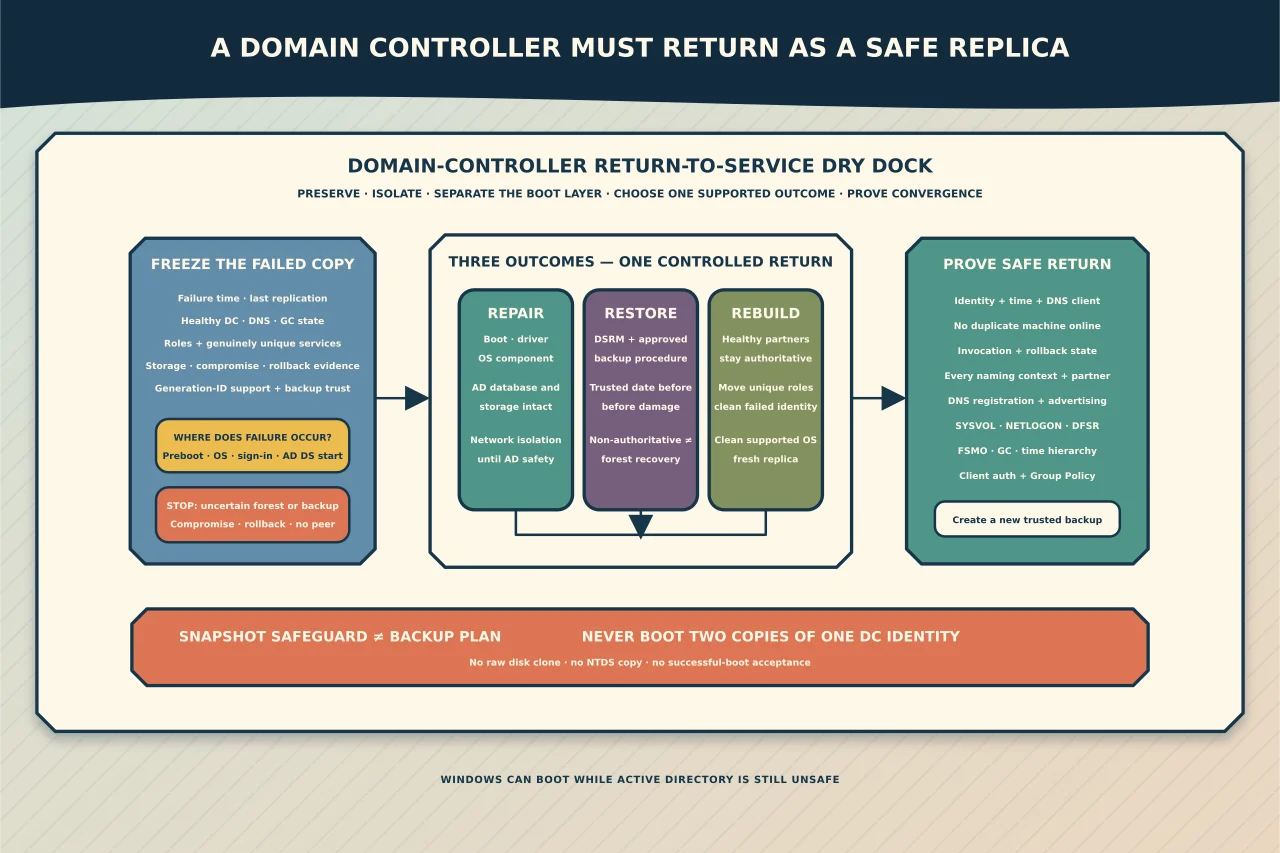
A domain controller is both a Windows server and one replica in a distributed database. A fix that makes Windows boot can still be unsafe for Active Directory.
Decide whether recovery is worth it
If other healthy writable DCs serve the domain, rebuilding the failed controller is often safer and faster than restoring its old directory state. Recover in place when it holds a genuinely unique dependency, no healthy replica exists, or an approved recovery plan requires it.
Before touching the VM/disk, record:
- failure time and last successful replication;
- other DC and DNS/GC health;
- FSMO roles and unique services;
- hypervisor and VM-Generation ID support;
- available full-server/system-state backups and their trust date;
- SYSVOL state; and
- evidence of storage failure, compromise or rollback.
Preserve the failed disks and configuration before repair attempts.
Separate the boot layer
Determine whether failure occurs before Windows, during kernel/storage boot, at sign-in, or when AD DS starts. Capture recovery-environment diagnostics, disk/volume state and System/Directory Service events.
Repairing BCD or a Windows image is an OS operation; it should not replace or rewind ntds.dit. If the storage holding the directory database/logs is unreliable, move to supported restore or rebuild rather than repeated boots.
Use DSRM for AD-aware offline work
Directory Services Restore Mode starts the DC with AD DS offline and uses the DSRM credential. It is the correct environment for supported AD system-state restore and certain recovery diagnostics.
Knowing the DSRM password is a preparedness requirement, not something to discover during the outage. Protect and test access while healthy.
Do not make unreviewed registry/database edits merely because DSRM starts. The same authority that makes recovery possible can destroy the only usable copy.
Do not treat a VM snapshot as backup
Supported Windows Server versions on a hypervisor that exposes VM-Generation ID can detect certain snapshot restores, change the directory InvocationID and discard the RID pool to prevent USN reuse. That safeguard reduces a historic virtualisation risk; it does not make arbitrary snapshot rollback a complete AD recovery plan.
Microsoft’s supported route remains an AD-aware full-server or system-state backup/restore procedure. Unsupported VHD restoration is an emergency boundary with explicit warnings, not routine practice.
Never clone/copy a DC disk and boot both identities. Never copy ntds.dit between servers.
Choose among three outcomes
Repair Windows without rewinding AD
Use when the directory database/storage is intact and the problem is limited to boot files, drivers or OS components. Keep network isolation until the restored boot state and AD safety are understood, then validate replication before normal service.
Restore from supported backup
Use DSRM and the documented backup-product procedure. Confirm backup age is inside the supported lifetime and predates corruption/compromise. A non-authoritative restore normally allows newer directory changes to replicate back from healthy partners; an authoritative/forest recovery is a different, carefully controlled scenario.
Rebuild the DC
If healthy partners exist, recover/move unique services and roles, force-remove/metadata-clean the failed identity where required, install a clean supported OS and promote it again. Rebuild avoids trusting a damaged local database and refreshes the replica from known healthy partners.
Reintroduce cautiously
Before normal network access, confirm the intended server identity, time, DNS client, patch level and no duplicate machine is online. After AD DS starts, verify:
- InvocationID/replication state and absence of rollback quarantine;
- every naming context and partner;
- DNS registration and DC advertising;
- SYSVOL/NETLOGON and DFSR;
- FSMO/GC state and time hierarchy;
- authentication and Group Policy from a client; and
- a new trusted backup.
One successful boot is not recovery. The DC must return as a safe, converging replica—or be replaced by one.