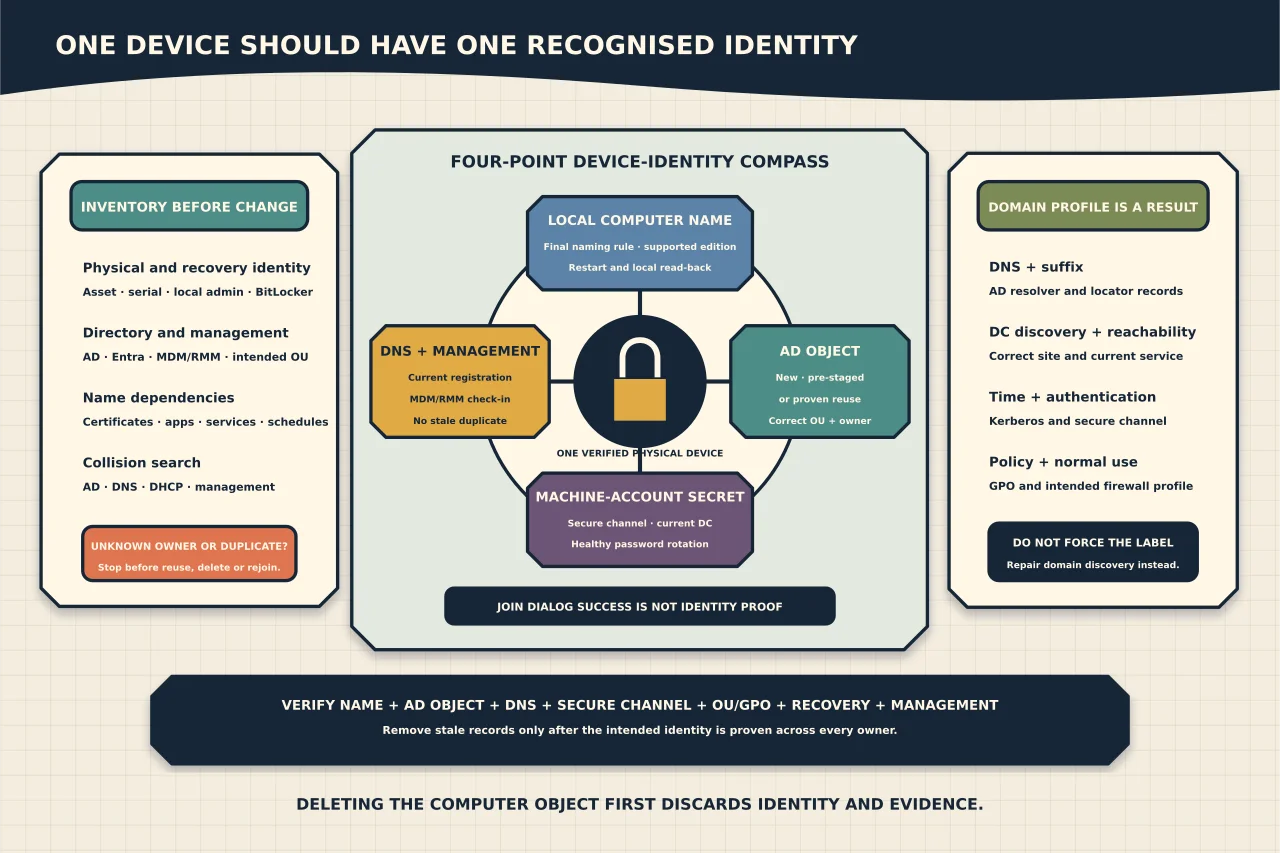
A Windows device name, its Active Directory computer object and its local machine-account secret form one identity. Rename/join errors—and a network stuck on Public—often mean those layers or domain discovery disagree.
Prepare before rename or join
Record current name, serial/asset identity, AD/Entra/management objects, BitLocker recovery, certificates, local recovery account, applications and scheduled services tied to the name. Confirm Windows edition supports domain join and DNS/time can locate/authenticate to the domain.
Choose the final naming rule and OU. Search AD, DNS, DHCP, endpoint management and inventory for collisions. Do not reuse an object merely because its display name looks right.
Choose the account path
- New account: delegate create rights only in the intended OU.
- Pre-staged account: create it with intended owner/permissions and join using the matching device/name.
- Reuse existing account: prove it belongs to this physical/logical device and that current domain-join hardening permits the operator to reuse it.
Microsoft advises explicit delegated permissions and does not recommend relying on the broad legacy “Add workstations to domain” right. Use an individually attributable join identity, not Domain Admin for convenience.
Rename and join as controlled state changes
Avoid renaming and domain rejoining blindly in the same step during troubleshooting. If already domain joined, prove secure-channel health and understand management/certificate/application effects before rename.
After the supported rename/join command or UI reports success, restart as required and verify the device uses the intended AD object, OU and name. Check DNS registration, management check-in and duplicate/stale records.
Diagnose join failure by stage
Capture NetSetup/Windows events and classify:
- domain name/DC cannot be found: DNS, suffix, site, SRV or network;
- clock/authentication failure: time/Kerberos/credential;
- access/account reuse denied: delegated rights and hardened reuse ownership;
- name/account collision: wrong pre-staged object or duplicate device;
- restart succeeds but sign-in fails: secure channel, DNS, user/profile or DC availability.
Do not delete the computer object before reading why reuse was rejected. Deletion discards identity/evidence and may break another device.
Repair a proven secure-channel problem first
For a member computer, use Test-ComputerSecureChannel -Verbose after DNS/DC reachability is correct. If the machine password is mismatched, use Microsoft’s supported repair/reset path against a healthy current DC.
The cmdlet is not valid evidence for a domain controller. Rejoining is a later recovery path, not the default first response.
Understand DomainAuthenticated network profiles
Windows identifies a domain network when Network Location Awareness can discover and authenticate to the joined domain through the active connection. Administrators do not set DomainAuthenticated manually like Public/Private.
If a known office network appears Public:
- confirm the device is genuinely domain joined and its secure channel works;
- verify AD DNS servers and suffix;
- test DC Locator/SRV records and reachability;
- check time/Kerberos and NLA-related events/services; and
- reconnect/restart the affected network/service only after evidence capture.
Forcing a registry/category value can apply the wrong firewall policy while domain discovery remains broken. Fix discovery.
Verify the whole identity
After rename/join/repair, confirm:
- local name, AD computer object and DNS agree;
- secure channel and fresh domain sign-in succeed;
- correct OU/GPO and DomainAuthenticated firewall profile apply;
- BitLocker key, certificates and management identity remain associated correctly;
- applications/services using the former name are updated;
- stale AD/DNS/DHCP/management objects are removed only after proof; and
- machine-password rotation remains healthy.
The job is complete when one device has one recognised identity across directory, network and management—not when the join dialog says welcome.