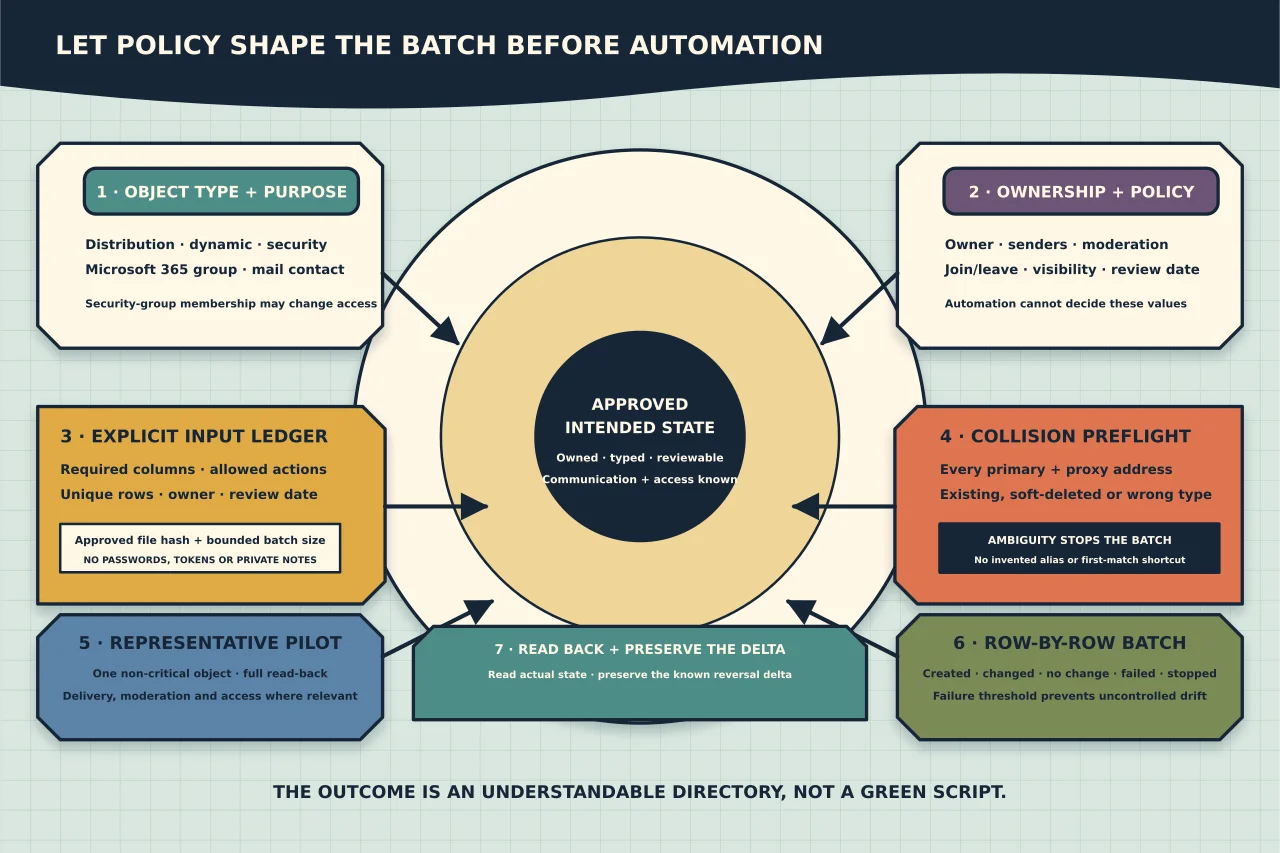
A CSV can create hundreds of Exchange Online objects quickly. It cannot decide whether those objects should exist, who owns them, or who should be allowed to send to them.
Bulk administration is safe only when the policy decisions happen before the script. Start by defining the object, outcome and lifecycle. Then automate the repetitive part.
Choose the correct object type
Several Microsoft 365 objects can have email addresses, but they are not substitutes for one another:
- Distribution list: distributes messages to a defined set of recipients. It needs owners and delivery-management decisions.
- Dynamic distribution group: calculates recipients from a rule when mail is sent. Its usefulness depends on reliable directory attributes and tested recipient filters.
- Mail-enabled security group: can distribute mail and grant access to resources. Membership changes may therefore alter both communication and authorisation.
- Microsoft 365 group: provides a shared collaboration identity and resources such as a mailbox and SharePoint site. It is more than a mailing list.
- Mail contact: represents an external recipient in the organisation’s directory. It does not create a mailbox in the tenant.
Write the intended use before choosing. If the request is “make a group for the project,” establish whether it needs collaboration resources, security permissions, external senders, moderation or only message distribution.
Define ownership and policy
Every group or imported contact population should have an accountable owner and review date. Before a bulk job, decide:
- who may request additions and removals;
- whether owners can manage membership themselves;
- whether senders outside the organisation are accepted;
- whether messages require moderation;
- whether users may join or leave;
- whether the group appears in address lists;
- whether nested groups are permitted;
- whether membership grants access to anything; and
- when stale objects will be reviewed or removed.
For external contacts, record the legitimate source of the address and the business reason for making it directory-visible. An imported address book becomes personal-data inventory that needs stewardship.
Use an explicit input schema
Do not try to represent every operation in one clever spreadsheet. Separate object creation from membership changes when possible.
A contact file might contain:
Name,ExternalEmailAddress,Alias,Owner,ReviewDate
Alex Example,alex@external.example,alex.external,owner@example.com,2027-03-01
A membership file might contain:
Group,Member,Action,Ticket
field-team@example.com,alex@example.com,Add,CHANGE-1001
field-team@example.com,casey@example.com,Remove,CHANGE-1001
Do not put passwords, access tokens or private notes in the CSV. Store the approved input in a controlled location because it may contain personal information.
Validate before connecting
Treat input validation as part of the change, not optional polish. Check:
- required columns are present;
- required values are not blank;
- email addresses parse as addresses;
- aliases fit the organisation’s naming rules;
- actions are from a small allowed set;
- rows are unique;
- the approved batch size is not exceeded;
- owners resolve to the intended identities;
- review dates are valid; and
- the file has not changed since approval.
Then connect to Exchange Online and inspect collisions. A proposed SMTP address may already belong to a mailbox, group, contact or soft-deleted object. Search both primary and proxy addresses; do not assume that a missing display name means the address is free.
$address = 'alex@external.example'
Get-Recipient -ResultSize Unlimited -Filter "EmailAddresses -eq 'smtp:$address'" |
    Format-List DisplayName,RecipientTypeDetails,PrimarySmtpAddress,EmailAddresses
Use Microsoft’s current filtering syntax and test it in your environment. For large directories, design efficient scoped lookups rather than downloading everything for every row.
Build a plan, not only commands
Create a preflight result for every proposed row:
| Row | Intended result | Preflight state | Planned action |
|---|---|---|---|
| Contact A | External contact exists with approved address | Address unused | Create |
| Member B | Member belongs to field-team | Already a member | No change |
| Member C | Member removed from security group | Group also grants access | Stop for access-owner approval |
No-change rows are useful results. A rerunnable process should not fail or duplicate objects merely because part of the desired state already exists.
Stop the batch when a collision is ambiguous, the target type is wrong, an owner is missing, or a mail-enabled security group would change access without the correct approval.
Pilot one representative object
Create or change one non-critical object first. For a distribution group, inspect the current New-DistributionGroup documentation and specify deliberate values rather than accepting accidental defaults.
After creation, read back at least:
RecipientTypeDetails;- primary SMTP address and all proxy addresses;
- owners;
- join and leave restrictions;
- external sender acceptance;
- moderation settings;
- address-list visibility; and
- membership count.
If the group is mail-enabled security, also prove whether the membership changed effective resource access.
Run the approved batch with per-row results
Use a loop that records Created, Changed, No change, Failed or Stopped for every input row. Catch individual errors but set a failure threshold: continuing past widespread permission, throttling or schema failures can make the final state harder to reconcile.
Support preview mode where the cmdlets implement -WhatIf, but do not confuse a preview with validation. Keep the exact script version, input-file hash, operator, tenant, start/end times and results.
Do not silently “fix” bad input by generating a new alias or selecting the first matching object. Return the row for correction.
Read back the complete intended state
After the batch, query Exchange Online again rather than trusting success messages. Compare:
- every intended object against its actual type and addresses;
- every group against its actual owner and policy;
- every intended membership against the observed membership; and
- every failed or skipped row against an explicit follow-up decision.
For groups that receive mail, send a controlled message from permitted and, where relevant, prohibited sender paths. Confirm delivery, rejection or moderation behaves as designed. Avoid testing with sensitive content.
Make the job reversible
Before removing contacts, groups or large memberships, export the current state. For additions, keep a transaction list that identifies only the objects created by this run. A reversal should target that known delta—not broadly delete everything that matches today’s CSV.
Deletion has secondary effects. A group may be referenced by transport rules, permissions, applications or people outside the immediate request. Search and obtain the required ownership approval before removing it.
Review what automation cannot decide
At completion, ask:
- Are all new objects owned?
- Are external addresses still legitimate and necessary?
- Are group delivery and moderation settings intentional?
- Did any security-group membership alter access?
- Is the authoritative membership source clear?
- Is there a review and retirement date?
- Can another administrator explain and rerun the process?
The goal is not a perfectly green script output. It is a directory whose objects, permissions and communication paths remain understandable after the spreadsheet and technician are gone.