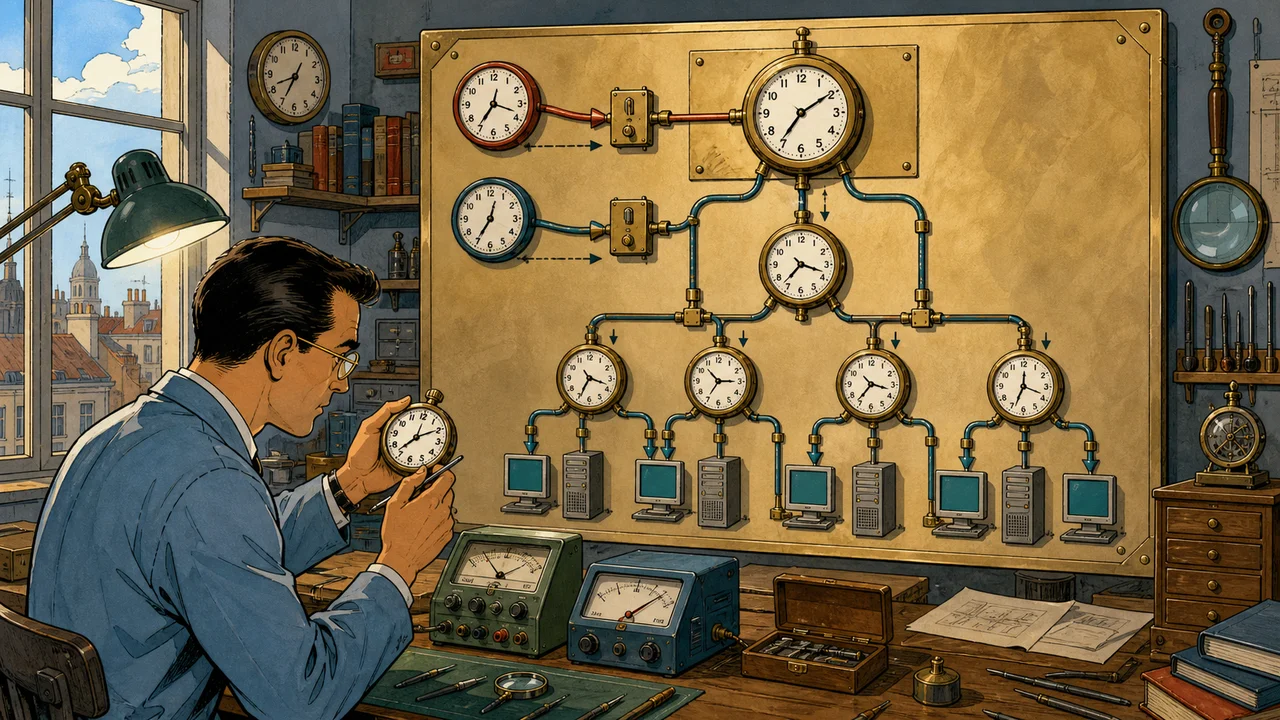
Windows domain time should be boring. Users should not have to think about it, administrators should be able to name its authority, and every important clock should have an observable path back to an approved reference.
When that path is wrong, the symptoms rarely say “time hierarchy.” They look like intermittent sign-in failures, Kerberos errors, certificates that appear early or expired, confusing event sequences, scheduled work at the wrong moment, or logs that cannot be correlated during an incident.
The tempting repair is a copied w32tm command on whichever domain controller is closest. That can hide the problem, configure the wrong PDC emulator, or create competing authorities.
Find the forest-root PDC emulator, prove its effective source and policy, then repair the hierarchy from the top. A successful resync is an event; a stable, monitored chain is the outcome.
The operating model in one minute
Microsoft’s Windows Time architecture uses the Active Directory Domain Services hierarchy to select time sources for domain-joined computers.
In the normal design:
- the PDC emulator in the forest-root domain obtains time from one or more approved sources outside the domain hierarchy;
- PDC emulators in child domains follow the parent-domain hierarchy;
- other domain controllers follow a suitable domain source;
- member servers and workstations follow the domain hierarchy; and
- source-selection rules prevent circular time paths.
There is one PDC emulator in each domain, but only the PDC emulator in the forest-root domain normally anchors the forest to external time. “Configure the PDC” is therefore incomplete advice.
Domain-hierarchy time is also different from a manually configured external NTP relationship. Windows can authenticate domain time through its domain mechanisms; an ordinary internet NTP exchange is not authenticated in the same way. Source approval, network control, diversity, monitoring, and operational ownership still matter.
Stop and classify the situation
Do not change time configuration until you know which of these you are handling:
| Situation | First objective |
|---|---|
| Routine design or planned correction | Map the hierarchy, effective policy, approved peers, and rollback state |
| Small but persistent offset | Compare sources, latency, reachability, events, and configuration before correction |
| Large or sudden offset | Treat it as an incident; protect authentication and time-sensitive workloads before forcing change |
| PDC emulator unavailable | Restore or deliberately transfer/seize the role under the AD recovery plan; do not improvise a second authority |
| One member computer is wrong | Diagnose its domain discovery, local policy, service, source, and network path before touching the root PDC |
| Many systems drift together | Trace the hierarchy upward and inspect the authoritative source and policy |
A large time jump can affect authentication, event ordering, certificates, databases, replication-dependent investigation, scheduled tasks, and applications that assume time never moves backwards. Establish an incident owner and application impact before forcing a resync, restarting services, or manually setting a domain controller’s clock.
Build a trustworthy change record
Record the ticket, requester, operator, reason, affected forest and domains, maintenance window, application owner, expected result, rollback trigger, and evidence location.
Use redacted names in shared notes. Domain names, IP addresses, upstream-source names, site topology, screenshots, and event exports can expose infrastructure details. Keep full operational evidence in the authorised system, not in a public article, chat transcript, or code repository.
Before the change, capture:
- forest-root domain and every child domain;
- the current PDC emulator for each domain;
- operating-system version and patch level of relevant DCs;
- physical or virtual placement and hypervisor platform;
- current Windows Time service state and startup behaviour;
- effective source, stratum, last successful sync, poll interval, phase offset, and leap indicator;
- configured peers and peer state;
- effective Windows Time configuration, including whether values came from policy;
- relevant Group Policy objects and their scope, security filtering, and precedence;
- DNS resolution and UDP 123 reachability to every approved upstream source;
- firewall, NAT, routing, proxy, and provider controls on that path;
- recent Time-Service, System, Kerberos, Netlogon, directory, and hypervisor events; and
- at least several time-offset samples, not just one.
This is both diagnostic evidence and rollback evidence. “Set it back to default” is not a rollback plan when the previous state is unknown.
Find the real role holders
Microsoft confirms that the PDC emulator, RID master, and infrastructure master are per-domain roles. A forest with three domains has three PDC emulators. Use an authorised administrative session and query the current directory, rather than relying on a diagram, server name, old ticket, or memory.
If the Active Directory PowerShell module is available, this read-only query returns the role holder for the current domain:
Get-ADDomain | Select-Object DNSRoot, PDCEmulatorQuery each domain explicitly where the forest has more than one:
Get-ADDomain -Identity "child.example.invalid" |
    Select-Object DNSRoot, ParentDomain, PDCEmulator
Replace the example with the verified domain. Do not copy .invalid into a change command.
Microsoft also documents graphical and directory-service methods in Find servers that hold FSMO roles. Cross-check the result against current AD replication health. A role recorded in the directory is not proof that its holder is reachable, healthy, or has completed the replication required to operate correctly.
Do not transfer or seize the PDC role merely to make a time command convenient. Role movement is a separate AD change with separate prerequisites, impact, rollback, and approval.
Read the effective Windows Time state
Microsoft describes w32tm as the preferred command-line tool for configuring, monitoring, and troubleshooting Windows Time. Run read-only queries first on the forest-root PDC, then on representative child PDCs, other DCs, and members.
w32tm /query /source
w32tm /query /status /verbose
w32tm /query /configuration
w32tm /query /peers
Interpret them together:
- Source shows the source currently selected. A local CMOS clock, hypervisor provider, unexpected server, or free-running state needs explanation.
- Status shows operational evidence such as stratum, last successful sync, poll interval, and phase-offset data.
- Configuration shows effective Windows Time settings and identifies policy-derived values. This matters because policy can override a local
w32tm /configchange. - Peers shows configured peer state; configuration alone does not prove reachability or selection.
Record the complete output securely. Do not reduce it to “source looks right.” A correctly named source with stale last-sync evidence or unstable offset is not healthy.
Inspect the Microsoft-Windows-Time-Service operational and System logs for source changes, discovery failures, rejected samples, large corrections, service restarts, or a loss of synchronisation. Correlate event time cautiously when the clock itself is suspect.
Prove the path, not only the endpoint
From suitable authorised systems, sample the hierarchy and the proposed upstream sources.
w32tm /monitor /domain:example.invalid
w32tm /stripchart /computer:ntp-a.example.invalid /dataonly /samples:10
The monitor command helps compare domain-controller offsets in the named domain. The strip chart samples the difference to one specified source. These are observations, not automatic certification of the source.
Check:
- whether names resolve to the intended addresses;
- whether the path reaches the intended service over UDP 123;
- whether return traffic survives firewall and NAT handling;
- whether offsets are plausible and reasonably stable across repeated samples;
- whether different upstream names actually terminate on independent infrastructure;
- whether latency and path asymmetry undermine the required accuracy; and
- whether a provider limits client count, polling behaviour, geography, or usage.
Microsoft’s high-accuracy configuration guidance makes network latency and the entire topology part of an accuracy claim. Do not promise sub-millisecond, one-millisecond, or regulatory accuracy from a generic domain-time recipe. Those targets require an explicit design, supported systems, suitable reference clocks, measured network conditions, and ongoing proof.
If w32tm /resync reports that no time data was available, Microsoft lists source-name resolution, UDP 123 reachability, response validity, and configuration among the areas to investigate in its no-time-data troubleshooting article. Repeating /resync is not a network test.
Choose upstream sources deliberately
The forest-root PDC emulator should use sources approved by the organisation. Depending on the environment, these might be managed internal NTP appliances, a regulated time service, or reputable external providers permitted by policy.
The design decision should record:
- who operates each source and under what terms;
- source quality, stratum, and traceability required by the organisation;
- geographic and network diversity;
- whether apparently different names share one provider or failure domain;
- DNS, anycast, address-change, firewall, and monitoring implications;
- the security limitations of ordinary NTP and any compensating controls;
- permitted polling rates and provider abuse policy;
- primary and degraded-mode behaviour; and
- ownership when every upstream source fails.
Microsoft’s current tools guidance recommends three or more time peers for Windows Server 2016 and later. With only two peers, it recommends marking one as fallback-only so an equal split does not leave selection ambiguous. More names are not useful if they all depend on the same resolver, route, provider, or appliance.
Do not publish or paste a random public-pool hostname into a production command. The placeholder names below deliberately cannot resolve.
Decide whether policy or local configuration owns the setting
Windows Time settings can come from local configuration or Group Policy. Microsoft’s Windows Time tools and settings reference warns that policy-defined values overwrite pre-existing W32Time registry values.
Before changing anything, answer:
- Is an existing domain GPO already configuring Windows Time?
- Does it target all domain controllers when it should target only the forest-root role holder?
- Is the scope tied to a server name, an organisational unit, a security group, or a WMI filter?
- What happens after the PDC emulator role moves?
- Will a local command be overwritten at the next policy refresh?
- Is the change auditable and maintainable by the next administrator?
A hard-coded GPO attached to every domain controller can turn every DC into a manual NTP client. A server-specific GPO can become stale after a role transfer. A local command can disappear under effective policy. The durable design needs an explicit ownership and role-movement process, not only a working command today.
Direct registry editing is not the default route in this guide. Microsoft publishes registry values for reference and troubleshooting but warns that invalid edits are not validated before application. Use a controlled, supported management method and preserve the previous effective state.
Configure the forest-root PDC in a controlled change
The following command is an explained template, not permission to run it. It applies only after you have verified that the target is the healthy forest-root PDC emulator, selected approved sources, captured rollback evidence, confirmed policy ownership, checked reachability, assessed current offset, and obtained the change approval required by your organisation.
w32tm /config `
  /manualpeerlist:"ntp-a.example.invalid,0x8 ntp-b.example.invalid,0x8 ntp-c.example.invalid,0x8" `
  /syncfromflags:manual `
  /reliable:yes `
  /update
What it expresses:
/manualpeerlistsupplies a space-separated list of approved peers;0x8requests client-mode association, which is important when communicating with some non-Windows NTP servers;/syncfromflags:manualtells this computer to use the manually specified peers;/reliable:yesadvertises this DC as a reliable time source to the domain hierarchy; and/updatenotifies the service of the configuration change.
Peer flags are bit values and can be combined. Do not add 0x1 for special polling or change polling intervals without understanding provider limits and the supported Windows behaviour. If an approved two-peer design is unavoidable, document Microsoft’s fallback-only guidance and validate the combined flags in the isolated lab before production use.
Do not run the template on every PDC emulator. A child-domain PDC normally follows its parent-domain path. Do not run it on members. Do not mark an unhealthy or disconnected DC reliable merely to make a status field look correct.
Whether the service must be restarted, rediscovery requested, or policy refreshed depends on the chosen management method and current state. Each of those actions can create impact and must appear in the change plan. Avoid bundling them with unrelated service, registry, firewall, or role changes.
Keep child domains, other DCs, and members in the hierarchy
Domain-joined computers normally use the NT5DS domain hierarchy. If a child PDC, other DC, or member has been left on a manual source, first establish why. A temporary incident workaround, old role ownership, image template, hypervisor setting, or mis-scoped policy may be the real cause.
Microsoft documents this configuration command for returning a domain member to hierarchy-based discovery:
w32tm /config /syncfromflags:domhier /updateIt is still a change. Use it only on the verified target, after recording current state and confirming that domain discovery, DNS, secure channels, sites, replication, and upstream DC time are healthy. Resetting a client to a broken hierarchy does not fix the hierarchy.
After a PDC role transfer, verify both the new and former role holders. The new forest-root PDC needs the approved authoritative design; the former holder should no longer remain an unintended manual reliable source. Role transfer, policy retargeting, time-source change, and verification should be one coordinated runbook even if they require distinct approvals.
Treat virtualised domain controllers as two time systems
A virtual DC can see Windows Time inside the guest and a time-synchronisation provider from the hypervisor. If both are active without a deliberate design, the clock may appear to change source, snap after host events, or conceal a broken domain path.
Microsoft’s virtualised domain-controller guidance for Hyper-V recommends disabling host-to-guest time synchronisation for VMs configured as DCs so they synchronise through the domain hierarchy. Its general Hyper-V Integration Services reference also explains that the time integration service synchronises a guest with the physical host.
Do not turn off every virtualisation time feature across an estate based on one sentence. Before changing a DC:
- identify the hypervisor and supported vendor guidance for that version;
- inspect guest integration-service and provider state;
- verify what corrects time during boot, restore, resume, migration, and large skew;
- confirm the physical hosts’ own trustworthy time path;
- identify clustering, backup, replication, and management dependencies;
- test the exact behaviour with an isolated representative DC; and
- record both guest and host rollback.
The forest-root PDC must not ultimately depend on a Hyper-V host whose own time loops back through that same domain authority.
Handle a large offset as an incident
If the authoritative DC or many domain members are minutes or hours wrong, pause the routine runbook.
- establish a trustworthy reference using an independent approved instrument or source;
- determine which systems are wrong and in which direction;
- preserve relevant logs and configuration before their timelines become harder to interpret;
- identify authentication, certificate, database, virtualisation, backup, replication, cluster, and scheduled-work dependencies;
- stop uncontrolled manual corrections by multiple administrators;
- decide with service owners whether the correction may be slewed, stepped, staged, or requires downtime; and
- define recovery and validation before changing the clock.
Do not expand maximum positive or negative phase-correction values merely to make a huge offset disappear. Microsoft’s authoritative-time configuration article warns that correction boundaries affect how Windows accepts large changes. A refusal to correct can be a safety signal, not a nuisance.
If the forest-root PDC is failed or isolated, use the AD disaster-recovery and FSMO procedure. Creating a second “temporary” reliable PDC without resolving role ownership can make the time path less trustworthy.
Verify the result in layers
Immediately after the controlled change, repeat the read-only evidence:
w32tm /query /source
w32tm /query /status /verbose
w32tm /query /configuration
w32tm /query /peers
Then verify all of these:
Authority
- the current forest-root PDC is the intended target;
- only the intended systems use manual approved upstream sources;
- child-domain PDCs, other DCs, and members show the expected hierarchy; and
- no former role holder or hypervisor path remains a competing authority.
Quality
- peers resolve and respond over the intended network path;
- a valid upstream source is selected;
- last-successful-sync evidence advances;
- stratum and leap state are plausible;
- repeated offsets converge and remain inside the agreed operating threshold; and
- failover behaves as designed when tested safely.
Persistence
- effective configuration still matches after policy refresh;
- service restart behaviour is understood and accepted;
- the source remains correct after a representative reboot or hypervisor lifecycle event in the isolated test; and
- a PDC role-movement test has a documented way to retarget the authority.
Service outcome
- representative DCs and members follow the intended source chain;
- relevant Time-Service errors stop without hiding new warnings;
- authentication and other affected services recover; and
- monitoring sees the new source, offset, and last-sync state.
One clean w32tm /resync response proves only that one request completed. It does not prove source diversity, hierarchy, accuracy over time, policy persistence, failover, or application health.
Roll back from evidence, not from memory
Define rollback triggers before execution. Examples include selecting an unapproved source, increasing or oscillating offset, loss of sync across DCs, application failure, policy conflict, hypervisor contention, or unexpected event volume.
Rollback should:
- stop further rollout;
- preserve post-change evidence;
- restore the captured peer list, source mode, reliability state, policy, and integration setting through the same controlled management path;
- refresh or restart only what the recorded method requires;
- verify the restored source and hierarchy across representative systems; and
- keep the incident open if the previous state was itself unhealthy.
Do not “roll back” to an arbitrary default or a local clock. If the old configuration was the reason for the change, restoration may reduce immediate impact without resolving the original risk.
Monitor the time service as a chain
A useful monitor answers more than “is W32Time running?” Track, at minimum:
- current source and unexpected source changes;
- time since last successful synchronisation;
- offset and its trend against the agreed threshold;
- stratum, leap state, and peer reachability;
- forest-root PDC role-holder changes;
- Time-Service warnings and errors;
- Group Policy drift;
- virtualisation integration drift for DC guests; and
- failure of primary and alternate upstream paths.
Set alert thresholds from application and security requirements, not from a generic blog value. A manufacturing system, financial timestamp, distributed database, identity service, and ordinary office workstation may have very different tolerance and evidence requirements.
Assign an owner and a review cycle. Upstream services change addresses and terms; firewalls change; DC roles move; virtual machines migrate; policies are edited; and monitoring credentials expire. Time remains trustworthy only when the operating process follows the topology.
Escalation evidence pack
When the hierarchy still fails, give the next engineer a compact, privacy-reviewed pack:
- impact, scope, first-known time, and last-known-good time;
- forest/domain topology and current PDC role holders;
- whether each relevant DC is physical or virtual and its host-time design;
w32tmsource, verbose status, configuration, and peer output;- monitor and strip-chart samples with timestamps;
- effective Group Policy evidence;
- DNS resolution and UDP 123 path results;
- relevant Time-Service, System, authentication, and hypervisor events;
- changes attempted, exact outcomes, and current rollback state; and
- an independently observed trustworthy reference.
Redact public copies, but do not remove the identifiers required by the authorised resolver. “Time sync broken” is not enough to distinguish a bad peer, wrong role holder, blocked return path, stale policy, virtualisation conflict, large-offset safety limit, or failing local oscillator.
The standard to aim for
A sound Windows domain time service has one explainable authority, approved upstream references, a non-circular domain hierarchy, measured quality, controlled virtualisation interaction, maintainable policy, tested failover, useful alerts, and a rollback record.
The PDC emulator matters, but it is not a magic clock. Its health depends on the role being correctly identified, its sources being trustworthy and reachable, the rest of the forest following the intended chain, and operators continuing to verify what the system is actually doing.
That is the difference between making w32tm return success and operating time as part of identity infrastructure.