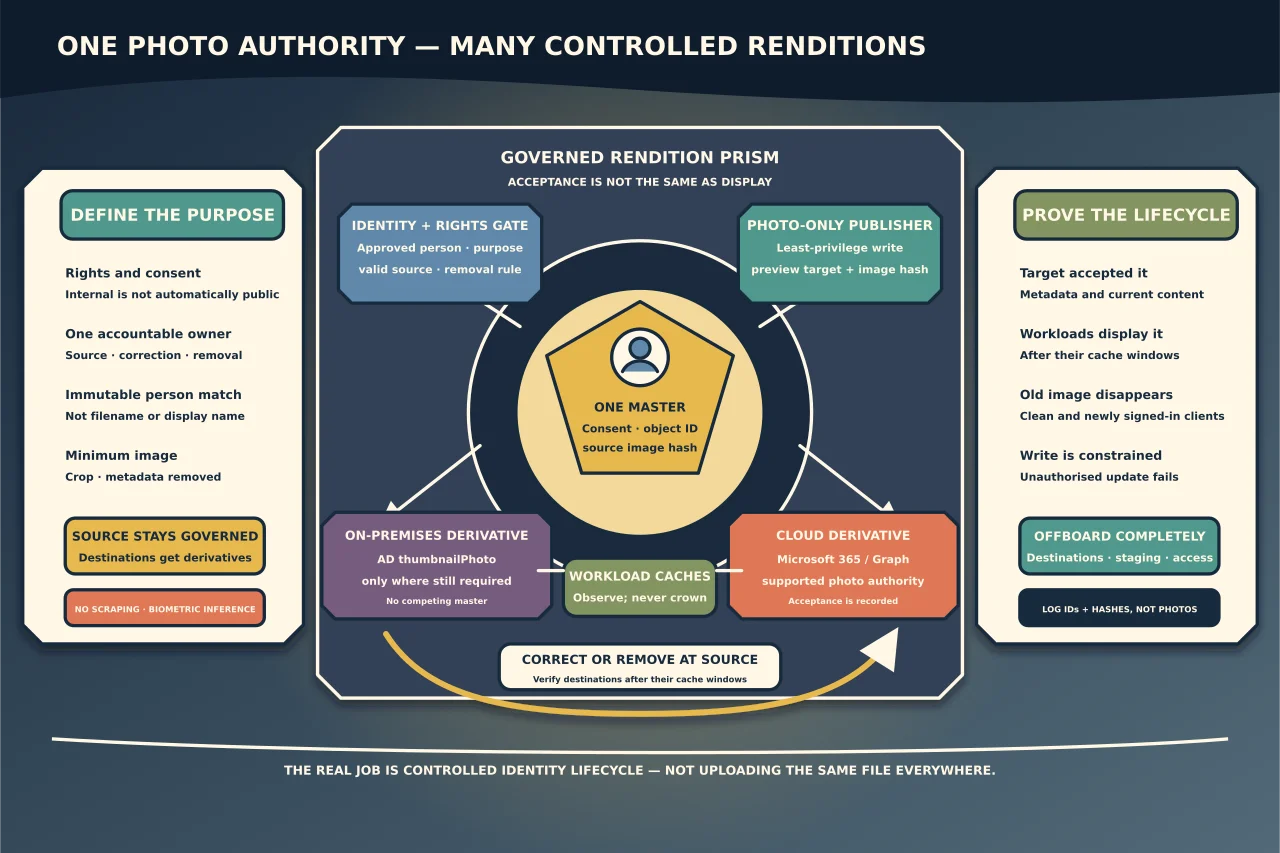
A profile photo looks like one field. In a hybrid Microsoft environment it may exist as a low-resolution AD attribute, a higher-resolution cloud profile photo and cached copies in several applications. Uploading the same image everywhere creates competing authorities and an unpleasant offboarding problem.
Decide why photos exist
Record the purpose: directory recognition, collaboration, building access card, website or something else. Collect the minimum image needed for that purpose with an explicit owner, lawful/consensual process, retention period and correction/removal route.
Do not reuse HR or identity-document photos automatically. Do not infer that an employee consented to public or cross-tenant display because a photo exists internally.
Choose one source of truth
Possible authorities include an approved HR/media library, on-premises AD or Microsoft 365. Define which system accepts new images and which merely receives a derivative.
For cloud-first collaboration, Microsoft 365 supports admin/user controls and Microsoft Graph profile-photo APIs. For legacy/on-prem applications, AD’s thumbnailPhoto may still be required. A hybrid design can publish controlled renditions to both, but it still needs one master and one update workflow.
Prepare the image
Require a supported image type, sensible square crop, neutral framing and no embedded location/device metadata. Keep the source image in the governed system; create only the renditions required by destinations.
Use an immutable user/object ID to match the person. Filenames, display names and email addresses can change or collide.
Use least-privilege publication
Microsoft Graph exposes dedicated profile-photo permissions. Prefer the least-privileged delegated or application permission that fits the approved bulk workflow instead of broad user-directory write access.
For AD, delegate write access only to the photo attribute on the intended users/OU. The publishing identity should not also manage groups, passwords or unrelated attributes.
Run a preview that maps source identity, target object and image hash before upload. Reject missing/duplicate matches and files outside policy.
Understand propagation
Microsoft 365 workloads and clients cache photos differently. A successful Graph/API response proves the service accepted the binary; it does not prove Teams, Outlook, Entra pages and every device display it immediately.
Record the expected propagation window and test exact destinations. Avoid repeatedly uploading during cache delay—doing so obscures which version should appear.
In hybrid environments, verify whether on-premises thumbnailPhoto still synchronises or whether cloud photo controls are authoritative for the workloads in use. Do not assume that changing one automatically overwrites the other in every direction.
Verify replacement and removal
For a pilot user, confirm:
- source consent/approval and immutable identity match;
- target photo metadata/content after upload;
- correct image in agreed workloads after cache windows;
- old image no longer appears on clean/new clients;
- unauthorised user/application cannot update it; and
- removal/offboarding clears every governed destination.
Keep only image hash, object ID, action, time and result in operational logs—not another copy of the photo.
Handle corrections and offboarding
Provide a simple route for a person to correct or withdraw a photo where policy allows. On departure, follow the agreed retention/removal rule and consider shared contact, Teams/chat cache and external collaboration visibility.
Disable the publishing application’s permissions when the workflow is retired. Inventory and remove staging folders, CSV mappings and cached exports.
The technical task is uploading an image. The real task is ensuring the right person controls a current image, every destination receives it through a known path and old copies do not become an unmanaged identity archive.