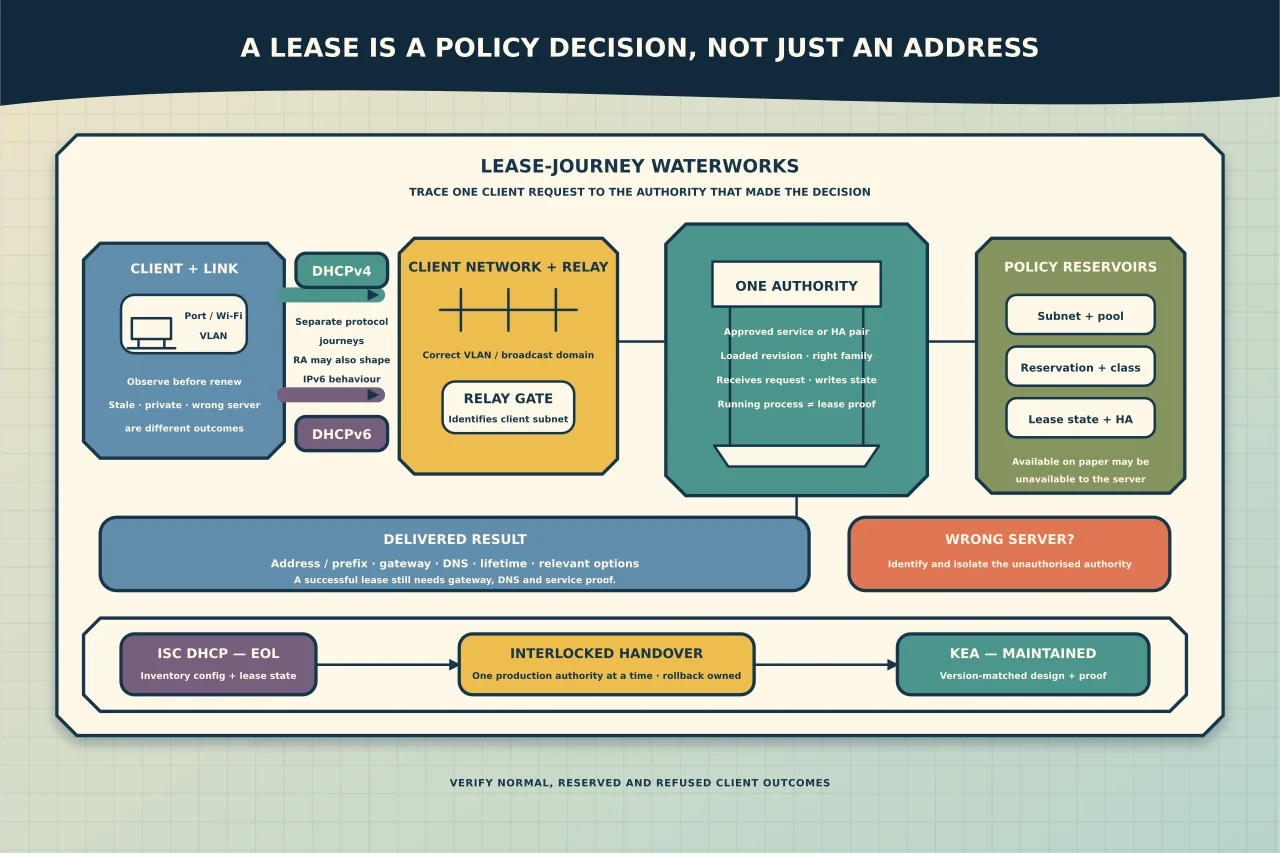
DHCP looks simple when it works: a device joins a network and receives an address. Behind that moment are policy decisions about which clients belong on which subnet, what addresses they may use, where their gateway and DNS services live, how long a lease remains valid and which server owns the truth.
When any of those decisions is wrong, “restart DHCP” is rarely a sufficient diagnosis.
What a DHCP service actually decides
A DHCP service can supply more than an address. Depending on the protocol and environment, it may provide a prefix or address, lease lifetime, default gateway, DNS servers, domain or search information and application-specific options. Reservations may bind a stable assignment to a client identifier, while dynamic pools serve other clients.
Keep these concepts separate:
- Subnet: the network on which the client belongs.
- Pool: the range available for dynamic allocation.
- Reservation: a deliberate assignment or client-specific policy.
- Option: supporting network information delivered to a client.
- Lease: the server’s record that an address is assigned for a period.
- Relay: a network device that forwards DHCP messages between a client network and a server elsewhere.
- Authoritative service: the approved server or HA pair responsible for that network.
DHCP and DNS often integrate, but they are not the same service. A client can receive a valid address and still fail name resolution. A DNS record can exist even though the device has no usable lease.
DHCPv4 and DHCPv6 are related, not interchangeable
DHCPv4 normally participates in allocating IPv4 addresses and common IPv4 options. DHCPv6 operates separately and may provide stateful IPv6 addresses or other IPv6 configuration. IPv6 hosts can also use router advertisements for default-router and addressing information.
Do not assume that fixing DHCPv4 fixes IPv6, or that an IPv6 address proves the IPv4 service is healthy. Record which protocol, client and network are failing.
Start diagnosis with one lease journey
Define the case precisely:
This authorised client on this switch port, WLAN or VLAN requested configuration at this time and received this result. This comparable client or network behaved differently.
Capture:
- client network and VLAN;
- client identifier or MAC address where appropriate;
- DHCPv4, DHCPv6 or both;
- assigned address, prefix, gateway, DNS and lease time;
- server identifier shown to the client;
- expected subnet, pool or reservation;
- relay/gateway address and path;
- server log timestamp and decision; and
- recent changes to switching, relays, scopes, HA, packages or configuration.
An automatic private IPv4 address, a stale address retained by the client and a lease from the wrong server are three different outcomes. Preserve the observed configuration before forcing a renewal.
Trace the path in order
1. Client and local link
Confirm that the client is actually attached to the intended Ethernet or Wi-Fi network and that its interface is configured to use the expected automatic or managed settings. A static address or stale virtual adapter can imitate DHCP failure.
2. VLAN and broadcast domain
DHCP discovery begins on the local client network. Confirm the switch port, wireless network and VLAN assignment. A device on the wrong VLAN can receive a perfectly valid lease—from the wrong scope.
3. Relay path
When the server is not on the client subnet, a relay or gateway normally forwards the request. Check that the relay targets the approved server and identifies the client network correctly. If every scope on one remote site fails while local scopes work, the relay path deserves attention before the server package.
4. Server selection and configuration
Establish which service instance received the request and which subnet definition matched it. Confirm that the requested family is enabled, the interface or socket arrangement is correct for the deployment, and the configuration loaded is the revision you intended—not merely the file you edited.
5. Pool, reservation and lease decision
Check pool utilisation, exclusions, reservation matching, duplicate identifiers, abandoned/declined leases and any client-class policy. A pool with many addresses on paper may have none that the server considers available.
6. Delivered options and downstream services
A successful lease does not prove usable connectivity. Compare the delivered gateway, prefix, DNS servers and relevant options with the design. Then test the gateway, DNS and intended service separately.
Diagnose the common symptom patterns
No client on one VLAN receives a lease
Inspect VLAN membership, relay configuration, firewall path and the matching subnet declaration. Do not expand a pool until you know requests reach the intended server.
Some clients work and others do not
Compare identifiers, reservation/class policy, pool availability and client protocol behaviour. Look for a pattern by device type, switch, WLAN, client class or time—not just a list of failures.
Clients receive the wrong gateway or DNS service
Identify the server that supplied the lease. A rogue, forgotten or overlapping DHCP service may answer faster than the approved one. Do not solve that by teaching clients to ignore bad options; remove or isolate the unauthorised service.
Renewals work but new leases fail
Existing clients may retain valid leases while a pool is exhausted, a server has stopped, or new discovery traffic cannot cross a relay. Compare renewal and first-lease paths.
Service is running but no requests appear
“Active” only proves a process state. Confirm that it loaded the intended configuration, is listening as designed, can write lease state and receives requests on the expected path.
Choose a maintained platform deliberately
ISC DHCP is end-of-life. That does not mean every existing server stopped working in 2022, but it does mean organisations should not treat an unmaintained code line as the long-term answer.
ISC’s maintained successor is Kea. Kea separates DHCPv4, DHCPv6 and dynamic-DNS functions, uses JSON configuration, and can use file or database-backed data depending on the design. High availability, hooks, APIs and Stork monitoring are capabilities to evaluate—not boxes every small deployment must tick.
Choose the current stable or stable LTS line according to support horizon, distribution packaging, required features and organisational update policy. Do not deploy a development release to production because its version number is higher.
Plan an ISC DHCP-to-Kea migration
Inventory the existing service
Record every active subnet, pool, exclusion, reservation, option, client class, relay target, lease store, dynamic-DNS relationship, failover/HA peer, monitoring check and administrative dependency. Identify unused historical configuration rather than automatically carrying it forward.
Design the target behaviour
For every client network, state:
- which server or HA pair is authoritative;
- what pool and reservations apply;
- which gateway and DNS information clients should receive;
- how relays identify the subnet;
- how lease state is stored and protected;
- what monitoring detects exhaustion, service failure and HA degradation; and
- how rollback avoids competing servers.
Translate, then review manually
Migration tooling can accelerate conversion, but a syntactically translated configuration is not proof of equivalent behaviour. Compare each material policy and option with the version-matched Kea ARM. Remove unsupported or obsolete assumptions rather than disguising them.
Validate away from the production broadcast domain
Parse and review the target configuration using the supported mechanism for that exact release. Exercise representative reservation, dynamic-pool, option and exclusion decisions in an isolated or otherwise controlled path. Keep real production identifiers and secrets out of portable test artefacts.
Cut over one authority at a time
Use a maintenance window. Preserve the old configuration and lease data, but prevent the old and new services from answering the same production clients without an explicitly designed coexistence method. Update relay targets or service placement as planned, then observe actual client requests and server decisions.
Verify success and refusal
Confirm that:
- a normal authorised client receives the correct address and options;
- a reserved client receives the intended policy;
- an excluded or unauthorised case does not consume a normal lease;
- renewals and new leases both work;
- all remote relay paths reach the correct authority;
- pool utilisation and HA/service health are visible; and
- DNS behaviour, where integrated, is correct and auditable.
Operate DHCP as a service, not a forgotten daemon
Monitor service state, configuration-load failures, pool utilisation, lease-store health, HA role and relay reachability. Back up the configuration and any database or lease data required for recovery, then document how those artefacts are restored for the actual architecture.
Keep an owner and review date for every scope. Retire old reservations and options deliberately. DHCP failures often reveal years of undocumented network change; good administration prevents the next outage by making the assignment policy visible before it is urgent.