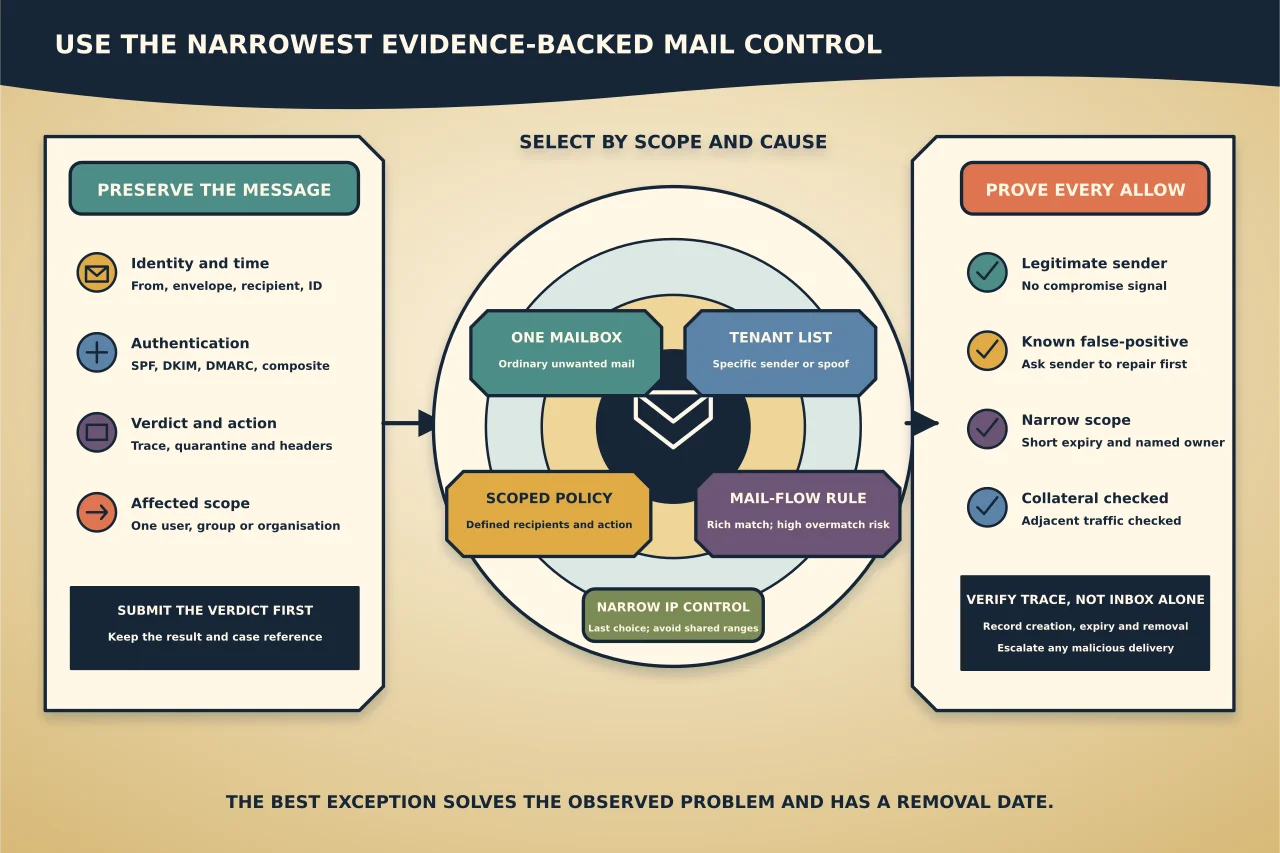
An unwanted message does not automatically justify blocking its domain. A wanted message in quarantine does not automatically justify allowing its domain.
Exchange Online and Microsoft Defender provide several controls at different scopes. Choose from the evidence and the number of people affected.
Preserve a representative message
For a false negative, use the original received message or an authorised submission—not a forwarded screenshot that has lost useful headers. For a false positive, preserve the quarantine or trace evidence and the expected sender relationship.
Record:
- sender visible in From;
- envelope sender where available;
- recipient and time;
- message ID;
- SPF, DKIM, DMARC and composite authentication results;
- filtering verdict and action;
- URLs, attachments or impersonation indicators; and
- number of users affected.
Protect personal data and message content. Do not publish headers unredacted.
Submit the verdict to Microsoft
Microsoft recommends submitting questionable messages, senders, files or URLs for analysis. Submission can improve platform detection and, in some workflows, create an appropriate temporary allow or block.
Do this before inventing a broad permanent exception. Record the submission result and case/reference where appropriate.
Pick the narrowest control
One mailbox
For ordinary unwanted mail affecting one person, the user’s Outlook Blocked Senders list may be sufficient. It affects that mailbox rather than the whole organisation.
This is not an incident-response control for phishing across the tenant. Preserve and submit malicious messages through the authorised security route.
Tenant Allow/Block List
Microsoft currently recommends the Tenant Allow/Block List as the preferred organisation-wide block route for specific domains, addresses and spoofed senders. Its exact effect depends on entry type and the applicable filtering policy.
An organisation-wide block can also affect outbound messages to the blocked address or domain. Assess business relationships before use.
Anti-spam policy
Use a scoped anti-spam policy when a defined recipient group needs a deliberate filtering action or sender/domain treatment. Confirm policy priority, included recipients, exclusions and the action for each verdict.
Mail-flow rule
Mail-flow rules can match richer conditions, but their flexibility makes overmatching easy. Use test mode where suitable, narrowly define conditions/exceptions, and inspect trace before enforcement. Do not create a transport rule to bypass filtering for an entire domain.
Connection filter
IP blocking is a coarse last choice. Shared cloud and consumer services can serve many unrelated senders, and provider IP ranges change. Microsoft advises keeping IP blocks narrow and avoiding large shared ranges.
Treat allows as higher risk than blocks
An allow can override a protection verdict and deliver something Microsoft would otherwise stop. Before allowing, confirm:
- the sender and sending service are legitimate;
- SPF, DKIM and DMARC are configured appropriately;
- the message is not an impersonation or compromised-account case;
- the exact filter causing the false positive is known;
- the narrowest identifier and recipient scope are used; and
- the entry has a short expiry and accountable owner.
Do not allow a whole domain because one marketing platform sent one wanted message poorly. Ask the sender to repair authentication or content first.
Some malware and high-confidence phishing outcomes cannot be overridden by ordinary allow mechanisms. Do not weaken separate protections to force delivery.
Understand sender identities
Email can contain different envelope and visible From addresses. A control that evaluates only the visible From domain may not behave like one that evaluates the sending IP, envelope sender, DKIM domain or spoofed identity.
Before declaring a block ineffective, determine which identity that control inspects. Confirm results in headers and trace.
Define the disposition
A verdict is only half the outcome. Anti-spam policies can route categories such as spam, high-confidence spam, bulk and phishing to Junk, quarantine or another configured action. Quarantine policy determines what users and administrators may see or release.
Review:
- who can release a message;
- whether users receive notifications;
- how long items remain;
- how false positives are reported; and
- whether high-risk categories require administrator review.
Avoid a configuration that silently moves important false positives into a place nobody monitors.
Test collateral effects
After a change, send approved synthetic messages that test:
- the exact unwanted or wanted sender pattern;
- an adjacent legitimate sender from the same service;
- an unaffiliated sender on any shared infrastructure;
- intended recipients inside and outside the scoped policy;
- outbound mail if a tenant block can affect it; and
- quarantine/release behaviour.
Inspect trace and headers; do not rely only on Inbox placement.
Keep an exception register
Every organisation-level allow or block should record:
- owner and approver;
- evidence and submission result;
- control and exact scope;
- reason the sender could not fix the cause;
- creation and expiry dates;
- test result;
- related incident or business service; and
- removal result.
Review exceptions after sender remediation, platform changes or incidents. Remove entries that no longer have current evidence.
If malicious mail reached users
Blocking future messages is not the complete response. Investigate whether users clicked, authenticated, opened attachments, created inbox rules or had credentials/session tokens compromised. Use the organisation’s incident process and preserve evidence.
The best anti-spam operation solves the observed problem with the smallest policy change—and leaves a clear path for that exception to disappear.