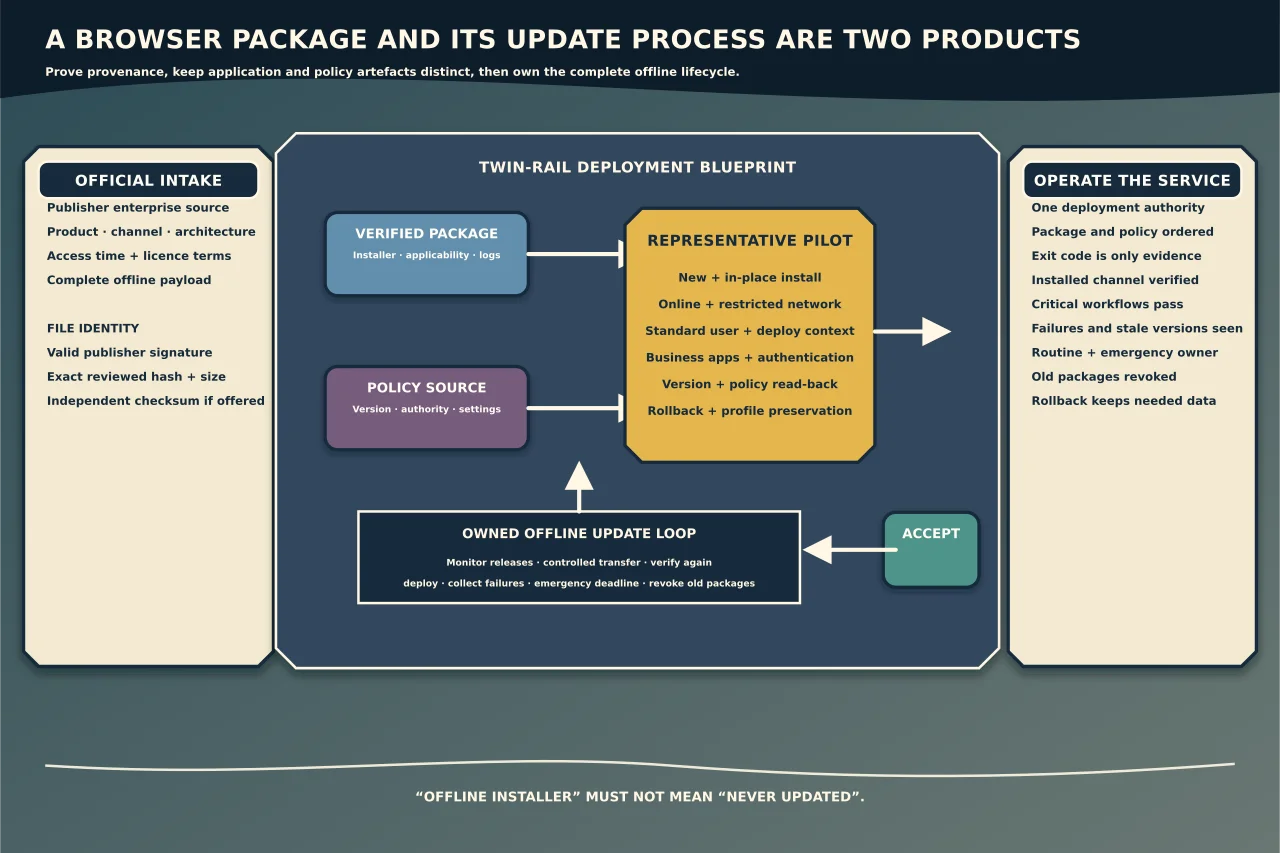
An enterprise browser deployment has two products: the browser installed today and the update/policy process that keeps it trustworthy tomorrow.
An MSI copied to a share may install successfully, yet be the wrong architecture, stale channel, modified file or disconnected from future updates. Build a provenance record before building a deployment.
Define the deployment outcome
Record:
- browser product and supported channel;
- Windows editions/builds and CPU architecture;
- device or user scope;
- online, restricted-network or fully offline operating model;
- management authority: domain policy, MDM, endpoint tool or local configuration;
- required extensions, proxy/certificate and sign-in behaviour;
- security/privacy requirements;
- update cadence and emergency-update target;
- pilot, rollback and support ownership; and
- success evidence from the actual business web applications.
“Offline installer” should mean a complete vendor-supported package that installs without fetching payloads. It must not mean “never updated”.
Acquire from the publisher’s official enterprise source
Use the vendor’s current enterprise/business download page and capture:
- exact URL and access time;
- product, channel, version and architecture shown;
- filename, size and published checksum if provided;
- licence/redistribution terms;
- accompanying policy templates/documentation; and
- the package’s Authenticode publisher/signature state.
Do not use a search-ad download, third-party mirror or a file retrieved from another customer’s system. A familiar filename proves nothing.
Verify signature and exact file identity
On Windows, PowerShell can inspect an Authenticode signature:
Get-AuthenticodeSignature -LiteralPath 'C:\Packages\BrowserInstaller.msi' |
  Select-Object Status, StatusMessage, SignerCertificate
Confirm Valid status and inspect the signer subject/chain expected from the official publisher. A valid signature proves the signed file and signer relationship Windows validated; it does not prove that this is the version, channel or product you intended.
Create a SHA-256 identity record:
Get-FileHash -LiteralPath 'C:\Packages\BrowserInstaller.msi' -Algorithm SHA256Compare it with the publisher’s independently trusted value when one is published. Otherwise use it to prove that the pilot and production systems received the exact reviewed file. A hash copied from the same untrusted site as the package is not independent verification.
Record certificate details, hash, size and version without publishing internal paths or inventory.
Keep installer and policy templates together—but distinct
Enterprise browsers often ship administrative templates or management definitions separately from the application package. Templates describe available policy; installing them does not configure the browser, and installing the browser does not apply policy.
For Microsoft Edge, current Microsoft guidance directs administrators to the Enterprise download for policy templates and distinguishes mandatory from recommended settings. Other browsers have their own current mechanisms.
Version the policy source and record:
- template release/channel;
- central-store or MDM ingestion owner;
- settings deliberately configured;
- settings left at browser default;
- device versus user scope;
- conflicts between domain, MDM, endpoint and local policy; and
- removal behaviour.
Do not import every available template and then enable “security-sounding” settings without understanding application impact.
Build a reproducible deployment artefact
The deployment record should contain:
- verified source package and hash;
- detection logic based on installed product/version/channel, not only a file;
- install and uninstall commands from current vendor documentation;
- process exit-code/reboot handling;
- execution identity and working directory;
- architecture/applicability rules;
- policy dependency/order;
- log location and collection rules;
- timeout/retry behaviour; and
- supersedence and rollback decision.
Avoid embedding credentials or proxy secrets in command lines. Windows Installer logs can include properties and sensitive paths; store and share them as diagnostic evidence, not public attachments.
Pilot by workflow and breakpoint
Use a representative, controlled group:
- supported Windows versions/architectures;
- new install and in-place update;
- standard user and required administrative deployment context;
- online and genuinely restricted/offline devices;
- key business web applications and authentication;
- proxy/TLS inspection/certificate conditions;
- default-browser and file/protocol association behaviour under policy;
- extensions and enterprise mode/compatibility features where required; and
- uninstall/rollback or previous-channel coexistence rules.
Verify the installed browser’s own version/policy pages and management reporting. A deployment tool reporting exit code 0 does not prove the correct channel, policy or usable browser.
Treat offline fleets as a supply-chain process
For disconnected or intermittently connected devices, define:
- who monitors vendor security releases;
- how packages enter the environment;
- where signature/hash verification occurs;
- how removable media or transfer systems are controlled;
- maximum exposure window for emergency updates;
- how failed devices report status; and
- how old packages are revoked or removed.
If updates cannot reach the fleet quickly enough for its risk, the architecture—not a registry tweak—is the problem to solve.
Diagnose failures without weakening controls
Capture package hash/signature, OS build, installed version, deployment command, execution identity, exit code, MSI/deployment logs and applicable application-control/endpoint events.
Distinguish:
- package not applicable;
- signature/trust or application-control block;
- previous version/process conflict;
- permissions/working-directory failure;
- policy/template mismatch;
- network dependency hidden inside a bootstrapper; and
- successful install followed by policy, profile or application failure.
Do not disable endpoint protection, application control or signature enforcement to “see if it works”. Use the control’s audit/log evidence and approve the narrow publisher/file rule if justified.
Operational acceptance
Accept the release only when:
- the reviewed package is the deployed hash and valid publisher;
- version/channel/architecture are correct;
- intended policies apply from the authoritative system;
- critical workflows, authentication and certificates work;
- unwanted extensions/settings remain controlled;
- monitoring identifies failures and stale versions;
- emergency and routine updates have owners/timescales; and
- rollback does not erase needed profiles/data or weaken security.
That turns an installer into a maintained browser service rather than another forgotten executable on a share.