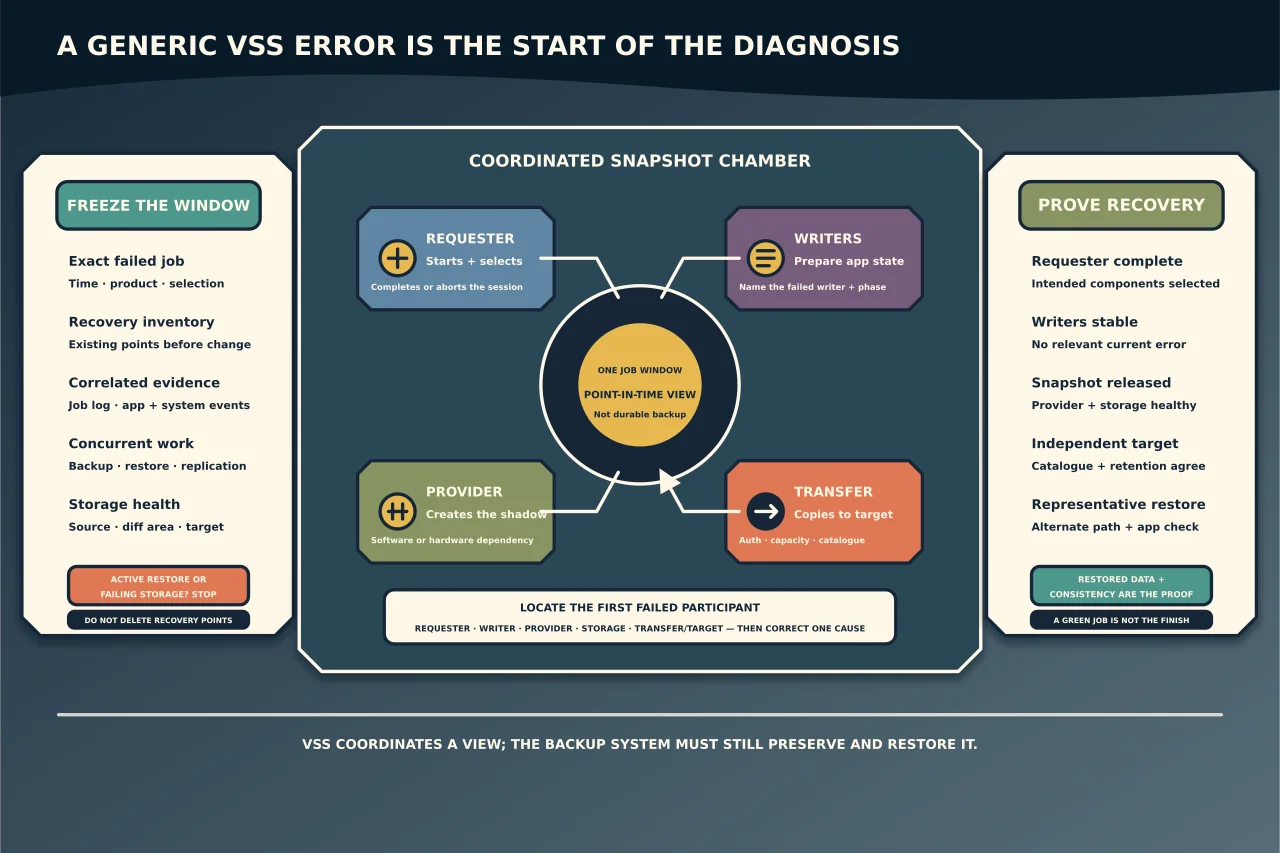
Volume Shadow Copy Service coordinates a point-in-time view of open Windows data. It does not, by itself, copy that data to durable backup storage. A complete VSS operation involves a requester (usually backup software), writers that prepare application data and a provider that creates the shadow copy.
A generic VSS error is therefore a starting point, not a diagnosis.
Protect recovery options before troubleshooting
Record the failed job, time, selected data, backup product/version, target and whether another backup or restore is active. Preserve the application and System events plus the product job log. Inventory existing recovery points before deleting or resizing anything.
If the affected volume or target shows storage errors, stop repeated backup attempts and investigate storage health. If a restore is running, do not restart VSS/application services underneath it.
Locate the failing participant
Correlate evidence in this order:
- Requester: Did the backup application start, select the right components and complete or abort the VSS session correctly?
- Writer: Which named application/System writer failed, timed out or disappeared, and during which operation?
- Provider: Which software or hardware provider was selected, and can it create/maintain the shadow copy?
- Storage: Is there sufficient free and shadow-storage space on source and target, with healthy I/O?
- Transfer/target: Did snapshot creation succeed but copying, authentication, retention or verification fail later?
Use vssadmin list writers and vssadmin list providers as state evidence, not repair commands. Capture writer names, state and last error soon after the failed job. A later healthy listing does not erase the job failure; a stale failed state does not prove the current job will fail.
Match events to the failed job
Filter events around the exact job window and use writer/provider/requester identifiers to correlate them. Microsoft documents cases where a VSS event reports cleanup of an older abandoned session during a new operation; that event is not necessarily the cause of the active failure.
Do not search one error code and apply the first registry or service-reset recipe. The same top-level backup message can wrap a SQL writer permission fault, Hyper-V concurrency, a provider registration problem or a full diff area.
Diagnose common layers
One writer fails
Identify the owning application and check its service, logs, supported backup state and vendor guidance. A database writer may reject backup because the application instance or permissions are wrong. Repair the application-specific cause; restarting every writer service disrupts healthy workloads and may temporarily hide recurrence.
No writers appear
Treat this as VSS infrastructure/registration or permissions evidence rather than dozens of independent application failures. Use Microsoft’s current procedure for the exact events and Windows version. Avoid bulk DLL re-registration scripts from old forums.
The provider or snapshot fails
Confirm which provider the requester chose, storage-provider health, diff-area placement/capacity and volume support. A hardware provider adds vendor-specific dependencies. Do not delete all shadows when System Restore, Previous Versions or another recovery workflow depends on them.
Snapshot succeeds but the job fails
Move beyond VSS. Check target authentication, capacity, repository state, transport, retention, catalogue and backup-agent/product logs. A VSS success cannot fix an expired service account or inaccessible repository.
Failures overlap
Find concurrent backup, restore, snapshot, replication or maintenance jobs. Writers can have limited concurrent-session behaviour. Reschedule or coordinate proven conflicts instead of increasing timeouts blindly.
Make one cause-specific correction
Document the before-state and rollback. Examples include correcting one writer service identity, updating the backup application/provider, repairing exact provider registration, allocating justified shadow storage, resolving target access or preventing one verified scheduling conflict.
Restart only the affected service when its application owner confirms the impact. Some writers are hosted by production applications; a reboot or service restart can be a business outage.
Do not clear backup catalogues, snapshots or logs merely to obtain a clean screen. Those are recovery assets and evidence.
Prove backup and restore
Run a controlled job covering the previously failing component. Verify:
- requester reports the intended selection and completion;
- required writers finish stable with no relevant error;
- the provider creates and releases the snapshot as designed;
- data reaches the intended independent target;
- retention/catalogue records the recovery point;
- a file restores to an alternate location and matches expected content; and
- an application owner validates an application-consistent restore or supported recovery test.
A green job is not the finish line. Until representative data can be restored within the required recovery time and consistency, the system has only produced a promising backup report.