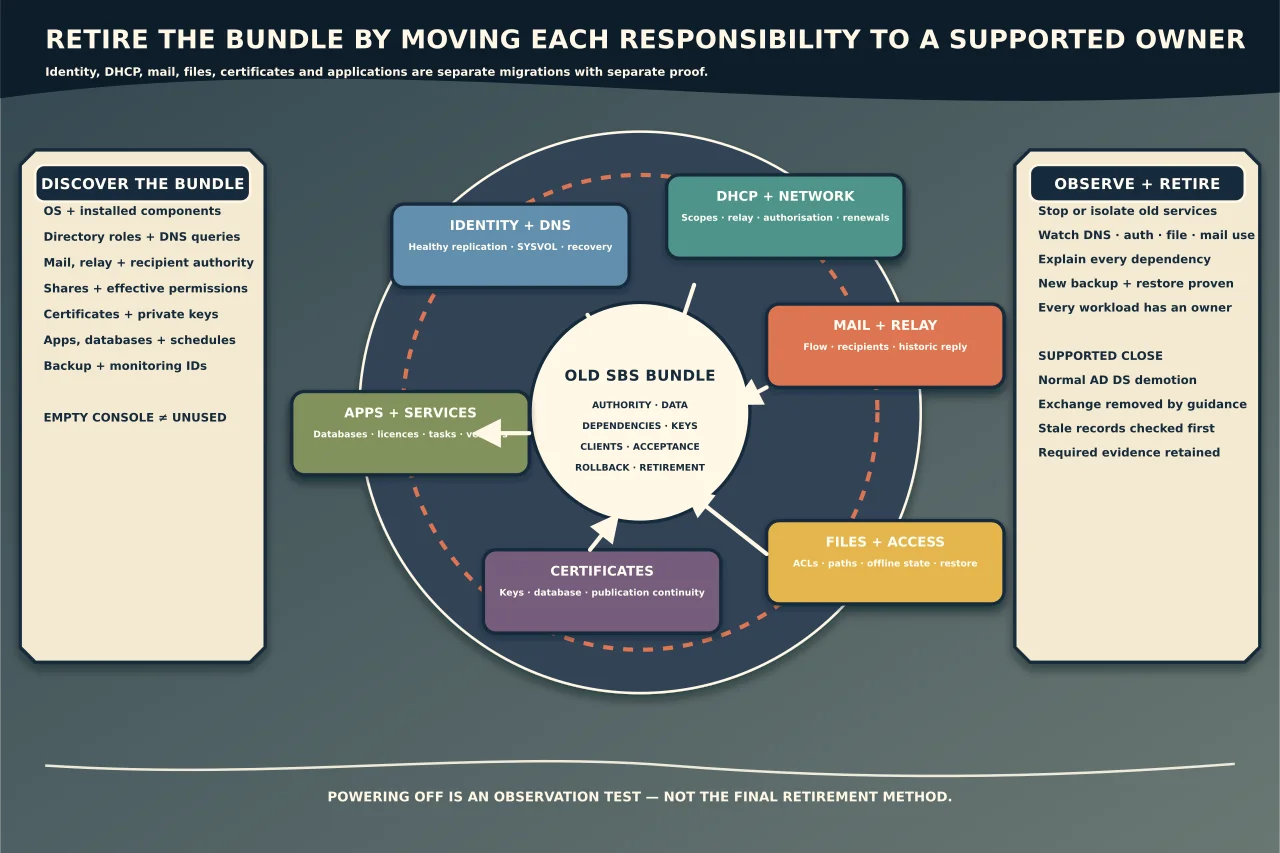
Small Business Server solved a real problem: one machine could provide identity, email, files, remote access, updates and administration for a small organisation. Years later, that concentration makes retirement deceptively difficult. A server can appear to be “just the old file server” while it still answers DNS, holds directory roles, updates certificates, relays scanner mail or authenticates a payroll application.
The safe approach is to dismantle the bundle deliberately. Move and verify each responsibility, observe the new environment, then retire the old machine through the supported path.
Confirm exactly what is installed
Do not plan from the label “SBS 2011” alone. Microsoft records the package lifecycle through its component products. Common SBS 2011 components include Windows Server 2008 R2 and, in Standard deployments, Exchange Server 2010; those products reached regular end of support in 2020. Editions, add-ons and later modifications vary, so inventory the actual operating system, roles, applications and patch state.
Unsupported does not mean the machine stops running. It means continued operation carries security, compatibility and support risk. Avoid an unplanned internet-facing exposure while migration is being prepared, but do not disable a service until its dependency is known.
Build a responsibility map
For each workload, record the current authority, users/dependants, data, credentials or keys, destination, cutover test, rollback and retirement condition.
At minimum inspect:
- Active Directory domains, controllers, DNS, Global Catalog and FSMO roles;
- DHCP scopes, reservations, options, DNS updates and network relays;
- Exchange mailboxes, public folders, accepted domains, connectors, SMTP relay, Autodiscover and recipient management;
- file shares, NTFS/share permissions, quotas, Folder Redirection, Offline Files and login mappings;
- AD Certificate Services, certificates, private keys and CRL/AIA publication;
- SQL databases and line-of-business applications;
- WSUS and client update policy;
- VPN, Remote Web Access, Remote Desktop gateway or router dependencies;
- printers, scan-to-email and scheduled tasks;
- backup software, encryption and restore media; and
- monitoring, service accounts, scripts and vendor support contracts.
Use network, DNS, authentication and mail logs to find real usage. An empty-looking folder or console is not proof of no dependency.
Choose supported destinations workload by workload
There is no requirement to recreate SBS as another all-in-one machine. Choose each destination from business needs, security, recovery objectives, cost, skills and ownership.
Identity may remain on supported Windows Server domain controllers, move toward cloud-managed identity, or use a documented combination. Email may move to a hosted service or a supported on-premises design. Files may go to a supported file server, SharePoint/OneDrive or another governed platform depending on permissions, application access, data volume and connectivity. Line-of-business applications follow their vendor’s supported platform—not whichever server is convenient.
Avoid commercial momentum masquerading as architecture. A cloud service is not automatically the right home for latency-sensitive or poorly supported software, and a new local server is not automatically simpler once resilience and maintenance are counted.
Stabilise identity and recovery first
Before workload cutovers, verify the directory is healthy: DNS, replication, SYSVOL, time, backups, FSMO/GC placement and administrative access. Identify whether SBS is the only domain controller and whether any other controller contains a current, writable copy of every required naming context.
Microsoft recommends introducing clean servers running a supported Windows Server version as domain controllers and demoting older controllers, rather than treating an in-place operating-system upgrade as the default domain upgrade. Check functional-level and application compatibility before promotion.
After introducing new DC/DNS services, prove:
- replication converges in every required direction;
- clients locate and authenticate through the new controllers;
- DNS zones and locator records are healthy;
- SYSVOL and Group Policy process normally;
- FSMO and Global Catalog placement match the design;
- system-state recovery is credible; and
- services do not depend on the old server’s address or name.
Keep the old server online only as required for the controlled transition. Do not seize roles while a healthy transfer remains possible.
Move network and certificate services explicitly
For DHCP, migrate scopes, leases, reservations, policies, filters, options and DNS-update behaviour; separately update AD authorisation and router/IP-helper destinations. Test both new clients and existing lease renewal before deauthorising the source.
If SBS hosts a CA, preserve the CA certificate/private key, database, configuration, template list and CDP/AIA continuity. Do not simply install a fresh CA with a similar name. If no service needs the CA, prove that across the maximum certificate lifetimes and revocation paths before retirement.
Replace WSUS or other update policy deliberately. Remove or update GPOs only after clients demonstrate the intended new update authority.
Treat email as its own migration
Inventory every mailbox, shared mailbox, distribution group, public folder, alias, forwarding rule, relay device, connector, accepted domain and application that sends mail. Preserve reply compatibility where historic Exchange addresses require it, and plan DNS/Autodiscover/mail-flow changes against the chosen destination.
Do not conclude that Exchange is unused because users read mail elsewhere. The server may still relay application mail, manage directory recipients or participate in a hybrid/source-of-authority design. Apply Microsoft’s current decommissioning guidance to the actual Exchange version and identity model. Never delete Exchange objects manually from Active Directory as a substitute for supported retirement.
Validate inbound and outbound delivery, replies to historic messages, shared/delegated access, calendaring, relay, mobile/desktop discovery, retention and recovery before removing the old service.
Move files without changing identity by accident
Inventory shares and effective permissions, including groups, inheritance, explicit denies, service accounts, Offline Files and Folder Redirection. Preserve timestamps and ACLs where required, but do not carry unexplained access forward blindly.
Perform an initial copy, reconcile changes, schedule a final cutover and make the old path read-only or otherwise controlled. Test representative allowed and denied users, applications, mapped paths, long names, large files, backup and restore. If namespace aliases can decouple users from a physical server, design them before widespread path changes.
Give line-of-business applications their own acceptance tests
Identify database engines, licensing services, ODBC names, hard-coded paths, SMTP settings, certificates, scheduled jobs and vendor agents. Obtain current vendor support requirements and a recoverable application/data backup.
“The service starts” is not an application test. Run a representative business transaction, permission boundary, report/export, scheduled task, backup and restore. Keep the old application state recoverable until data reconciliation and business-owner acceptance are complete.
Observe before retirement
After cutover, run an agreed observation period with the old services stopped or isolated where safe, but the recovery state retained. Monitor DNS queries, authentication, file access, mail relay, application connections and support tickets. Any unexpected traffic is a dependency to explain, not merely suppress.
Use a retirement checklist showing zero required dependencies for every SBS role. Confirm new backups and restores, documentation, monitoring, licensing, vendor contacts and administrator access.
Demote and remove through supported paths
If the server remains a domain controller, use supported AD DS demotion tooling. Microsoft warns that removing AD DS role files directly is not a supported substitute. Forced demotion is for a controller that cannot contact others and has no reasonable repair path; it loses unreplicated changes and requires immediate metadata cleanup.
After normal demotion and restart, remove remaining roles or applications according to their current guidance. Clean obsolete DNS records, relay entries, monitoring, backup jobs and management references only after checking that they are truly stale. Retain required migration evidence and dispose of storage through the organisation’s sanitisation process.
Powering the server off is a useful observation test, not the final retirement method. Retirement is complete when every former responsibility has a supported owner, client and business tests pass, recovery works, the directory and mail systems contain no unintended old-server dependency, and the old equipment cannot quietly return as an unpatched authority.