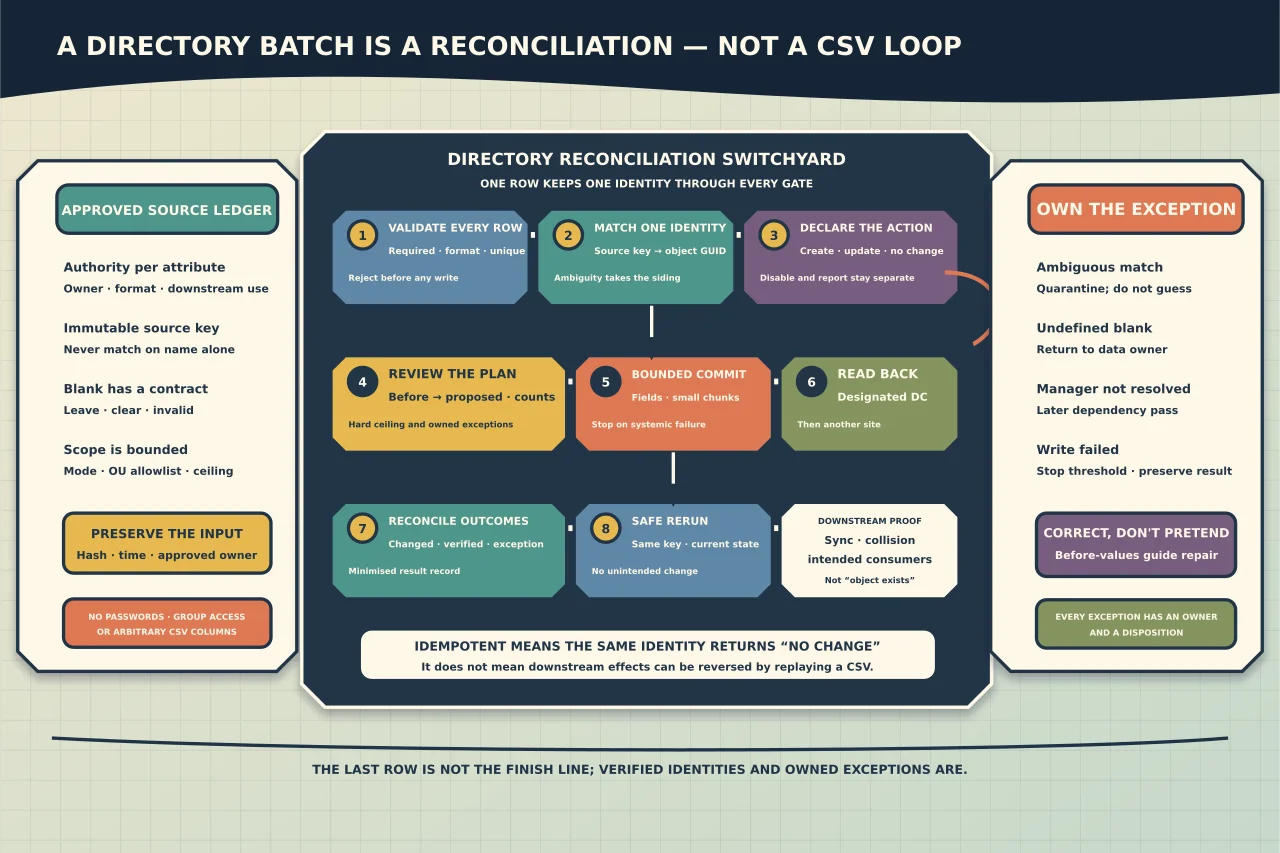
A CSV piped into New-ADUser is a fast way to create accounts—and a fast way to duplicate people, place them in the wrong OU or turn an empty spreadsheet cell into lost directory data.
Treat bulk administration as a small data migration.
Define authority per attribute
For every input field record:
- business owner/source;
- AD attribute and format;
- required, optional or derived;
- whether blank means “leave unchanged” or “clear”; and
- downstream consumers such as sync, email, access or reporting.
Names are not stable unique identifiers. Use an approved immutable personnel/source key for reconciliation and map it to AD GUID/SID after creation. Define username/UPN collision rules rather than appending a number silently.
Separate create, update, disable and report
Use distinct modes. A file intended to update phone numbers should not create a missing user. A leaver report should not disable accounts merely because a join failed.
Default to read-only preview. Require an explicit approved commit mode and bounded OU/record count for mutation.
Validate the whole batch first
Before any write, reject or quarantine rows with:
- duplicate source IDs, UPNs or account names;
- missing required values;
- target OU outside the allowlist;
- unresolved or circular manager references;
- invalid dates, country/phone formats or overlong values;
- unsafe CSV formulas in exported reports;
- ambiguous existing-object matches; or
- an empty value whose meaning is undefined.
Check uniqueness against both the input and current directory. Resolve managers/groups in a later pass after all required identities exist.
Generate a review plan
For each row show exact action: create, update selected attributes, no change or exception. For updates, display before and proposed values with personal data minimised to reviewers who need it.
Summarise counts by action, OU and exception. Add hard ceilings so the script aborts if the planned count exceeds the approved batch.
Submit bounded changes
Use explicit parameters to New-ADUser and Set-ADUser; do not splat arbitrary CSV column names into the directory. Microsoft documents separate Add, Remove, Replace and Clear operations for non-standard attributes. Model those semantics explicitly.
Create accounts disabled unless the onboarding/password process is ready. Do not generate or export shared initial passwords in the report. Keep group access, mail enablement, licensing and privileged roles as separate approved stages.
Process in small chunks and capture per-row result. Stop the batch when failure rate or a systemic error crosses the defined threshold.
Make reruns safe
An idempotent rerun should find the same identity and report no change after success. Store the source key-to-object GUID mapping and compare current to desired state.
Do not use “user exists” as success: it may be a different person. Do not restart a partially successful import from the top if creation logic can duplicate or overwrite.
Verify independently
After submission, read each changed object from a designated DC and then after replication from another DC/site. Compare only the approved attributes plus identity/status. Confirm downstream sync accepts the object without collision or export error.
Return a result file with source row key, object GUID, action, changed attributes, verification and exception—never passwords or unnecessary personal data.
Correct rather than pretend to roll back
Directory writes may trigger sync, mail and access effects that a simple reverse CSV cannot undo. Preserve before-values and define correction for each attribute. For newly created unused accounts, quarantine/disable before deletion. For access-bearing groups or identifiers, require a separate rollback review.
Build reporting as a governed product
Specify purpose, fields, audience, freshness and deletion date. Query only required properties and protect exports. A useful report states source DC/time, scope and exclusions; a spreadsheet of every user property is a data leak waiting for a recipient mistake.
Bulk administration is complete when every intended row is verified, every exception is owned and the rerun produces no unintended change—not when PowerShell reaches the last line.